What Happened
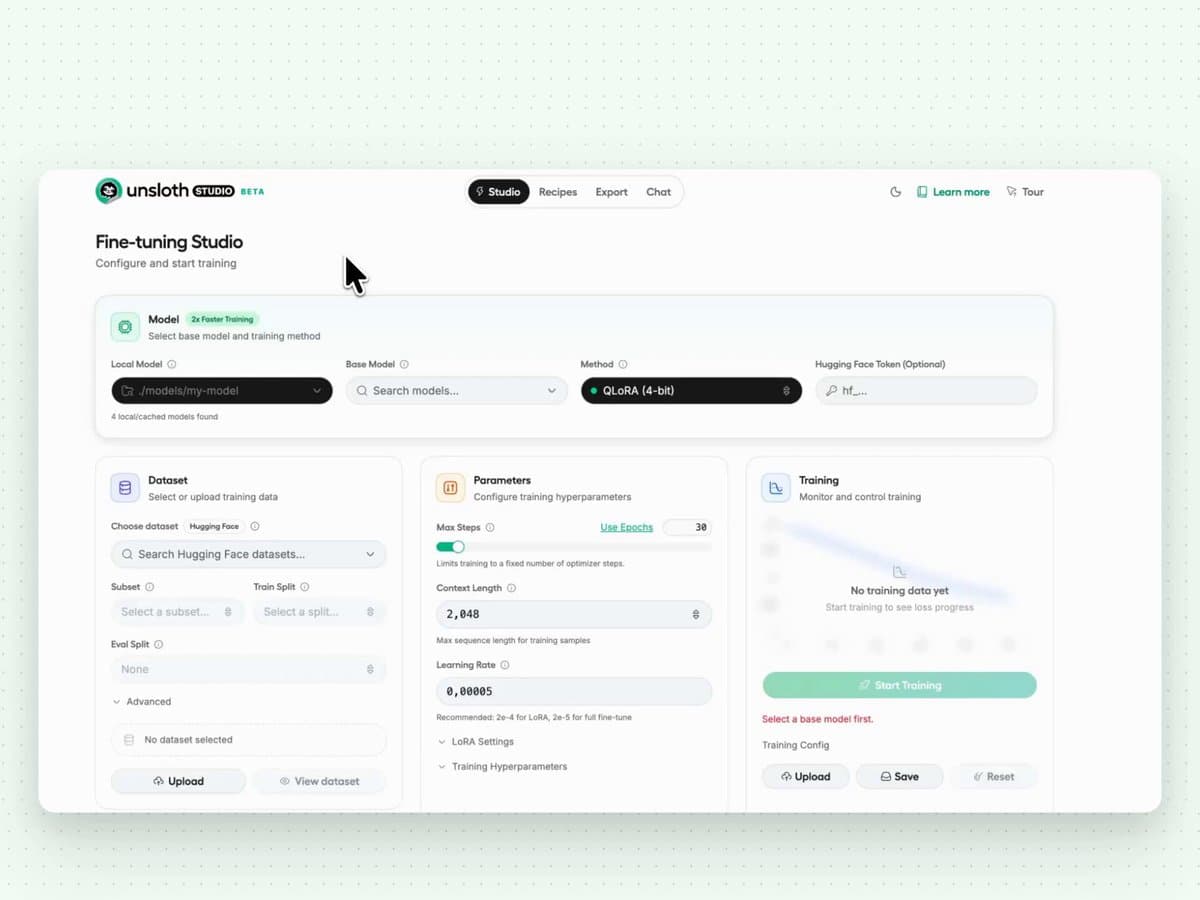
Developer Akshay Pachaar has announced the release of LLM Studio, a 100% open-source and free web-based user interface designed for fine-tuning large language models (LLMs) locally. The tool's primary claim is support for fine-tuning over 500 different LLMs directly on a user's personal computer, eliminating the need for cloud credits or API dependencies.
Key Features & Technical Details
Based on the announcement, the tool offers several concrete features:
- Local Execution: The UI runs entirely on the user's local machine, compatible with macOS, Windows, and Linux operating systems. This provides privacy and cost control but is constrained by the user's available hardware (CPU, GPU, and RAM).
- Broad Model Support: It claims compatibility with a library of over 500 pre-configured models. This likely includes popular open-source families like Llama, Mistral, Gemma, and Qwen.
- Format & Modality Support: A key technical detail is native support for GGUF model files, the standard format for running quantized models efficiently on consumer hardware via llama.cpp. The tool also explicitly mentions support for vision models, audio models, and embedding models, indicating it can handle fine-tuning tasks beyond pure text generation.
- Web UI: The interface is browser-based, which aims to lower the technical barrier for fine-tuning compared to command-line scripts and Python notebooks.
Context & What It Means
Fine-tuning is a critical technique for adapting a general-purpose LLM to a specific task, style, or dataset. However, the process typically requires significant ML engineering knowledge to set up training loops, manage GPU memory, and handle data formatting.
Tools like Oobabooga's Text Generation WebUI have popularized local inference for GGUF models. LLM Studio appears to target the next step in the workflow: local training. If it delivers on its promises, it could democratize model customization for developers, researchers, and hobbyists who have hardware capable of training smaller models (e.g., 7B or 13B parameter models quantized to 4-bit or 8-bit).
The support for GGUF is particularly notable, as it suggests the tool may be built on or integrated with the llama.cpp ecosystem, which is optimized for CPU/GPU hybrid execution. Supporting vision and audio models implies a framework-agnostic design, potentially wrapping libraries like Hugging Face's transformers and peft (Parameter-Efficient Fine-Tuning).
Limitations & What to Watch
The announcement is a high-level feature preview. Key details for practitioners are not provided in the source tweet:
- Supported Fine-Tuning Methods: It does not specify which techniques are available (e.g., Full fine-tuning, LoRA, QLoRA). QLoRA (Quantized Low-Rank Adaptation) is essential for fine-tuning large models on consumer GPUs.
- Hardware Requirements: No minimum or recommended system specifications are given. Fine-tuning a 7B model, even with QLoRA, typically requires a GPU with at least 8-12GB of VRAM for reasonable performance.
- Performance & Stability: As an initial release, its stability, training speed, and resource efficiency are untested publicly.
- Dataset Handling: The ease of importing and formatting training data via the UI is a critical usability factor not detailed.
Link to Project: The tweet includes a link to the project, which is likely its GitHub repository or documentation: https://github.com/tensorlakeai/llmstudio (URL inferred from common pattern, but the source link is shortened to https://t.co/kSGy8C5Ezz).
In summary, LLM Studio represents a significant push towards accessible, local fine-tuning. Its success will depend on the implementation details of its training backend, its resource management, and the clarity of its workflow. For the open-source LLM community, a reliable local fine-tuning GUI could accelerate experimentation and specialized model creation.