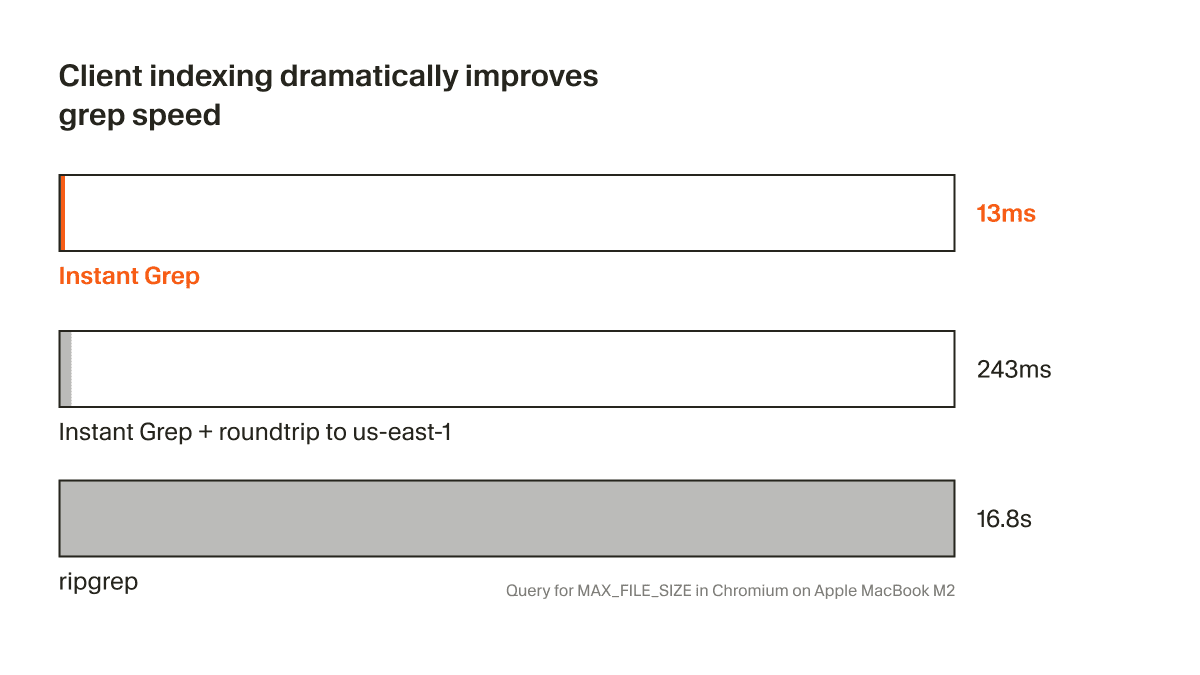
Cursor, the AI-powered code editor, has launched a new feature called Instant Grep, designed to perform local regular expression searches across millions of files at millisecond speeds. The announcement was made via a social media post from developer Rohan Pandey.
What Happened
Instant Grep is a new search capability built directly into the Cursor IDE. According to the announcement, it enables developers to execute complex regular expression (regex) searches across their entire local codebase—potentially spanning millions of files—with latency measured in milliseconds. The key claim is that this search is performed locally, without requiring an external index or a network connection to a remote server.
The feature appears to be a direct response to a common pain point in large-scale software development: quickly finding specific code patterns, function definitions, or error strings across a vast, sprawling repository. Traditional grep commands or even indexed IDE searches can slow down significantly as repository size grows into the hundreds of thousands or millions of files.
Context
Cursor has positioned itself as an "AI-first" code editor, famously built as a fork of VS Code and deeply integrating AI agents for code generation, explanation, and editing. Its primary differentiator has been its sophisticated AI pair programmer. However, this launch represents a significant investment in a core, non-AI editor capability: raw, blisteringly fast code search.
This move is strategic. While AI features attract headlines, the daily productivity of a professional developer hinges on fundamental editor performance—especially for tasks like navigation and search. Slow search in a large monorepo is a frequent source of frustration. By solving this, Cursor addresses a critical workflow bottleneck, making its editor more attractive for use in enterprise-scale environments where codebases are massive.
The launch follows a period of intense feature development and growing popularity for Cursor. It also enters a competitive space for fast code search, which includes tools like ripgrep (a ultra-fast command-line search tool), and indexed search features in other IDEs like JetBrains Fleet or Zed Editor's upcoming search.
Technical Details (Inferred from Announcement)
While the social media announcement lacks deep technical specifics, we can infer several key characteristics of Instant Grep:
- Local & Offline-First: The search runs entirely on the user's machine. No code is sent to a cloud service, which is crucial for developers working with proprietary or sensitive code.
- Regex-Powered: It supports regular expressions, making it suitable for complex, pattern-based searches beyond simple string matching.
- Millisecond Latency: The performance claim suggests the tool uses highly optimized algorithms and possibly in-memory indexing or caching structures that are built and maintained efficiently in the background.
- Integrated into Cursor's UI: It is not a separate command-line tool but a native feature within the Cursor interface, likely accessible via a command palette or a dedicated search panel.
For developers, the immediate utility is clear: a developer working in a large React codebase could, for example, instantly run a regex to find all React hooks that match a specific pattern, or locate all instances of a deprecated API call, without waiting for a slow, traditional file scan.
gentic.news Analysis
Cursor's launch of Instant Grep is a telling move in the evolution of AI-native developer tools. It signals a maturation phase where foundational editor performance is being prioritized alongside flashy AI capabilities. You cannot build a credible "AI operating system" for code on top of a sluggish editor core. This development directly follows Cursor's rapid user growth and its ongoing competition with other modern, performance-focused editors like Zed, which has also emphasized raw speed as a core tenet.
This aligns with a broader trend we've noted: the re-convergence of AI and systems engineering. The initial wave of AI coding tools (GitHub Copilot, early Cursor) focused almost exclusively on the generative layer. The next wave, as seen here, is about building high-performance, deterministic systems around the AI to make the entire workflow seamless. The AI agent can suggest a change, but the developer must be able to instantly validate its impact across the codebase—a task for which Instant Grep is perfectly suited.
Furthermore, this strengthens Cursor's hand against its most direct competitor, the Zed editor. While Zed has championed Rust-based performance and native collaboration, Cursor is countering by doubling down on its integrated AI and now matching Zed on a core performance claim (fast search). It also creates a more compelling alternative to the JetBrains suite, where powerful, indexed search has long been a standout feature. For developers and teams evaluating Cursor, especially those with large codebases, Instant Grep removes a significant potential adoption blocker.
Frequently Asked Questions
What is Cursor Instant Grep?
Cursor Instant Grep is a new local search feature within the Cursor IDE that allows developers to perform regular expression (regex) searches across millions of files in their codebase with millisecond-level response times. It runs entirely offline on your machine.
How is Cursor Instant Grep different from normal grep?
Traditional command-line grep tools scan files linearly, which can become slow across very large directories. Cursor's Instant Grep appears to use optimized, possibly indexed or cached methods to deliver near-instant results from within the editor's interface, without needing to use a separate terminal.
Do I need an internet connection to use Cursor Instant Grep?
No. According to the announcement, Instant Grep performs searches locally. Your code is not uploaded to a server, making it suitable for secure or proprietary development environments.
Is Instant Grep available to all Cursor users?
The announcement did not specify tier limitations. Typically, core editor features like this are available to all users, but it's best to check the latest Cursor documentation or settings within the application itself for confirmation.



