The Technique — A Structured Workflow for Research
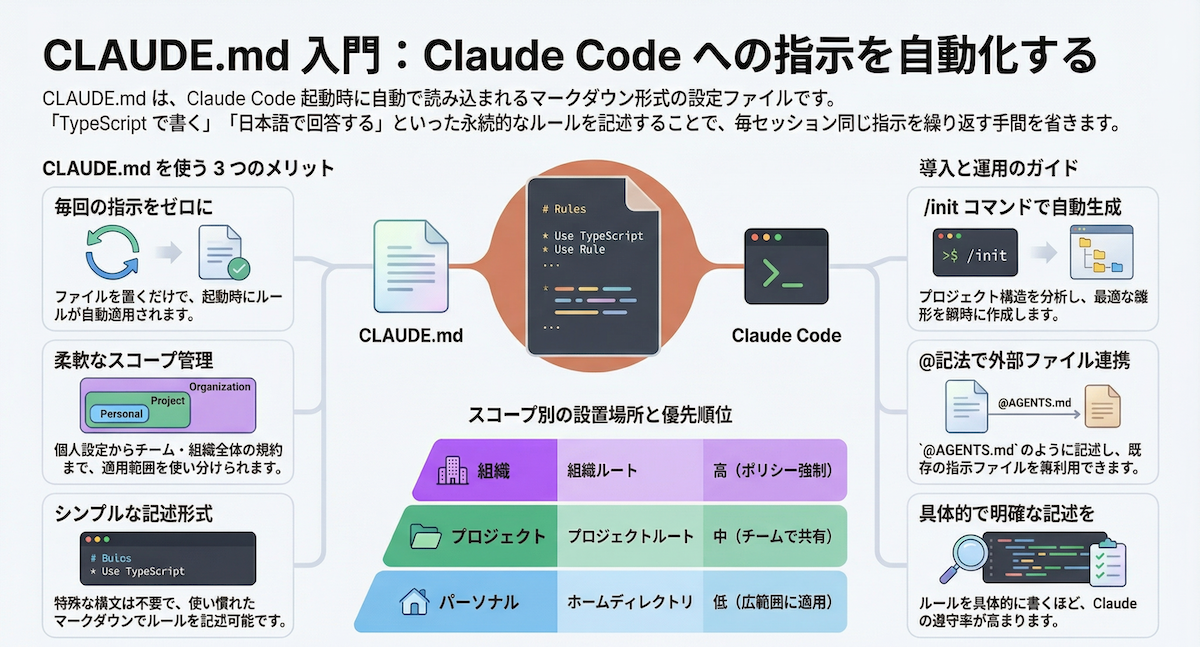
A presentation from the ClaudeCodeTools repository details a methodical approach for using Claude Code in academic research. The core technique revolves around a meticulously crafted CLAUDE.md file that transforms Claude from a general coding assistant into a specialized research collaborator. This file defines a structured workflow for common academic tasks like literature review synthesis, data analysis script generation, and manuscript drafting.
Why It Works — Context and Consistency
Academic projects have high stakes—reproducibility, accuracy, and adherence to specific formatting (APA, MLA, journal templates) are non-negotiable. A generic AI prompt can't guarantee this. The presented CLAUDE.md file works by pre-loading Claude Code with critical context: the research question, key variables, preferred statistical libraries (e.g., pandas, scipy, ggplot2), and citation guidelines. This eliminates the need to repeat these constraints in every prompt, saving tokens and ensuring consistency across a multi-session research project. It turns a one-off interaction into a persistent, context-aware research session.
How To Apply It — Build Your Research CLAUDE.md
You don't need the full presentation to start. Create a CLAUDE.md in your project root with these sections:
# Research Project: [Your Project Name]

## Core Objectives
- Primary Research Question: [State your question]
- Hypothesis: [Your testable hypothesis]

## Data & Methods
- Data Source: [e.g., ./data/raw_survey.csv]
- Key Variables: [list your independent/dependent variables]
- Analysis Stack: [e.g., Python with pandas, statsmodels, seaborn]
- Preferred Visualization: [e.g., "Use matplotlib with the 'seaborn-whitegrid' style"]

## Writing & Formatting
- Target Publication: [Journal Name or "APA 7th Edition"]
- Citation Style: [e.g., "Use author-date in-text citations"]
- Terminology: [Define any field-specific terms]

## Workflow Commands
- To generate a literature summary: `claude code "Synthesize the key points from ./papers/ into a related work section."`
- To create a plot: `claude code "Generate a script to plot [X] vs [Y] from our data, following our style guide."`
- To draft a methods section: `claude code "Write the methods section based on the analysis in ./scripts/analysis.py."`
This structure gives Claude Code the guardrails and context needed for reliable, repeatable academic work. The presentation suggests starting with broad literature synthesis tasks, then moving to data exploration, and finally using the generated outputs to draft manuscript sections—all guided by the same CLAUDE.md file.