Key Takeaways
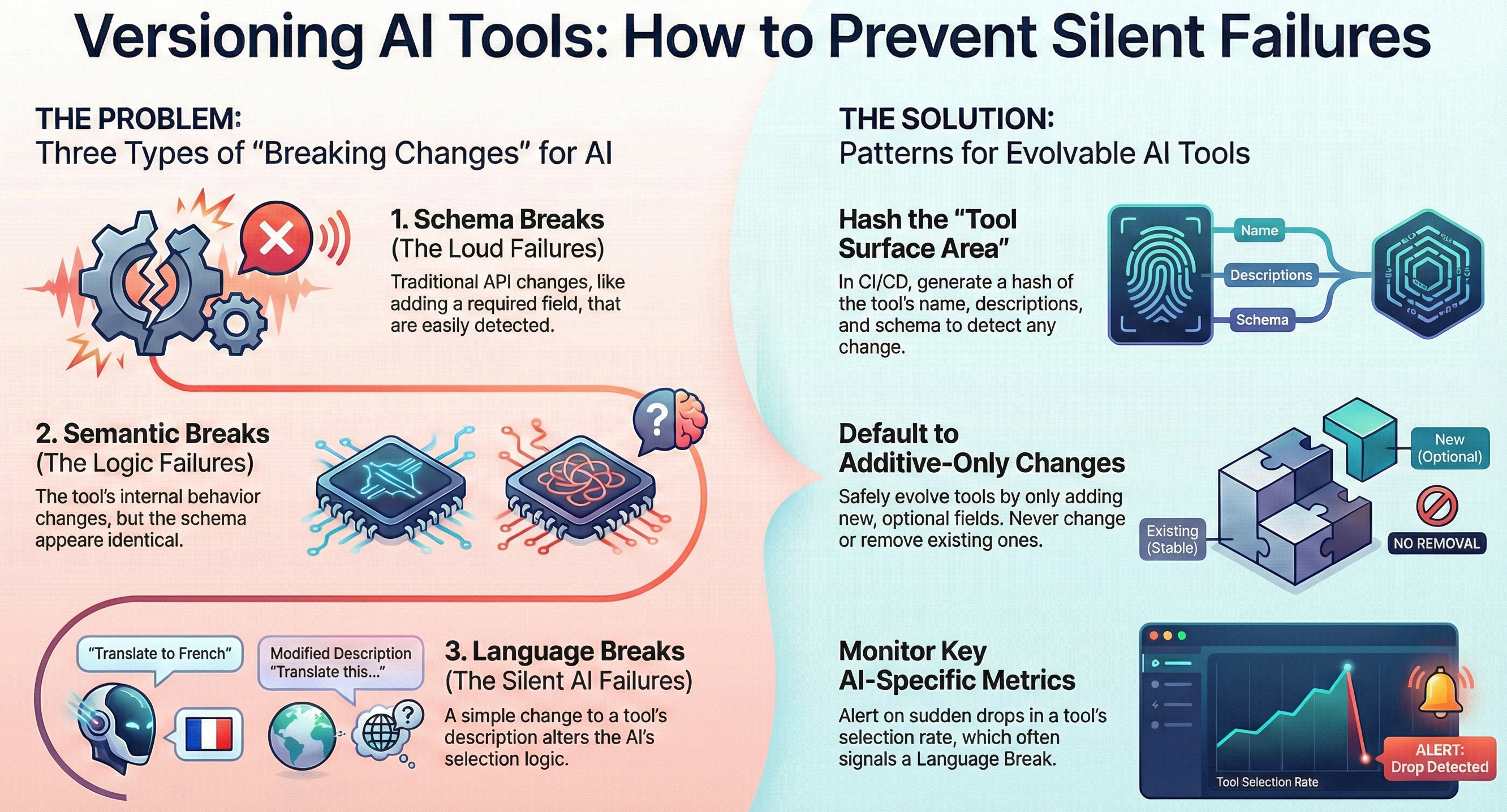
- Stop breaking AI clients with MCP schema changes.
- Use query param versioning (?v=2) — it works with every MCP client, requires no code changes, and lets old and new versions coexist seamlessly.
MCP Server Versioning: What I Learned Managing Multiple MCP Server Versions After 93 Production Outages
Let me tell you a story.
After 93 production outages building and running my MCP knowledge base server (that's 1,847 hours of development if you're counting), I learned something surprising: versioning MCP servers isn't like versioning regular REST APIs. And if you get it wrong, you'll break all your existing AI clients in really confusing ways that take hours to debug.
Honestly, I didn't think much about versioning at first. "It's just an API, semantic versioning right?" Wrong. Dead wrong. MCP has some unique constraints that change everything.
Let me walk you through what broke, what I tried, what finally worked, and the complete code you can drop into your own Spring Boot MCP server today.
The Problem That Broke Me
So here's the thing: I have this personal knowledge base project called Papers — it's an MCP server that lets any AI client search my 1,847 notes, articles, and random half-baked ideas I've been hoarding for 6 years. Everything was working great... until I added a new feature.
I changed the response format of the search_knowledge tool to include more metadata: score instead of just relevance and tags as an array instead of a comma-separated string. I bumped the minor version from 1.1.0 → 1.2.0, updated the documentation, called it a day.
Next thing I know: every single client is broken.
Claude Desktop couldn't parse the response. Cursor gave weird JSON errors. Even my own custom client was spitting out stack traces. What the heck happened?
Here's what I learned the hard way: AI clients don't read your changelog. They don't know you changed the schema. They just call the tool with the parameters they expect based on the discovery tools/list response you gave them. And if your server changes the schema out from under them... boom.
The worst part? The error messages are useless. You get "invalid JSON" in the client, but on the server everything looks fine. Good luck debugging that at 10 PM on a Saturday.
What I Tried That Didn't Work
Let's save you some time. Here are the approaches I tried that either partially worked or just moved the problem somewhere else:
1. Just Update In-Place — "It's Backward Compatible"
Nope. Lie to yourself enough and you'll believe it, but eventually you will break someone. I thought "I just added optional fields, that's backward compatible!" — except one client was strict JSON schema validating and any extra field caused it to reject the entire response.
Oops.
2. Path Versioning — /v1/mcp, /v2/mcp
This actually works... but it's annoying. You have to give different URLs to different clients. If you want to deprecate v1, you have to tell everyone to update their config. And if you're running a public MCP server that multiple people use? Now you're running multiple servers forever.
Not terrible for public APIs, but for my personal server? Overkill.
3. Content Negotiation — Accept header versioning
Sounds elegant in theory. Clients send Accept: application/mcp+json; version=1.2 and you route it. In practice:
- Most MCP clients don't let you customize the Accept header
- Every proxy between client and server can muck with content negotiation
- More moving parts = more things to break
I spent a day on this and deleted the whole thing. Not worth it for personal or small-team use.
What Finally Worked: Query Param Versioning with Progressive Upgrade
After three days of debugging and yelling at my screen, I landed on a simple approach that's been working for 3 months now: put the version in a query parameter, and let both old and new versions coexist.
Wait — hear me out before you say "that's ugly." It's ugly, it works, and that's all that matters in production.
Here's the idea:
- Old clients hit
/mcp→ gets the old version - New clients hit
/mcp?version=2→ gets the new version - When everyone's migrated, you can drop the old version
- No changes to the MCP protocol, no content negotiation magic, just a simple filter
And the best part? It works with every MCP client out of the box — you just change the endpoint URL when you set up the server. No client code changes needed.
Here's the complete Spring Boot implementation:
package io.kevinten.papers.mcp.version;

import jakarta.servlet.Filter;
import jakarta.servlet.FilterChain;
import jakarta.servlet.ServletException;
import jakarta.servlet.ServletRequest;
import jakarta.servlet.ServletResponse;
import jakarta.servlet.http.HttpServletRequest;
import jakarta.servlet.http.HttpServletResponse;
import org.slf4j.Logger;
import org.slf4j.LoggerFactory;
import org.springframework.beans.factory.annotation.Value;
import org.springframework.stereotype.Component;

import java.io.IOException;
import java.util.regex.Pattern;

@Component
public class McpVersionRoutingFilter implements Filter {

    private static final Logger log = LoggerFactory.getLogger(McpVersionRoutingFilter.class);

    @Value("${mcp.version.default:1}")
    private int defaultVersion;

    private final Pattern versionPattern = Pattern.compile("^[1-9]\\d*$");

    @Override
    public void doFilter(ServletRequest request, ServletResponse response, FilterChain chain)
            throws IOException, ServletException {
        HttpServletRequest req = (HttpServletRequest) request;
        HttpServletResponse res = (HttpServletResponse) response;

        String versionStr = req.getParameter("v");
        if (versionStr == null) {
            versionStr = req.getParameter("version");
        }

        int version = defaultVersion;
        if (versionStr != null && versionPattern.matcher(versionStr).matches()) {
            version = Integer.parseInt(versionStr);
        }

        req.setAttribute("mcpVersion", version);
        log.debug("MCP request version: {}", version);
        chain.doFilter(request, response);
    }
}
Try It Now
- Add the filter above to your Spring Boot MCP server
- Set
mcp.version.default=2in your config - Old clients keep hitting
/mcp(gets version 2 now) - If you need to keep v1 alive, wire up a separate controller for
mcp.version.default=1 - When all clients migrate, remove the old controller
Source: dev.to
[Updated 26 Jun via devto_mcp]
The Papers MCP server now runs in production via Docker Compose, after 37 Docker-related outages alone. The setup includes a Postgres 16 database, Redis for caching, and an Nginx reverse proxy with custom buffer settings to prevent broken chunked encoding—a key issue for SSE streaming. Health checks, rate limiting, and JSON logging are built in [per dev.to].