The Technique — A Disciplined Workflow Plugin
"Vibe Coding" is the all-too-common pattern of asking Claude Code for something vague, getting code that looks right, and shipping it—only to discover critical omissions days later. The solution isn't a smarter AI, but a smarter process.
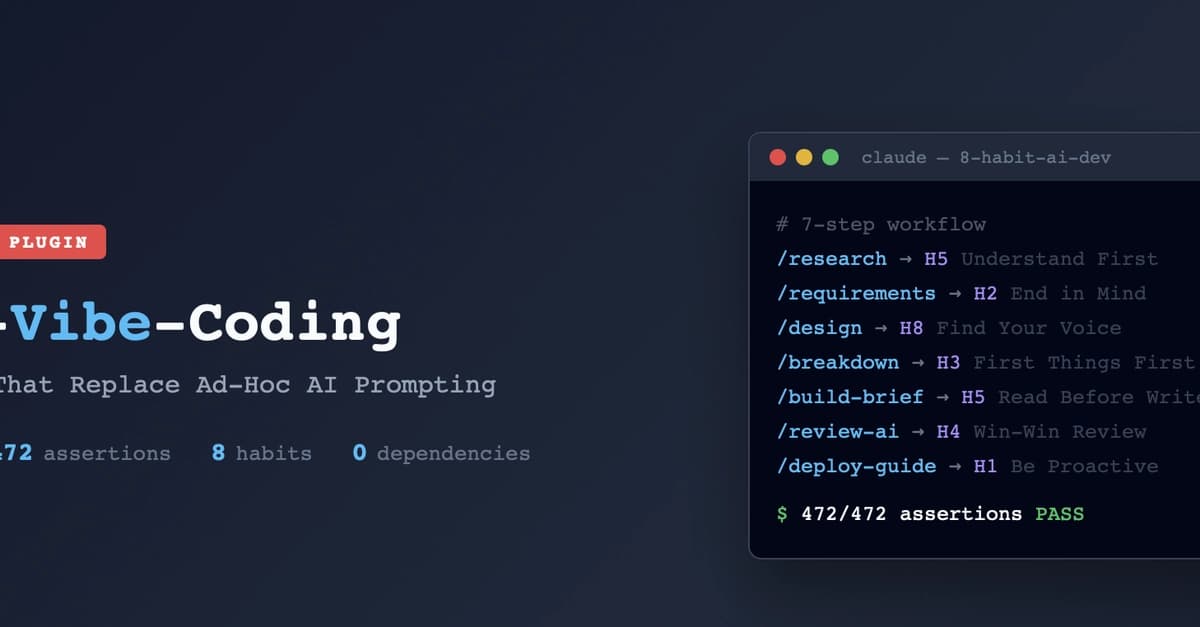
The 8-habit-ai-dev plugin enforces exactly that. It's a methodology packaged as a markdown-only plugin with 17 skills that guide you through a 7-step workflow before, during, and after coding.
Why It Works — Concrete Checkpoints Over Ad-Hoc Prompts
This plugin works because it replaces vague intent with concrete, auditable artifacts. It's grounded in Stephen Covey's principles, applied as engineering checkpoints. The core innovation is treating the human-AI collaboration as a process that needs structure, not just better prompts.
The plugin includes 472 automated assertions and DAG-validated skill chains to ensure the methodology itself is sound. It has zero dependencies and runs entirely via Claude Code's plugin system.
How To Apply It — Start With Two Commands
You don't need to adopt all 7 steps at once. The author recommends starting with just two skills that eliminate most problems:

/requirements— Define "Done" Before Starting
Stop typing "build me a login page." Instead, run/requirementsand let the plugin help you generate a Product Requirements Document (PRD). You'll get a structured markdown template covering the what, why, who, success criteria, and out-of-scope items. This gives Claude concrete specifications and gives you a checklist for review./review-ai— Audit the AI's Output Before Commit
After Claude generates code, run/review-ai. It performs an automated audit across four axes: Security, Quality, Completeness, and Performance. Critically, every finding cites a specificfile:line, moving beyond vague suggestions to actionable fixes.
Installation and Setup
Install the plugin directly from its GitHub repository:
# Clone the repository into your Claude Code plugins directory
cd ~/.config/claude-code/plugins
git clone https://github.com/pitimon/8-habit-ai-dev.git
After installation, run /calibrate once. Answer 5-7 questions about your development maturity. The plugin will write a profile (~/.claude/habit-profile.md) and automatically adapt all 17 skills to your level—whether you need full guidance (Dependence), just key checkpoints (Independence), or multi-agent workflow patterns (Interdependence).
Advanced Skills to Grow Into
Once you've mastered the two core commands, explore the full workflow chain:
/research: Investigate existing code and patterns before specifying./design: Make intentional architecture decisions (applies the "sticky latch principle" to classify decisions by rework cost)./breakdown: Break work into atomic tasks using the "fork agent pattern" for token efficiency./build-brief: Structure context so critical info survives Claude's internal compression./reflect: Capture lessons after each task. Lessons are saved to~/.claude/lessons/and are automatically searched by future/researchand/build-briefsessions, creating a closed learning loop.
The /whole-person-check skill is particularly unique. It scores a feature across four dimensions—Body (Discipline), Mind (Vision), Heart (Passion), and Spirit (Conscience)—to flag imbalances where AI-generated code might be technically correct but lack craft or ethical consideration.
What Makes This Different
This isn't another tool collection. It's a disciplined methodology. While most plugins add more agents or MCP integrations, this one adds structure. The v2.8.0 release even adapts patterns from Claude Code's own internals, like context compression awareness and the sticky latch principle, making it deeply integrated with how the AI actually works.
The plugin is self-validating. It uses shell scripts (validate-structure.sh, test-skill-graph.sh, validate-content.sh) to run 472 assertions on its own markdown skill definitions, treating broken instructions like production bugs.