The Technique — Configuring Memory, Not Just Code
After two weeks and 40 commits across multiple projects, one developer discovered Claude Code's real power isn't in generating code—it's in remembering preferences across sessions. The breakthrough came from systematically using Claude Code's two memory systems:
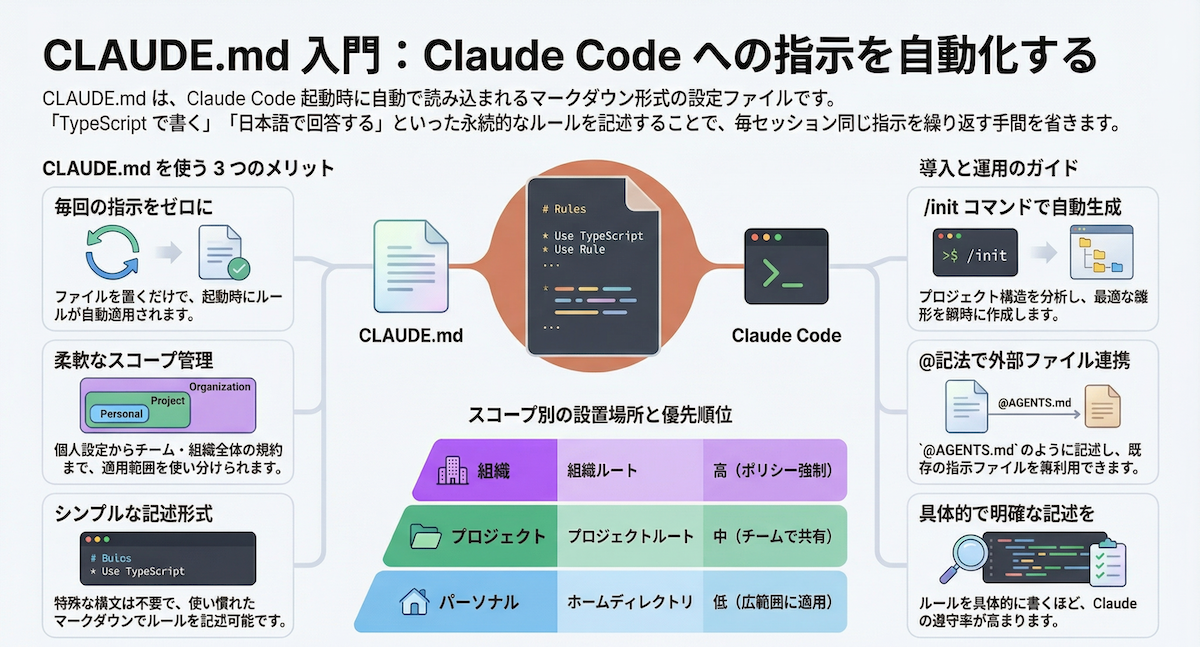
File-Based Memory (CLAUDE.md) — Project-specific rules that persist across sessions. The developer's CLAUDE.md includes:
## Code Style
- TypeScript strict mode, no `any`
- `interface` over `type` for object shapes
- Functional components with named exports
- Files under 200 lines

## Git Workflow
- Always use conventional commits (`feat:`, `fix:`, `chore:`)
- Never commit `.env` files
- Never force push to main

## Testing
- AAA pattern (Arrange, Act, Assert)
- Mock external dependencies only
- Test WHAT it does, not HOW
- Run single tests during development
Knowledge Graph (Cross-Project) — Corrections that carry between projects via MCP. When the developer corrected Claude Code's behavior once (like avoiding words like "delve" or "tapestry" in generated content), that preference stored globally.
Why It Works — The Compounding Effect
Each correction, each preference saved, each rule written makes the next session marginally better. Over two weeks, those margins stack up. The AI doesn't get smarter—your configuration gets better.
Most developers make two critical mistakes:
- Tolerating mediocre output — They either accept slightly wrong code or regenerate hoping for better
- Putting probabilistic trust where they need deterministic rules — Asking agents to follow standards instead of enforcing them in CLAUDE.md
The correct approach: explicitly correct the AI and explain why. "Don't mock the database in these tests—we got burned when mocks diverged from the real schema." This creates a feedback loop that prevents recurrence.
How To Apply It — Multi-Agent Workflows That Scale
1. Sub-Agents for Exploration, Main Context for Implementation
When you need to understand unfamiliar code, spawn a sub-agent to explore while keeping your main context window clean:
# In Claude Code chat
"Create a sub-agent to explore the authentication module and trace dependencies. Report back with a summary."
This prevents context window pressure from accumulating exploration noise.
2. Plans as Files, Not Chat
Always save implementation plans to markdown files:
# Instead of chat output
"Write the implementation plan to plan.md using SPARC methodology:
- Specification
- Pseudocode
- Architecture
- Refinement
- Completion"
Plans survive context compression and can be reviewed by sub-agents before implementation.
3. Multi-Agent Code Review
Run parallel review agents with narrow mandates:
# After writing code
"Create three review agents in parallel:
1. Security review - check for unsanitized input, hardcoded secrets
2. Architecture review - check abstraction levels, dependency injection
3. Simplification review - flag over-engineering, single-use abstractions"
Four agents reviewing simultaneously takes the same wall-clock time as one.
4. Git Worktrees for Parallel Feature Work
Use git worktree to maintain separate working directories:
git worktree add ../feature-branch feature-branch
cd ../feature-branch
# Claude Code works here while you review another branch
This creates genuinely parallel workflows without branch-switching overhead.
Where It Breaks Down (And How To Fix It)
Over-Engineering Tendency — Claude Code often proposes complex solutions when simple ones exist. The antidote: ask "what's the simplest version of this?" early and often.
Context Window Pressure — Long sessions (3+ hours) get sluggish. Workaround: break large tasks into multiple sessions with clear scopes, persisting plans to files between sessions.
Testing Implementation vs. Behavior — Claude Code occasionally writes tests that test implementation rather than behavior. Fix: include "test WHAT it does, not HOW" in your CLAUDE.md rules.
The Cross-AI Audit System
The developer's most advanced pattern: using Claude Code for implementation and Gemini CLI for auditing. One AI shouldn't review its own work—different training data catches different issues.
System setup:
- Claude Code (Opus 4.6) = fast implementer with 4 parallel sessions
- Gemini CLI (3.1 Pro) = strict auditor reviewing every piece of code
- Neither merges to
mainwithout the other's sign-off
This creates the same cross-review benefit as having two developers, without the coordination overhead.