Key Takeaways
- Datasette Agent 0.2a0's
context.ask_user()lets tools pause for user input mid-execution. - Claude Code users can adopt this pattern for safer, more interactive tool workflows.
What Changed
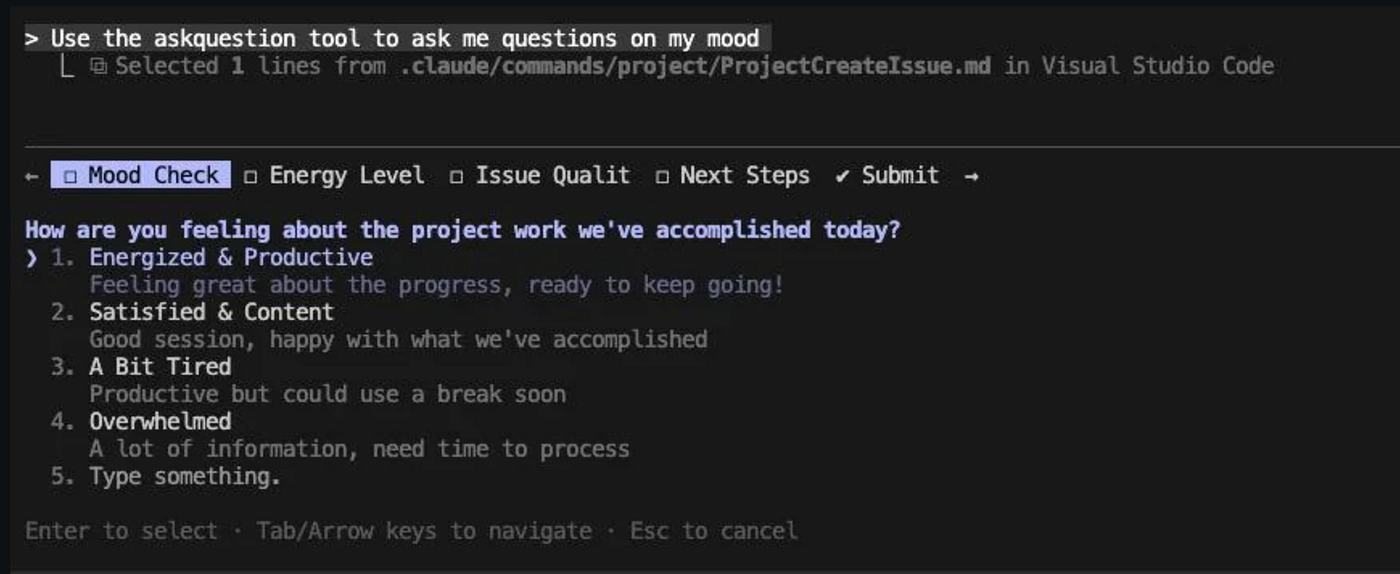
Datasette Agent 0.2a0 introduces a deceptively simple but powerful capability: tools can now ask users questions mid-execution and wait for an answer before continuing.
This isn't just a UI trick. The agent's turn suspends while waiting. The question renders as a form in the chat UI and persists to an internal database — so even if the server restarts, the conversation picks up where it left off.
Here's the API:
async def my_tool(context: ToolContext):
    # Ask before doing anything with side effects
    confirm = await context.ask_user(
        "Delete all records from the users table?",
        options=["Yes, delete", "No, cancel"]
    )
    if confirm == "Yes, delete":
        # Now it's safe to proceed
        ...
Three question types are supported:
- Yes/no: default behavior with a simple question string
- Multiple choice: pass
options=["Option A", "Option B"] - Free text: pass
free_text=True
What It Means For You
If you build custom tools for Claude Code (or any agentic workflow), this pattern solves a critical problem: confirmation without context loss.
Previously, you had two bad options:
- Ask upfront for all permissions (annoying, inflexible)
- Let the tool execute and only confirm after (risky, defeats the purpose)
ask_user() splits the difference. The tool starts, gathers context, then asks a precise question. If the user says no, the tool can adjust its approach without restarting from scratch.
For Claude Code users, this is especially relevant if you're building custom MCP servers or tool integrations. Imagine:
- A deployment tool that asks "Deploy to production?" only after building a diff
- A database tool that asks "This query will affect 10k rows. Continue?"
- A file management tool that asks "Overwrite existing file?" with the diff shown
Try It Now
To use this pattern in your own Claude Code tools (via MCP or the Tools API):
- Declare a
contextparameter in your tool function signature - Call
await context.ask_user(...)before any side effects - Handle the response to decide next steps
Example MCP tool stub:
@mcp.tool()
async def deploy_service(version: str, context: ToolContext) -> str:
    """Deploy a service version to production."""
    # Gather info first
    diff = await get_diff(version)

    # Ask for confirmation
    confirm = await context.ask_user(
        f"Deploy version {version} to production?\n\nDiff:\n{diff[:500]}",
        options=["Deploy", "Cancel", "Show full diff first"]
    )

    if confirm == "Deploy":
        result = await run_deploy(version)
        return f"Deployed {version}: {result}"
    elif confirm == "Show full diff first":
        # Could ask another question or return info
        return "Showing full diff in next message..."
    else:
        return "Deployment cancelled."
The key rule: call ask_user() before performing side effects. The tool re-executes from the top with stored answers replayed, so any side effect before the question would run twice.
Source: simonwillison.net
[Updated 14 Jun via devto_claudecode]
A complementary approach to ask_user() is the PreToolUse hook pattern, which inspects every tool call before it executes. Developer bfxavier describes a ~60-line classifier that reads the tool name and its input, then auto-allows read-only actions (Read, Grep, Glob) and flags writes for approval. The hook prints a JSON decision with "permissionDecision": "allow" or "deny" — and crucially, any failure (bad stdin, missing config, exception) triggers a fail-safe deny via exit code 0, ensuring the gate never accidentally permits an unsafe operation [per dev.to].