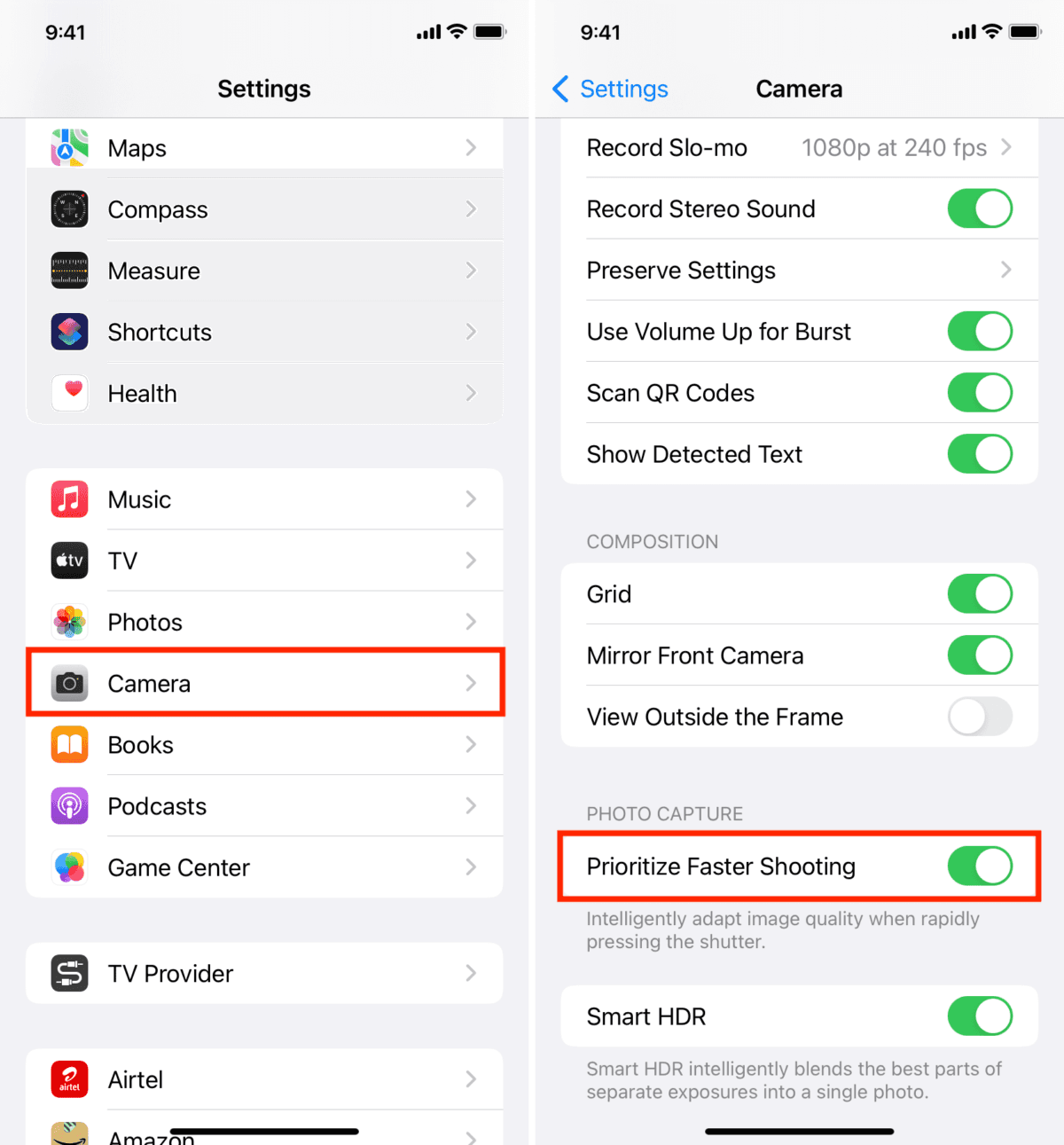
A detailed thread from photographer and technical creator Navtoor has gone viral, revealing that several default settings on the iPhone camera system actively reduce photo quality. The most notable setting, "Prioritize Faster Shooting," is enabled by default and sacrifices image processing quality to minimize shutter lag during rapid shots.
Key Takeaways
- A technical thread details how eight default iPhone camera settings, including 'Prioritize Faster Shooting,' silently compromise image quality.
- Users are sharing manual overrides to restore intended camera performance.
What the Setting Does

"Prioritize Faster Shooting" is designed for scenarios where capturing the moment is more critical than ultimate image fidelity, such as photographing moving children or pets. When enabled, the iPhone's image signal processor (ISP) and computational photography pipeline—which normally performs multi-frame fusion, advanced noise reduction, and Smart HDR—curtails these processes. This reduction in computational workload allows the shutter to respond faster to successive taps but results in:
- Noisier images, especially in low light.
- Reduced dynamic range (poorer highlight and shadow detail).
- Less detail from lens correction and sharpening algorithms.
The thread argues that most users are unaware this trade-off is being made automatically, as the setting is buried within the Camera settings menu under the "Photos Capture" section. The creator states that turning this setting off forces the iPhone to complete its full computational photography stack for every shot, regardless of shooting speed, yielding significantly better results.
The Seven Other "Wrong" Defaults
The thread lists seven other default settings the creator recommends changing for optimal quality:
- Lens Correction: Off by default for the Ultra Wide lens. Turning it on reduces distortion.
- Prioritize Faster Recording: Similar to the photo setting, reduces video quality for faster start times.
- Auto Macro: Enabled by default, often triggers the ultra-wide lens for close-ups unexpectedly.
- View Outside The Frame: Enabled by default, which the creator claims can subtly affect composition and processing.
- Scene Detection: On by default; the creator suggests it can sometimes apply unwanted automatic adjustments.
- Auto HDR: On by default; the creator recommends manual control for more consistent results.
- Preserve Settings: A meta-setting for Camera Mode, Filter, and Live Photo that is Off by default. Turning these on prevents the camera from resetting to Apple's defaults after closing the app.
The core argument is that Apple optimizes its defaults for the broadest, most casual user experience—prioritizing speed, simplicity, and avoiding user error—often at the expense of the maximum image quality the hardware is capable of producing.
gentic.news Analysis

This revelation touches on a critical and growing tension in consumer technology: the opacity of AI-driven, automated systems versus user agency. The iPhone's camera is arguably the most sophisticated AI photography system in the world, leveraging a dedicated Neural Engine for real-time scene understanding and pixel-by-pixel optimization. However, as this thread highlights, its default behaviors are prescriptive decisions made by Apple's engineering and product teams about what "good" photography means for the average user.
This aligns with a broader trend we've covered, such as in our analysis of Google's Pixel camera algorithms, where computational photography choices are often non-transparent. The difference here is that Apple provides manual toggles—buried as they may be—effectively making the iPhone camera a configurable computational photography platform. For the technical audience that reads gentic.news, this is a familiar paradigm: optimizing a model's inference parameters (in this case, the camera's ISP and neural networks) for a specific task (speed vs. quality). The thread serves as a crowdsourced hyperparameter tuning guide for the iPhone's imaging pipeline.
Looking forward, this incident underscores a demand for more "prosumer" transparency in AI-assisted tools. As on-device ML becomes more pervasive—from cameras to audio processing to predictive text—users will increasingly seek to understand and override the default assumptions baked into these systems. The next frontier may not be more automation, but better interfaces for controlling the automation we already have.
Frequently Asked Questions
What does "Prioritize Faster Shooting" do on iPhone?
It reduces the amount of computational photography processing (like multi-frame HDR and noise reduction) when you take photos in quick succession. This allows the shutter to respond faster but results in lower image quality with more noise and less dynamic range compared to when the setting is disabled.
How do I turn off "Prioritize Faster Shooting" to improve photo quality?
Go to your iPhone's Settings app, scroll down and tap Camera, then select Prioritize Faster Shooting under the "Photos Capture" section and toggle it OFF. This ensures the full image processing pipeline runs for every photo.
Are the other camera setting changes recommended in the thread necessary?
They are subjective recommendations for users seeking maximum manual control and potential quality gains. Settings like disabling "Auto Macro" prevent unwanted lens switching, while enabling "Lens Correction" fixes optical distortion. The changes are not essential for casual users but are considered optimizations by photography enthusiasts.
Does this affect all iPhone models?
The "Prioritize Faster Shooting" setting and the broader computational photography pipeline are present on iPhones with the Neural Engine (iPhone X and later). The specific impact on quality may vary based on the model's processor and camera hardware, but the fundamental trade-off between speed and processing depth applies across supported devices.