A recent social media report indicates OpenAI has significantly expanded the capabilities of its Codex model, transforming it from a coding assistant into a proactive desktop agent. According to the report, the new system can "see, click, type, [and] remember your habits," suggesting a shift toward multimodal, persistent AI that interacts directly with a user's computer environment.
Key Takeaways
- OpenAI has reportedly expanded its Codex model beyond code generation into a multimodal desktop agent that can see, click, type, and learn user habits.
- This signals a strategic move from an API tool into a proactive, personalized AI assistant.
What Happened
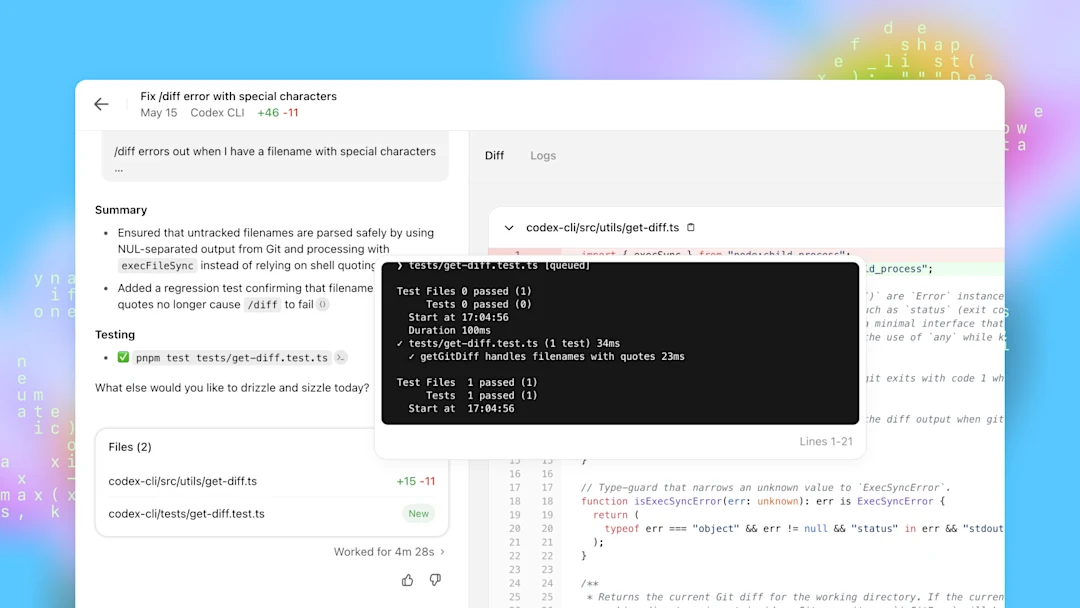
The report, originating from AI researcher Rohan Paul, states that OpenAI has expanded Codex from its original function as a coding assistant into a "desktop agent." The key claimed capabilities include:
- Visual Perception ("see"): Ability to interpret screen content
- Direct Interaction ("click, type"): Ability to execute actions via mouse and keyboard
- Memory & Personalization ("remember your habits"): Persistent learning of user workflows
This represents a fundamental architectural shift. The original Codex, powering GitHub Copilot, operated as a text-in, text-out API—suggesting code completions within an editor. The described agent appears to operate autonomously across applications, using computer vision to understand interfaces and taking actions to complete tasks.
Context & Technical Implications
Codex, a descendant of GPT-3 fine-tuned on code, was launched in 2021. Its primary product manifestation has been GitHub Copilot, an autocomplete tool for developers. Expanding it into a general desktop agent requires several major technical additions:
- Multimodal Understanding: The agent must process pixel data (screenshots) alongside possible DOM/accessibility tree data to "see" what's on screen. This likely involves a vision encoder integrated with Codex's language model.
- Action Space Definition: "Clicking and typing" requires the model to output structured actions (e.g., coordinates, keypresses) rather than just text. This involves training on demonstrations of computer interaction.
- Persistent Memory: Remembering habits implies the agent maintains a user-specific context or fine-tunes itself over time, a significant step beyond stateless API calls.
This move aligns with industry research into "agent" AI. Google's "Gemini Live" and projects like Adept AI's ACT-1 have demonstrated similar ambitions—training models to navigate software by watching human demonstrations. OpenAI's reported expansion suggests they are productizing this research direction, potentially using Codex as the reasoning core.
What This Means in Practice
If realized, this technology could automate complex, multi-step computer tasks that currently require manual execution. Examples include:
- Data Workflows: "Pull last week's sales figures from the CRM, put them into a spreadsheet, format a chart, and email it to the team."
- Software Setup: "Install and configure this development environment with these specific dependencies."
- Routine Administration: "File these expenses by logging into the portal, uploading receipts, and filling out the form."
The critical shift is from an assistant you ask to an agent you delegate to. Instead of writing a prompt for each step, a user might describe an end goal, and the agent would plan and execute the necessary actions across different applications.
Competitive Landscape & Open Questions
The report lacks concrete details on availability, pricing, or performance benchmarks. Key questions remain:
- Architecture: Is this a single, massive end-to-end model, or a orchestration system where Codex calls specialized tools (e.g., a vision module, an automation script)?
- Safety & Control: How are irreversible actions (deleting files, sending emails) gated or confirmed?
- Scope: Does it work only within a sandboxed environment or on a user's actual desktop?
This development positions OpenAI against other companies building AI agents:
OpenAI Codex Desktop Agent (reported) General desktop automation Adept AI ACT-1 Teaching AI to use any software Google Gemini in Workspace Assistance within Gmail, Docs, Sheets Microsoft Copilot for Windows OS-level integrationOpenAI's potential advantage is Codex's deep programming knowledge, which could enable it to understand and manipulate complex, logic-driven software (like IDEs or data tools) more effectively than a general-purpose model.
gentic.news Analysis
This reported expansion of Codex is a logical, yet aggressive, next step in OpenAI's product strategy. It follows their established pattern of taking a core model (GPT → ChatGPT, DALL-E → ChatGPT with vision) and evolving it into an interactive, multi-interface product. Historically, OpenAI has treated Codex primarily as an API powering GitHub Copilot. Transforming it into a standalone desktop agent suggests a new monetization front, directly competing with OS-level assistants from Microsoft and Google.
The technical claim of "remembering your habits" is particularly significant. It implies moving from zero-shot or few-shot prompting to long-term memory—a key research hurdle for practical agents. If OpenAI has implemented an efficient method for persistent user memory (beyond just a long conversation context window), it would be a notable advance over the current stateless paradigm of most AI assistants.
However, this report should be met with measured skepticism until confirmed by OpenAI with technical details. The challenges of reliable, safe desktop automation are immense. "Seeing" and accurately interpreting diverse, dynamic GUI elements is a harder computer vision problem than analyzing a standard photograph. Action execution must be nearly flawless to be trustworthy. We have not yet seen benchmark results for this class of agent on standardized tasks (like the "WebArena" or "MiniWoB++" environments used in academia), which would be essential to evaluate its real capability versus marketing promise.
Frequently Asked Questions
What is Codex?
Codex is an AI model developed by OpenAI, fine-tuned from GPT-3 specifically for understanding and generating code. It is the engine behind GitHub Copilot, which suggests lines and blocks of code within development environments. It was one of the first large language models to be productized successfully for a specific professional task.
How is a desktop agent different from ChatGPT?
ChatGPT is a conversational interface. You describe a task in text, and it responds with text or generated files. A desktop agent, as described, operates on the object level of your computer. Instead of telling you how to create a spreadsheet, it would directly open Excel, input data, and format cells by controlling the mouse and keyboard. It acts within the environment rather than just advising about it.
Is this product available to use?
Based solely on this social media report, there is no information on availability, beta access, or release timeline. The original Codex API was launched in a limited beta before being integrated into GitHub Copilot. If this desktop agent is real, a similar controlled rollout is likely.
What are the main technical challenges for an AI desktop agent?
The core challenges are robust perception (reliably interpreting thousands of different application interfaces), reliable action sequencing (executing long chains of steps without errors), and safe exploration (learning without performing destructive actions). Current research agents often operate in simplified or sandboxed environments. A product for general use on a personal computer is a much harder problem.