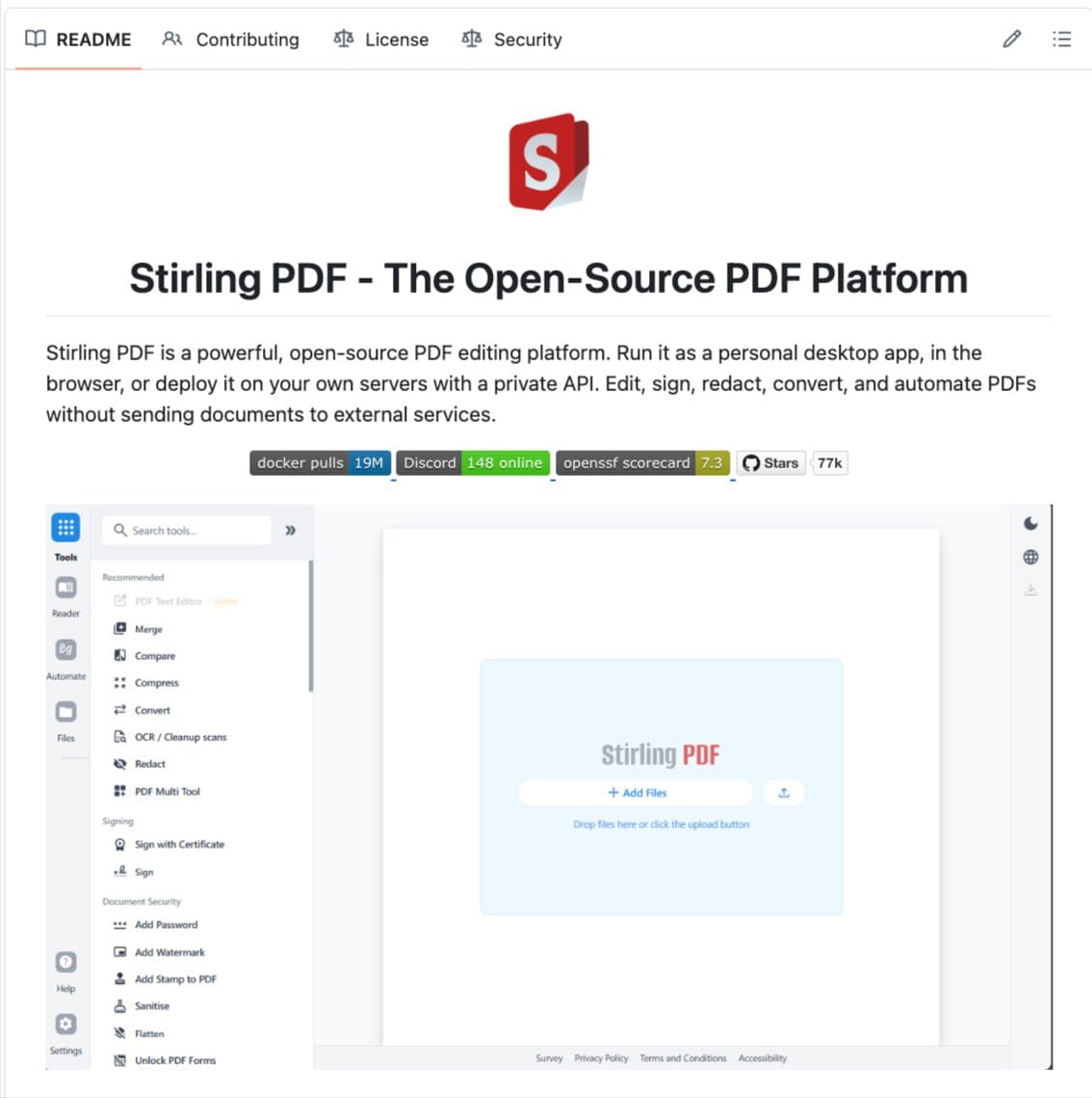
A tweet from developer Nav Toor has gone viral, highlighting a critical, often overlooked privacy risk: uploading sensitive documents like tax returns and pay stubs to unknown, cloud-based PDF processing websites. The thread then points to a massive, open-source alternative that keeps all processing on your own hardware: Stirling-PDF.
The project has quietly become a behemoth on GitHub, amassing over 77,100 stars, 6,700+ forks, and an estimated 25 million+ downloads. It's currently ranked as the #1 PDF application on the platform. This surge in popularity signals a significant shift in developer and enterprise sentiment toward privacy-preserving, self-hosted AI and document processing tools, moving away from subscription-based cloud services.
Key Takeaways
- Stirling-PDF, a fully local, open-source PDF toolkit, has surpassed 77,100 GitHub stars and 25M+ downloads.
- Its growth highlights a major shift toward privacy-first, self-hosted document AI, challenging paid cloud services like Adobe Acrobat.
What Stirling-PDF Does: A Fully Local PDF Suite
Stirling-PDF is a feature-complete, web-based PDF manipulation tool that runs entirely on a user's own machine or server. Its core promise is that files never leave the local environment. The project is built with a TypeScript frontend and a Java/Spring Boot backend, packaged for easy deployment via Docker.
Core Feature Set
- Basic Operations: Merge, split, compress, rotate, and reorder PDF pages.
- Conversions: Convert PDFs to and from Microsoft Office formats (Word, Excel, PowerPoint) and images.
- Security: Add/remove passwords, sanitize metadata, flatten forms, and redact content permanently.
- Enhancement: OCR (powered by Tesseract) to make scanned documents searchable, add watermarks, headers, footers, and page numbers.
- Viewing & Annotation: Built-in viewer with annotation capabilities.
- Automation: No-code pipelines for batch processing and a comprehensive REST API for every function, enabling full automation.
- Deployment: Available as a Docker container, a desktop app for Windows/macOS/Linux, or a traditional web application.
The Privacy and Cost Argument: Local vs. Cloud
The viral thread's central thesis is a stark privacy warning. When users casually upload documents to a free online PDF tool, those files are processed on remote servers in unknown jurisdictions, under undisclosed data retention policies. For sensitive financial, legal, or personal documents, this represents a substantial, often unrecognized risk.
Stirling-PDF eliminates this by processing everything locally. The server can be hosted on a personal laptop, a company's internal server, or a private cloud instance, ensuring data sovereignty.
Financially, the contrast with commercial leaders is dramatic:
Adobe Acrobat Pro $239.88 Cloud/Desktop Hybrid Smallpdf Pro $108 Cloud iLovePDF Premium $60 Cloud Stirling-PDF $0 (Self-Hosted) 100% LocalFor a team of 10 using Adobe Acrobat, the annual cost exceeds $2,600. Stirling-PDF offers a zero-licensing-fee alternative with superior privacy guarantees, though it requires technical resources for hosting and maintenance.
Technical Architecture and Community Trust

The project's scale (4,900+ commits, 175 releases) indicates mature, active maintenance. Its MIT license allows unrestricted use, modification, and distribution, even in commercial products. The 77,100+ stars serve as a powerful crowdsourced indicator of quality and trust within the developer community—a form of social proof far more credible to technical users than traditional marketing.
The backend's use of established libraries like Apache PDFBox and OpenPDF for core PDF operations, and Tesseract for OCR, provides a transparent, auditable foundation. Users can inspect the code, understand exactly how their documents are handled, and contribute fixes or enhancements.
gentic.news Analysis
Stirling-PDF's meteoric rise is not an isolated event but part of a broader, accelerating trend toward local-first AI and data processing. This movement is a direct response to growing concerns over data privacy, vendor lock-in, and the opaque practices of some cloud services. It aligns with the surge in popularity of other local AI tools, such as the Ollama framework for running large language models (LLMs) locally and the Stable Diffusion ecosystem for image generation, which we covered in our 2025 analysis "Local LLMs Break the 70B Parameter Barrier on Consumer Hardware."
The trend is particularly pronounced in the EU, where stringent regulations like the Data Act are pushing enterprises toward sovereign cloud solutions and software that guarantees data residency. Stirling-PDF, as a self-hostable tool, fits perfectly into this regulatory and architectural shift. It also contradicts the dominant SaaS narrative pushed by Adobe and others, proving there is massive demand for powerful, open-source alternatives that return control to the user.
From a technical investment perspective, the project's 48% TypeScript and 43% Java stack makes it accessible to a vast pool of developers for contributions and integrations. Its success underscores a key lesson for AI tool builders: for many tasks, especially those involving sensitive data, "good enough" local performance is vastly preferable to "better" cloud performance. The next frontier for tools like Stirling-PDF will be integrating more advanced on-device AI, such as local LLMs for intelligent document summarization or question-answering, while maintaining its core privacy principle.
Frequently Asked Questions
Is Stirling-PDF really free to use for commercial purposes?
Yes. Stirling-PDF is released under the permissive MIT License. This means you can use, modify, copy, and distribute the software, including for commercial purposes, without paying any licensing fees. The only costs would be associated with hosting it on your own infrastructure (e.g., server costs).
How difficult is it to self-host Stirling-PDF?
For developers familiar with Docker, it is very straightforward—often a single docker run command. The project provides detailed documentation for various deployment scenarios, including Docker Compose setups for persistence. For non-technical users, the desktop applications for Windows, macOS, and Linux offer the same local processing benefits without requiring server management.
How does its feature set compare to Adobe Acrobat Pro?
Stirling-PDF covers the vast majority of common PDF manipulation tasks that professionals need: merging, splitting, converting, OCR, redaction, and signing. Adobe Acrobat may have an edge in highly specific, advanced pre-press printing features or deeply integrated cloud services. However, for core functionality, Stirling-PDF is a direct replacement, with the decisive advantage of local processing.
What are the limitations of running PDF processing locally vs. in the cloud?
The primary limitation is hardware dependency. Complex operations on very large documents or batch processing thousands of files will be constrained by your local CPU, memory, and storage speed. A powerful cloud service might complete these tasks faster on their optimized infrastructure. The trade-off is absolute data privacy and security versus potential speed and convenience.