If you've been using ccusage to track your Claude Code spending and session history, there's a new tool that does everything faster while adding AI-powered insights. AgentsView 0.22 is an open-source desktop app that reads your Claude Code session files and provides analytics, search, and recommendations.
What It Does — Local-First Claude Code Analytics
AgentsView reads the session files that Claude Code leaves on your machine (~/.cursor or ~/.cursor-dev directories) and gives you a complete dashboard without sending data anywhere. By default, everything stays local. The tool supports 20+ AI coding agents including Claude Code, Codex, Copilot, Cursor, and Gemini.
The key feature for Claude Code users is the agentsview usage CLI command, which serves as a direct replacement for npx ccusage@latest. According to benchmarks, on a database with 22,000 sessions, it runs 80-220× faster than ccusage for daily reports. Even on smaller databases, reports come back in under a second.
Setup — Install in Under 60 Seconds
You have three installation options:

Desktop App (Recommended):
# Download from GitHub Releases:
# macOS: .dmg
# Windows: .exe
# Linux: .AppImage
The desktop app includes auto-update functionality and runs completely bundled.
Via pip or uvx:
# Install with pip
pip install agentsview

# Or run instantly with uvx (no install)
uvx agentsview
Shell Script (Windows PowerShell):
# Run the installer script
irm https://agentsview.io/install.ps1 | iex
Once installed, AgentsView automatically discovers your Claude Code session directories. No configuration needed.
When To Use It — Beyond Basic Usage Tracking
1. Replace ccusage with Faster Daily Reports
Instead of:
npx ccusage@latest daily
Use:
agentsview usage daily
You'll get the same daily spend report but in sub-second time, even with thousands of sessions. The tool reads from the same pre-indexed SQLite database that powers the rest of AgentsView.
2. Search Months of Claude Code Conversations
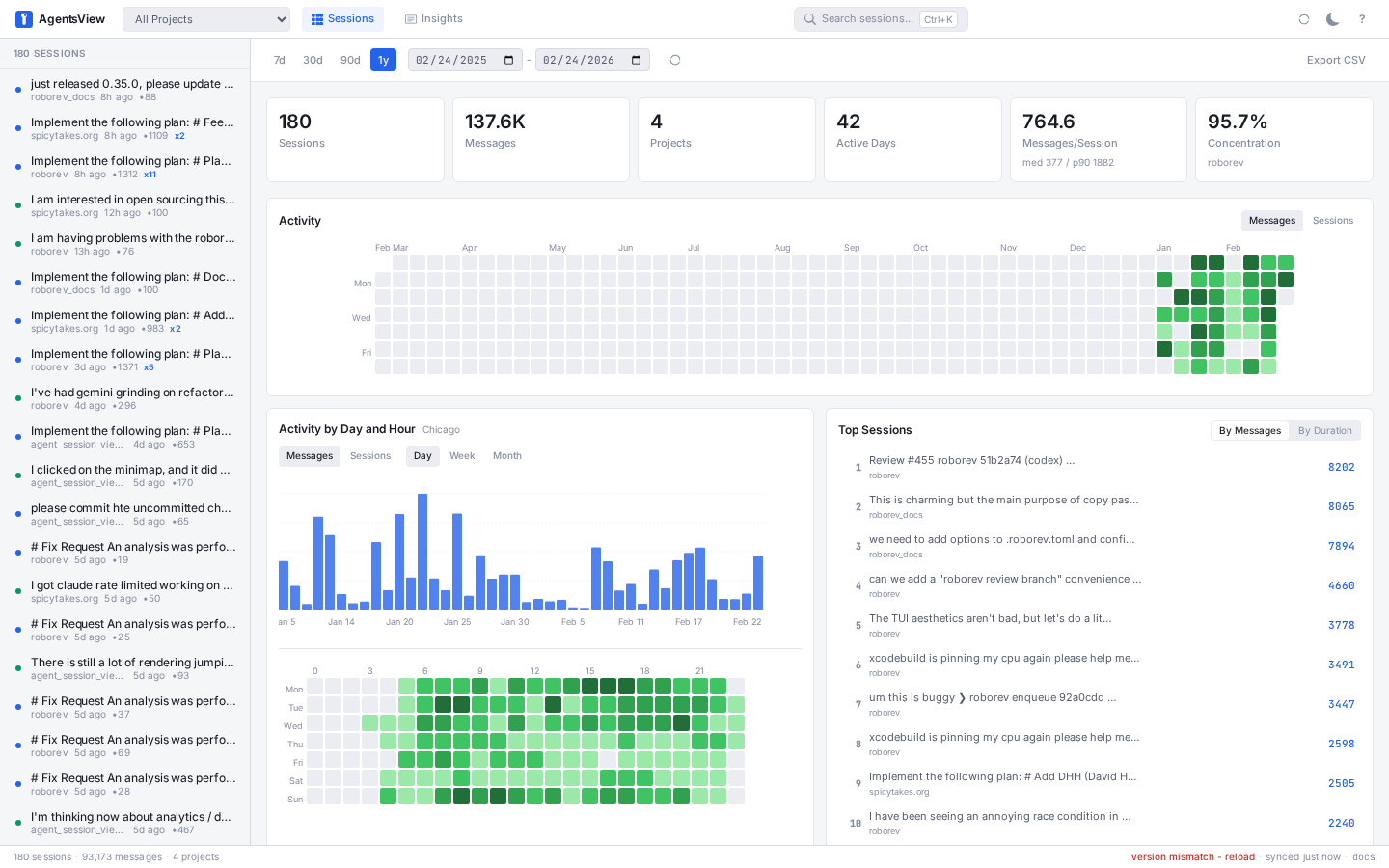
Full-text search across all message content means you can find that one conversation where you discussed a specific function, error message, or design decision — even months later. This is invaluable when you remember solving a problem with Claude Code but can't recall when.
3. Get AI-Powered Session Analysis
AgentsView can generate summaries and analysis of your coding sessions using Claude, Codex, Copilot, or Gemini. You get:
- Daily activity digests
- Multi-day analyses
- Recommendations scoped by project or across everything
4. Analyze Your Claude Code Work Patterns
View activity heatmaps, tool usage breakdowns, velocity metrics, per-project stats, and session distribution charts. Understand how you use Claude Code over time — which projects get the most assistance, when you're most active, and what types of tasks you're delegating.
5. Live Sync for Real-Time Monitoring
AgentsView watches your session directories for changes and streams new messages in real time. Start a coding session in Claude Code, watch it appear in AgentsView in another window.
Token Usage & Costs Tracking
Version 0.20.0 added support for Claude Code and Codex sessions, with more agents coming as their parsers start recording per-message token usage. The agentsview usage command gives you:
- Daily spend reports
- Today's-cost status line
- Per-project breakdowns

Import Your Chat History
You can also import your Claude.ai and ChatGPT conversations (including images) by uploading a zip export. This gives you a unified view of all your AI coding assistance in one place.
Why It Works — The Technical Edge
AgentsView uses a pre-indexed SQLite database that's optimized for querying session data. While ccusage processes files on the fly, AgentsView maintains an indexed database that makes queries instantaneous. The desktop app is built with Tauri, which keeps it lightweight and fast.
For teams or multi-machine setups, optional PostgreSQL sync can push session data to a shared database, though most individual Claude Code users will stick with the local-first approach.
Try It Today
If you're already using ccusage, the switch is seamless. Install AgentsView, run agentsview usage daily, and compare the speed difference. The desktop app gives you the additional analytics and search capabilities that ccusage doesn't offer.
For Claude Code power users who want to understand their patterns, optimize their prompting, and track costs efficiently, AgentsView 0.22 is worth the 60-second installation.