Key Takeaways
- Connect LangGraph to MCP using MCPClient: call send_request() in your handler, and add retries.
- This fixes broken agent responses and keeps conversation flows resilient.
The Problem: Your LangGraph Agent Won't Talk to MCP
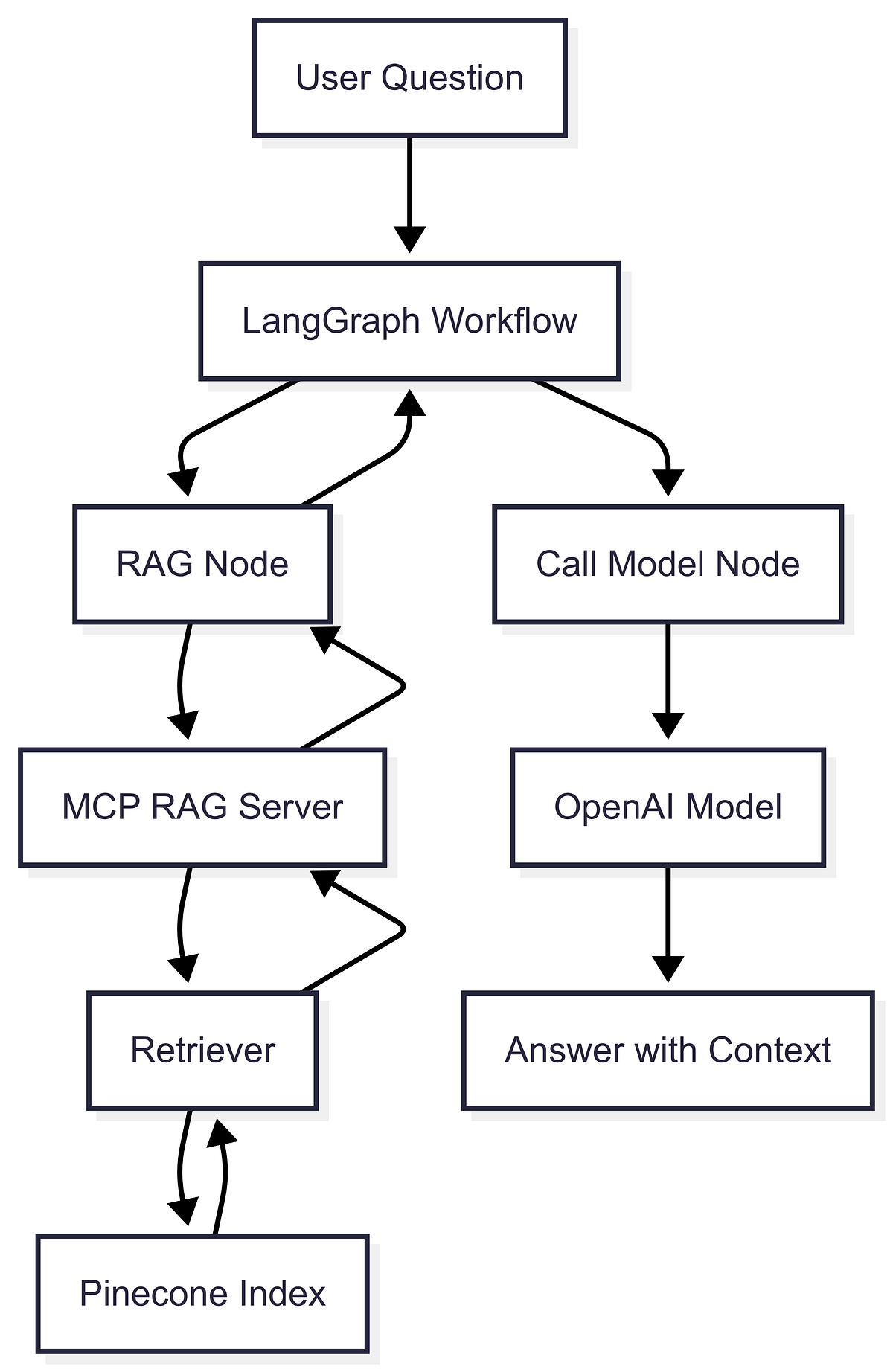
You've built a LangGraph agent with a sophisticated conversation flow. You deploy it, and suddenly it's silent — cryptic errors in the logs, no responses to user inputs. The culprit? A broken connection between your agent and the MCP server that provides the context and knowledge it needs.
This isn't a rare edge case. As MCP (Model Context Protocol) becomes the standard for connecting AI models to external tools — adopted by Claude Code, Cursor, and even Google — wiring it correctly is a skill every Claude Code user needs. The fix is simpler than you think.
The Technique: Use MCPClient to Bridge the Gap
The key is the MCPClient class from the MCP API. It establishes a connection to your MCP server and lets you send requests to retrieve context and knowledge. Here's the minimal pattern:
import langgraph as lg
from mcp.client import MCPClient

# Create a new LangGraph agent
agent = lg.Agent()

# Create a new MCP client
mcp_client = MCPClient("https://example-mcp-server.com")

# Define a function to handle user inputs
def handle_input(input_text):
    # Send a request to the MCP server to retrieve context and knowledge
    response = mcp_client.send_request(input_text)

    # Use the response to inform the agent's response
    agent_response = agent.generate_response(response.context, response.knowledge)

    return agent_response
This is the core wiring: every user input triggers a request to MCP, and the response's context and knowledge feed into your agent's response generation.
Why It Works
LangGraph agents are designed to generate human-like responses, but they need external context to be useful. MCP servers provide that context — whether it's database records, API data, or knowledge bases. Without the MCPClient bridge, your agent is flying blind, generating responses from nothing but its training data. That's why you see failures: the agent can't retrieve the context it needs, so the conversation flow breaks.
The Gotcha: Error Handling and Retries
Here's where most people trip up. If your MCP server goes down or becomes unresponsive, your agent will fail to retrieve context, and your conversation flow dies. The source article highlights this exact problem.
You need to wrap your MCP calls in retry logic. Here's a practical pattern:
import time
from mcp.client import MCPClient

def handle_input_with_retry(mcp_client, input_text, retries=3, delay=2):
    for attempt in range(retries):
        try:
            response = mcp_client.send_request(input_text)
            return response
        except Exception as e:
            print(f"Attempt {attempt + 1} failed: {e}")
            if attempt < retries - 1:
                time.sleep(delay)
    raise RuntimeError("MCP server unreachable after retries")
Integrate this into your handle_input function, and your agent becomes resilient to transient MCP failures.
Try It Now
- Install the MCP client:
pip install mcp(and ensure you havelanggraphinstalled). - Copy the basic pattern above and replace the URL with your MCP server endpoint.
- Add retry logic to your handler (use the snippet above).
- Test with a down server: Stop your MCP server and verify your agent retries gracefully instead of crashing.
A Word on MCP Trends
MCP is evolving fast. The community is shifting toward minimalism — using fewer servers to reduce context bloat. The recent 2026-07-28 spec removed sessions and the initialize handshake, making connections stateless. This means your MCPClient wiring might get simpler over time. Also, be aware of security: 11 CVEs were disclosed in July 2026 across 7,000+ MCP instances, so validate your server's STDIO transport.
Final Takeaway
Wiring LangGraph to MCP isn't magic — it's a direct MCPClient call with proper error handling. Do that, and your agent will never go silent again.
Source: dev.to