Key Takeaways
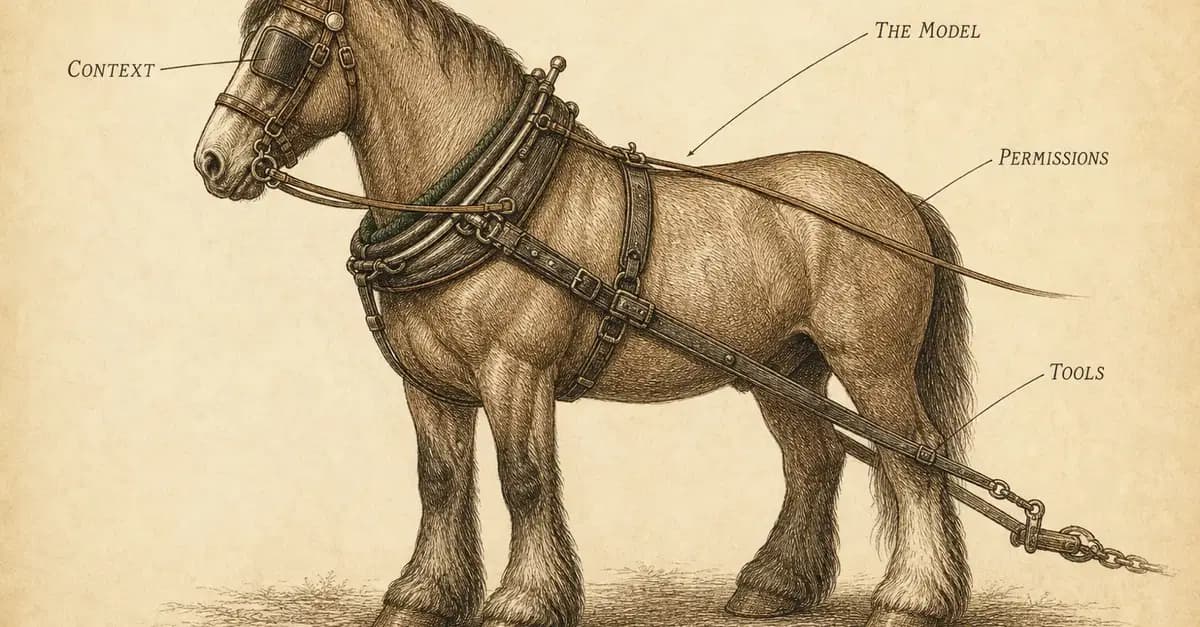
- Claude Code's harness—maximal tools, context caching, and subagent orchestration—drives a 23.8-point performance gap.
- Use CLAUDE.md and /compact to optimize your context window.
What Changed — The Harness Study That Quantifies Claude Code's Edge
In May 2026, researchers at Peking University ran 106 tasks through six different agent harnesses using the same pool of models, logging over 5,000 runs. The result? A 23.8-point performance gap between the best and worst harnesses—purely from the harness, not the model. Claude Code is built to be that best harness, and understanding why can make you faster today.
The study, called Harness-Bench, reveals that agent capability should be reported at the model-harness configuration level, not attributed to the base model alone. For Claude Code users, this means your workflow—how you set up CLAUDE.md, how you manage context, how you delegate—is as important as the model you're using.
What It Means For You — Your Harness Choices Matter More Than You Think
The Princeton SWE-agent paper showed that showing a model 100 lines of a file at a time fixed 18% of real GitHub issues, but showing the whole file dropped that to 12.7%. More information, worse results. Claude Code's harness is designed around this principle: it carefully controls what the model sees, when.
Claude Code's harness is maximal—about 45 tool-name slots covering some 95 tools, each described at length. The Bash tool description alone spans 39 template files. This rich tool surface is a deliberate bet: Princeton showed a well-described tool surface beats a bare shell by 64%.
But the real insight is Claude Code's context engineering. The system prompt is split at a __SYSTEM_PROMPT_DYNAMIC_BOUNDARY__—everything above it is identical for every user and cached, saving tokens and speeding up every request.
Try It Now — Optimize Your Harness Workflow
- Use CLAUDE.md as your harness control: Claude Code reads your CLAUDE.md to shape its context. Include concise, high-signal instructions about your project's structure, commands, and common pitfalls. This is your lever on the harness—make it count.

Practice context hygiene: The harness shows the model only part of the conversation history. Use
/compactto summarize long sessions and keep only the last few tool outputs. This mirrors the Princeton finding that trimming history to the last five tool outputs was worth 3 points.Let Claude delegate—but only when it matters: Claude Code's system prompt includes a coordinator block that decides when to spawn subagents. It explicitly warns: "Subagents multiply cost and time." Use subagents for parallelizable, independent tasks, but keep verification in your main loop.
Leverage tool descriptions: Claude Code's tools are described in extreme detail, so it knows exactly what each command does. Don't fight this—write scripts and commands that are self-documenting, and Claude will use them more effectively.
Cache your context: The dynamic boundary means static system prompt parts are cached. Keep your CLAUDE.md stable across sessions to maximize cache hits and reduce token usage.
The Bottom Line
The harness is not a black box—it's a set of decisions you can influence. By understanding how Claude Code's harness works, you can tune your own usage to get the 23.8-point edge every day.

Source: dev.to
[Updated 17 Aug via devto_claudecode]
The study's raw scores are now public: the best harness hit 76.2 and the worst 52.4, with that 23.8-point spread confirmed across 106 tasks and 5,000+ runs. [per dev.to] The article also exposes concrete harness internals—OpenCode's agentic loop is a literal while (true) in session/prompt.ts, and Claude Code's context engineering includes a __SYSTEM_PROMPT_DYNAMIC_BOUNDARY__ for caching. Princeton's file-window experiment (100 lines vs. whole file) was worth 5.3 points, trimming history to five tool outputs added 3, and a linter blocking broken edits added another 3—all harness, not model.