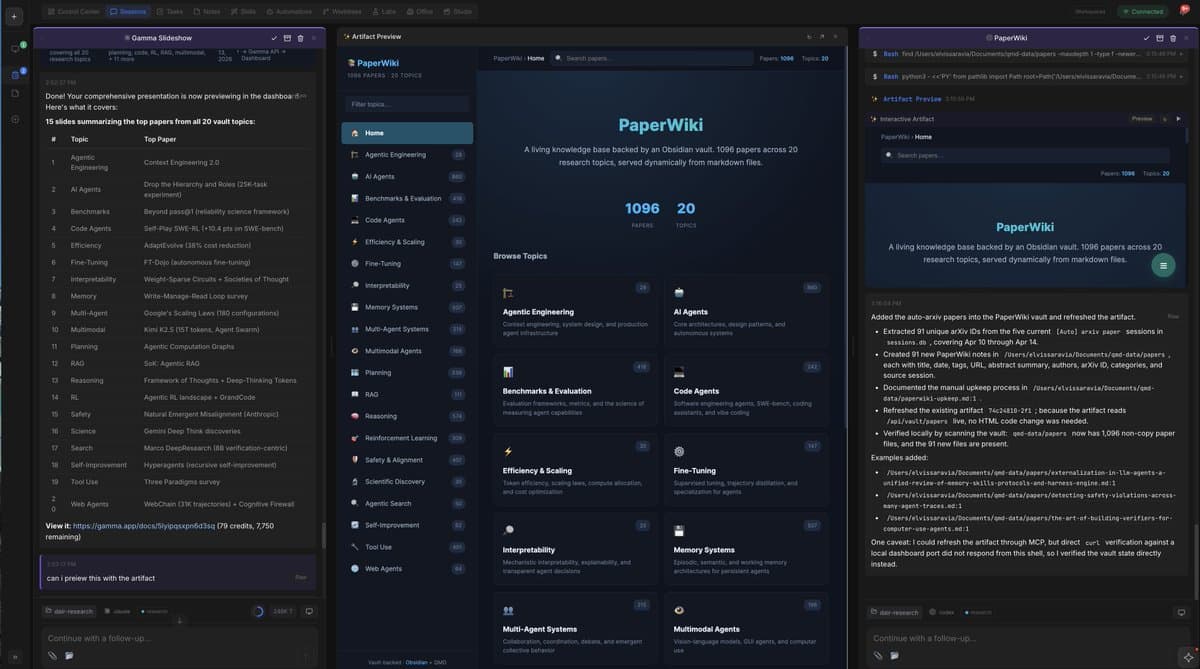
AI researcher and developer Omar Sar has observed a significant convergence in the user interfaces of popular AI-powered coding tools, including the new Codex app, Cursor, and Claude Code (desktop). In a detailed post, Sar argues this is not accidental but a necessary evolution beyond the limitations of command-line interface (CLI) agent sessions.
What Happened
Sar notes that the visual and functional designs of these leading coding assistants have begun to look "pretty similar." He identifies this as a deliberate process of exploring "newer and more optimal ways to build with coding agents." The core limitation driving this change is that traditional, linear CLI agent sessions "can only get you so far" in complex development workflows.
A specific feature Sar highlights is the side-by-side agent session view, which he praises in the Claude Code UI. He built a similar feature into his own agent orchestrator tool four months ago, reporting it as a "productivity boost." He also mentions the utility of an "infinite canvas of sessions" for certain tasks.
The Core Thesis: UI Flexibility Unlocks Agent Potential
Sar's central argument is that the flexibility of the user interface is directly tied to a developer's confidence and effectiveness when using AI coding agents. "The more flexible the UI, the more confidence I have in the coding agents, and the more I can push them to do more," he writes.
This belief led him to begin developing his own coding agent harness and UI last year. He claims to have since moved on to "more advanced views" that allow for further scaling with agents, suggesting that agent sessions can be visualized and can generate artifacts in "extremely flexible" ways.
What's Next
Sar predicts this is just the beginning of a major shift. "Coding agents' UIs are about to drastically change again," he states, implying that the current convergence on side-by-side sessions is a precursor to even more innovative interfaces. He expects these new, more flexible visualization paradigms to become more visible in mainstream coding UIs in the coming months.
gentic.news Analysis
Omar Sar's observation taps into a critical, under-discussed layer of the AI-powered development revolution: the human-agent interaction model. While most coverage focuses on raw benchmark scores (like SWE-Bench) or new model capabilities, the practical throughput of a developer using an AI assistant is heavily gated by interface latency, context management, and workflow ergonomics.
This UI convergence Sar identifies—exemplified by Cursor, Claude Code, and others—represents a maturation phase. Early AI coding tools (like GitHub Copilot's initial inline suggestions) were feature additions to existing IDEs. The new generation, including the recently covered Cursor's Composer, are building agent-centric interfaces from the ground up. The move to persistent, multi-threaded side-by-side sessions reflects an understanding that AI coding is not a single Q&A but a protracted, stateful collaboration. This aligns with a broader trend we've noted towards session-based AI, where context persists and evolves across a multi-step task, a concept also being explored in research environments like OpenAI's o1.
Sar's point about UI flexibility breeding confidence is key. A rigid interface forces the human to conform to the agent's limitations, while a flexible one allows the human to guide the agent through complex, non-linear problem-solving—the true bottleneck for advanced coding tasks. The next frontier, as he hints, may be UIs that automatically generate custom visualizations (dependency graphs, state flows, test coverage maps) as artifacts of the agent's work, turning the coding session into a rich, multi-modal dashboard. This evolution will be crucial as agents move from writing snippets to owning entire development sprints.
Frequently Asked Questions
What are side-by-side agent sessions in AI coding tools?
Side-by-side agent sessions allow a developer to maintain multiple, concurrent conversations or tasks with an AI coding assistant within a single view. Instead of a single, linear chat history, you can have separate sessions for debugging, feature implementation, and code review open simultaneously, making it easier to manage complex, multi-faceted projects without losing context.
Why is UI design important for AI coding assistants?
The user interface dictates how efficiently a developer and an AI agent can collaborate. A poor UI creates friction, slows down the feedback loop, and limits the complexity of tasks that can be effectively delegated. A flexible, powerful UI—like one supporting multi-session views—increases developer trust and allows the agent to be used for more ambitious, non-linear work, ultimately determining the practical ceiling of productivity gains.
Which AI coding tools are leading this UI trend?
Based on Omar Sar's observations, the new Codex application (likely referring to OpenAI's IDE integration), Cursor, and Anthropic's Claude Code (desktop) are visibly converging on similar interface principles focused on flexible, multi-session management. These tools are moving beyond being simple plugins to becoming agent-native development environments.
What might the next generation of coding agent UIs look like?
Following the current trend towards session flexibility, future UIs may feature infinite canvases for organizing agent work, dynamically generated visual artifacts (like architecture diagrams or data flow charts created by the agent), and more sophisticated orchestration views that allow developers to manage fleets of specialized agents (e.g., one for frontend, one for backend, one for testing) within a single project.