As commercial deployment platforms like Vercel, Netlify, and Heroku continue to raise prices and eliminate free tiers, developers are facing mounting infrastructure costs. Vercel now charges $20 per seat per month, Netlify charges $19 per user per month for its Pro tier, and Heroku eliminated its free tier entirely in 2022. For teams, these costs quickly escalate: a 5-person team can pay $100-500 monthly, plus unpredictable bandwidth overage charges that sometimes reach thousands of dollars.
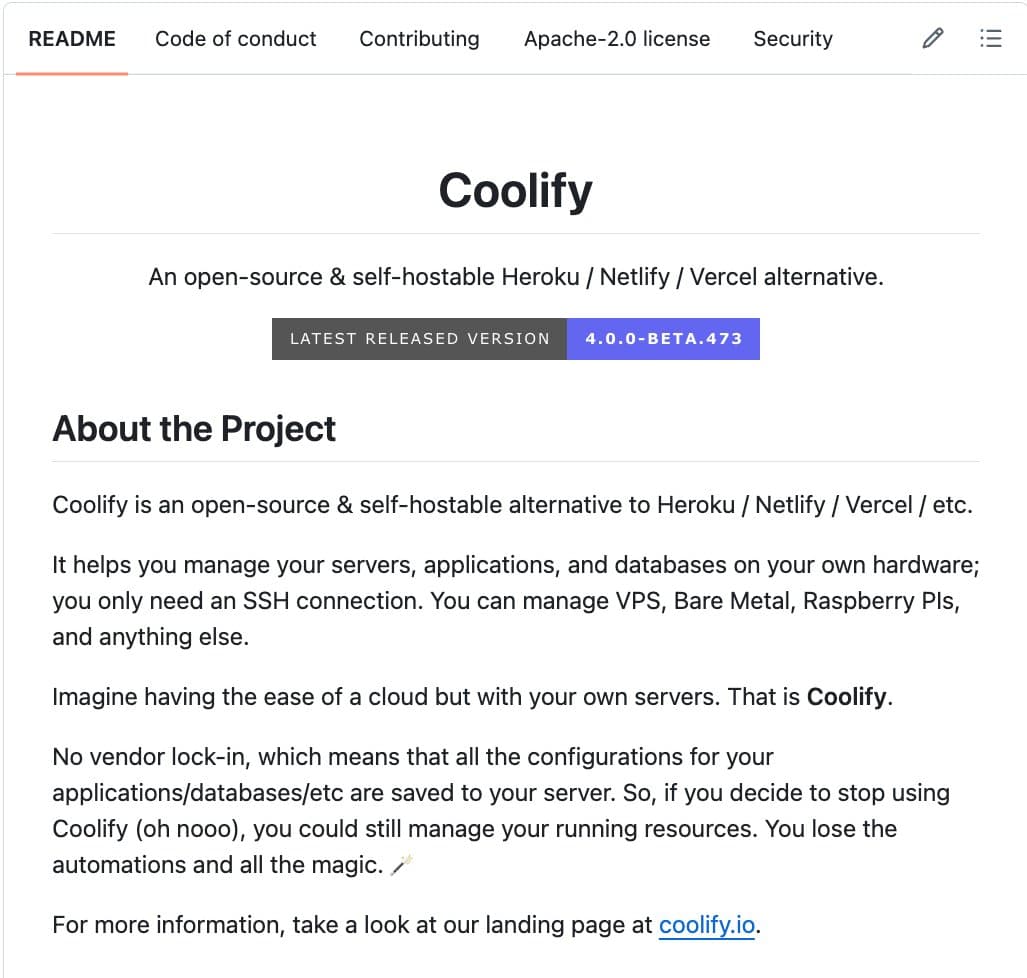
Enter Coolify, an open-source alternative that's gaining significant traction with over 53,000 stars on GitHub. The Apache-2.0 licensed platform offers a fundamentally different approach: self-hosted deployment on infrastructure you control, for $0 in platform fees.
What Coolify Actually Does
Coolify is a self-hostable platform-as-a-service that you install on any server accessible via SSH. This could be a $5/month VPS from providers like Hetzner or DigitalOcean, a Raspberry Pi, an old laptop, or any machine with SSH capabilities. Once installed, it provides a web interface for deploying and managing:
- Static sites (HTML, CSS, JavaScript)
- Full-stack applications (Node.js, Python, Ruby, Go, etc.)
- Databases (PostgreSQL, MySQL, Redis, MongoDB)
- APIs and backend services
- 280+ one-click services including WordPress, Ghost, Plausible Analytics, n8n, Supabase, and many others
Technical Capabilities vs. Commercial Platforms
What makes Coolify particularly compelling is that it includes features that commercial platforms typically charge extra for:
SSL Certificates Free, auto-renewed via Let's Encrypt Included Database Backups Automatic to S3-compatible storage Extra cost or manual setup PR Preview Deployments Included Included in higher tiers Browser-based Terminal Real-time server access Limited or unavailable Git Integration GitHub, GitLab, Bitbucket push-to-deploy GitHub/GitLab primarily Monitoring & Alerts Discord/Telegram/email notifications Limited or extra cost Vendor Lock-in None - configs stay on your server High - proprietary formats Monthly Cost (5-person team) $5 (server cost only) $100-500+The Self-Hosted Advantage: Cost and Control
The financial math is straightforward. A team using Coolify on a $5/month Hetzner VPS pays exactly $5 total, regardless of team size. The same team on Vercel would pay $20 per seat monthly ($100), plus potential bandwidth overages. For startups and indie developers, this represents a 95%+ cost reduction.
More importantly, Coolify eliminates "surprise bills" from bandwidth overages that have plagued developers on commercial platforms. Since you control the underlying infrastructure, you set hard limits on resource consumption.
From a technical perspective, Coolify uses Docker under the hood for containerization, with Traefik as a reverse proxy for routing, and integrates with Let's Encrypt for SSL certificates. The platform manages the complexity of container orchestration, networking, and SSL renewal through a clean web interface.
Installation and Getting Started
Installation requires a server with:
- Ubuntu 22.04 or newer (recommended)
- Docker and Docker Compose
- SSH access
The installation process is documented as a one-line command:
wget -q https://get.coolify.io -O install.sh && sudo bash install.sh
Once installed, you access the Coolify dashboard via your server's IP address or domain, configure your Git providers, and begin deploying applications. The platform supports environment variables, custom domains, and automated deployments on Git pushes.
Limitations and Considerations
While Coolify offers significant advantages, it's not a direct drop-in replacement for all use cases:
- Infrastructure Management: You're responsible for server maintenance, security updates, and scaling. This requires more DevOps knowledge than managed platforms.
- Global CDN: Unlike Vercel and Netlify, Coolify doesn't include a built-in global CDN. You'd need to configure Cloudflare or similar separately.
- Enterprise Features: Large organizations may miss enterprise SSO, advanced compliance controls, and dedicated support.
- Server Costs Scale: While platform fees are $0, your server costs will increase with traffic and resource needs.
gentic.news Analysis
Coolify's rapid growth to 53,000+ GitHub stars reflects a broader trend in the developer ecosystem: the re-emergence of self-hosting as a viable alternative to SaaS platforms. This movement gained momentum after Heroku's 2022 decision to eliminate its free tier, which alienated many developers and sparked a search for alternatives. The trend accelerated in 2024-2025 as Vercel and Netlify implemented per-seat pricing models that made their platforms increasingly expensive for teams.
This development aligns with several related stories we've covered. In March 2025, we reported on Portainer's growth as a Docker management platform, which similarly empowers developers to manage their own infrastructure. The success of Plausible Analytics (mentioned as one of Coolify's one-click apps) also demonstrates the market demand for privacy-focused, self-hostable alternatives to Google Analytics.
From a technical perspective, Coolify represents the maturation of containerization tooling to the point where sophisticated deployment workflows can be packaged for mainstream developers. Five years ago, setting up automated deployments with SSL, preview environments, and database backups required significant DevOps expertise. Today, platforms like Coolify abstract this complexity while maintaining the flexibility of self-hosting.
For AI/ML practitioners specifically, Coolify offers intriguing possibilities. Many AI applications (model APIs, vector databases, monitoring dashboards) are perfect candidates for self-hosting, especially when data privacy or cost control are concerns. The ability to deploy 280+ services with one-click could accelerate prototyping of AI-powered applications without committing to expensive cloud platforms.
Frequently Asked Questions
Is Coolify really free forever?
Yes, the Coolify software itself is Apache-2.0 licensed and free to use indefinitely. You only pay for the underlying server infrastructure (VPS, cloud instance, or physical hardware) where you install it.
Can I migrate from Vercel or Netlify to Coolify?
Migration depends on your specific setup. Static sites are generally straightforward to migrate. Full-stack applications may require adjustments to environment variables, build processes, and deployment configurations. Coolify uses Docker, so you'll need Dockerfiles or docker-compose configurations for your applications.
How does Coolify handle scaling compared to Vercel?
Coolify doesn't provide automatic scaling out of the box. You manually scale by upgrading your server resources or adding additional servers. For advanced scaling, you'd need to implement load balancing and potentially use Coolify in conjunction with orchestration tools like Kubernetes (which Coolify can help deploy).
Is Coolify suitable for production applications?
Yes, many teams use Coolify in production. However, you assume responsibility for server reliability, backups, and security. For critical applications, you should implement monitoring, regular backups, and consider high-availability setups with multiple servers.
What happens if I stop using Coolify?
Since Coolify doesn't use proprietary formats, your applications continue running on your server. The Docker containers, configurations, and data remain intact. You can manage them directly via Docker commands or migrate to another management platform.