The Bottleneck: Managing Multiple Agents
When you use Claude Code effectively, you're not just running one session. You're shepherding multiple agents across different tasks or branches simultaneously. The immediate breakdown isn't the AI's capability—it's your ability to manage the workflow. The core problem is context switching overhead: not knowing which agent needs your input, which is finished, or which is stuck on a permission prompt. Terminal tabs are a poor UI for this multi-agent reality.
Tool 1: Harness for Session Management
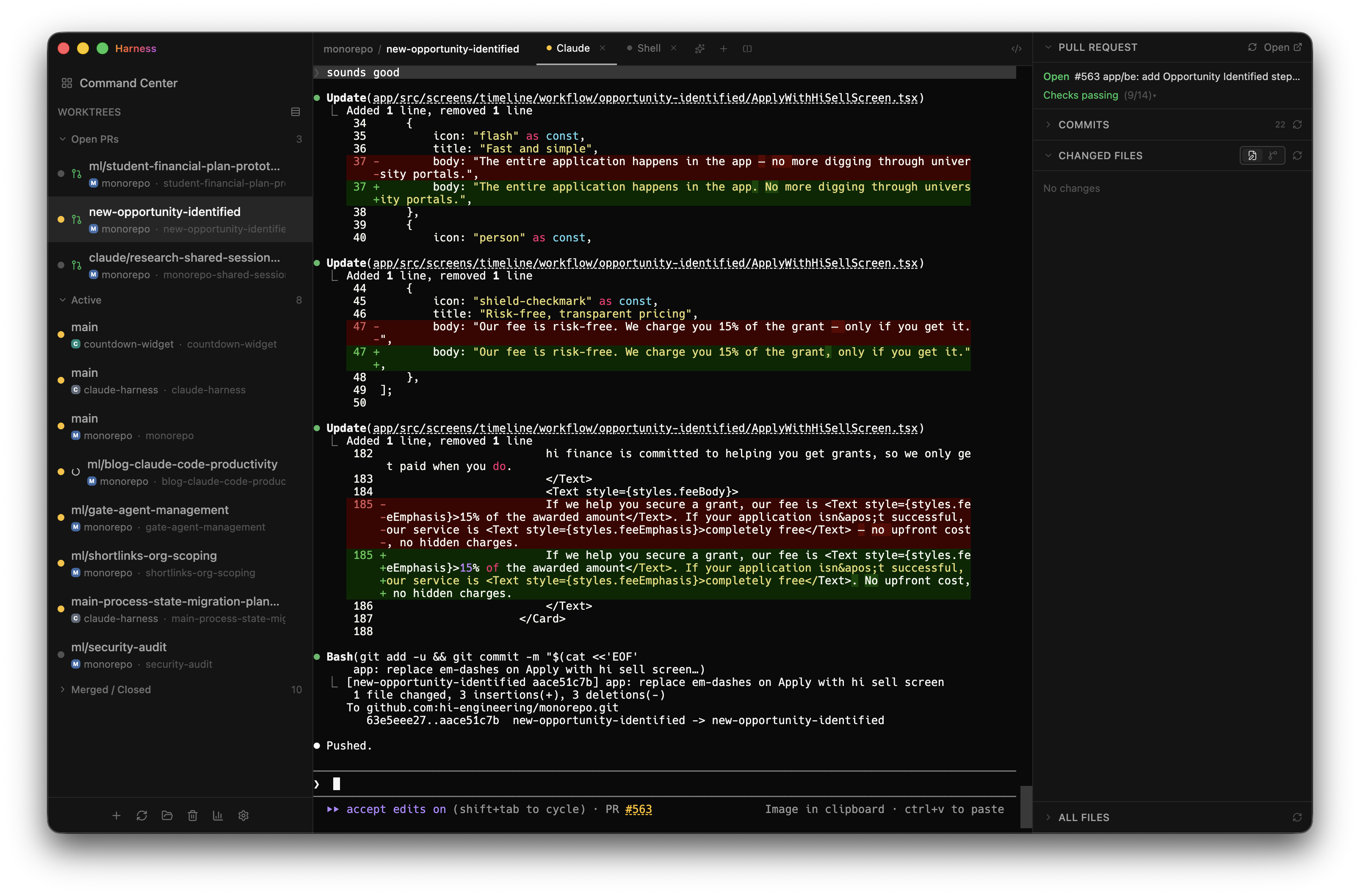
Harness is a Mac application built specifically to solve this visibility problem. It runs Claude Code across multiple git worktrees and provides a unified dashboard. Each session is represented with a status indicator:
- A dot for "working"
- A dot for "needs you" (e.g., waiting on a permission prompt)
- A dot for "done"
You run it on a second monitor, giving you an instant, at-a-glance view of your entire Claude Code operation. The developer built it to eliminate the "swivel-chair overhead" of constantly checking terminal tabs. This directly addresses the first critical skill for the Claude Code era: managing many projects and contexts at once.
How to Apply It: If you're on macOS and feeling this pain, try Harness. The setup involves pointing it at your git worktrees. The key outcome is reclaiming the mental energy previously spent on session management.
Tool 2: Per-PR Preview Environments for Faster Review
The second breakdown is in the review and iteration loop. A traditional workflow—git checkout, install dependencies, start dev servers, reset databases—is a massive bottleneck when Claude can generate a pull request every 20 minutes.
The solution is automated, per-PR preview environments. Every PR in your monorepo should automatically spin up its own isolated instances:
- A dedicated frontend
- A dedicated backend
- A mobile preview channel (if applicable)
Instead of cloning and building locally, you click a link. This collapses the "test this change" step from minutes to seconds, which is essential for keeping pace with Claude's output. This tool targets the second critical skill: iterating as fast as possible.
How to Apply It: Implement this using your existing CI/CD platform (like GitHub Actions, GitLab CI, or CircleCI) combined with a platform like Vercel, Netlify, or a self-hosted solution like Kubernetes. The goal is to make the environment a URL, not a local process.
The Underlying Principle
Mastering your tools matters more than ever because the tools are more powerful. Claude Code amplifies the need for two engineering skills that have always been valuable: concurrent context management and rapid iteration. These tools don't change the job—listening to users and imagining better solutions—but they remove the friction that prevents you from leveraging Claude Code at full capacity.
gentic.news Analysis
This developer's experience highlights a maturation in the Claude Code ecosystem. As noted in our recent coverage, the open-source repository 'claude-code-best-practice' has hit 19.7K stars, compiling 84 production tips. This trend shows the community is rapidly moving beyond basic prompting to systematize workflows and tooling around the agent. The focus on managing multiple agents aligns with the broader industry shift towards multi-agent frameworks, as seen with the rise of Claude Agent, which Anthropic developed to enable model collaboration.
The recommendation for preview environments also connects to a key competitive differentiator. While Cursor and GitHub Copilot integrate deeply into the editor, Claude Code's strength is its terminal-based, agentic approach that can orchestrate full-stack changes. This makes fast, automated testing environments a critical complement, not just a nice-to-have. The recent bug in Claude Code 2.1.107 that broke OAuth authentication underscores the importance of robust, isolated testing environments before deploying agent-generated code to production.