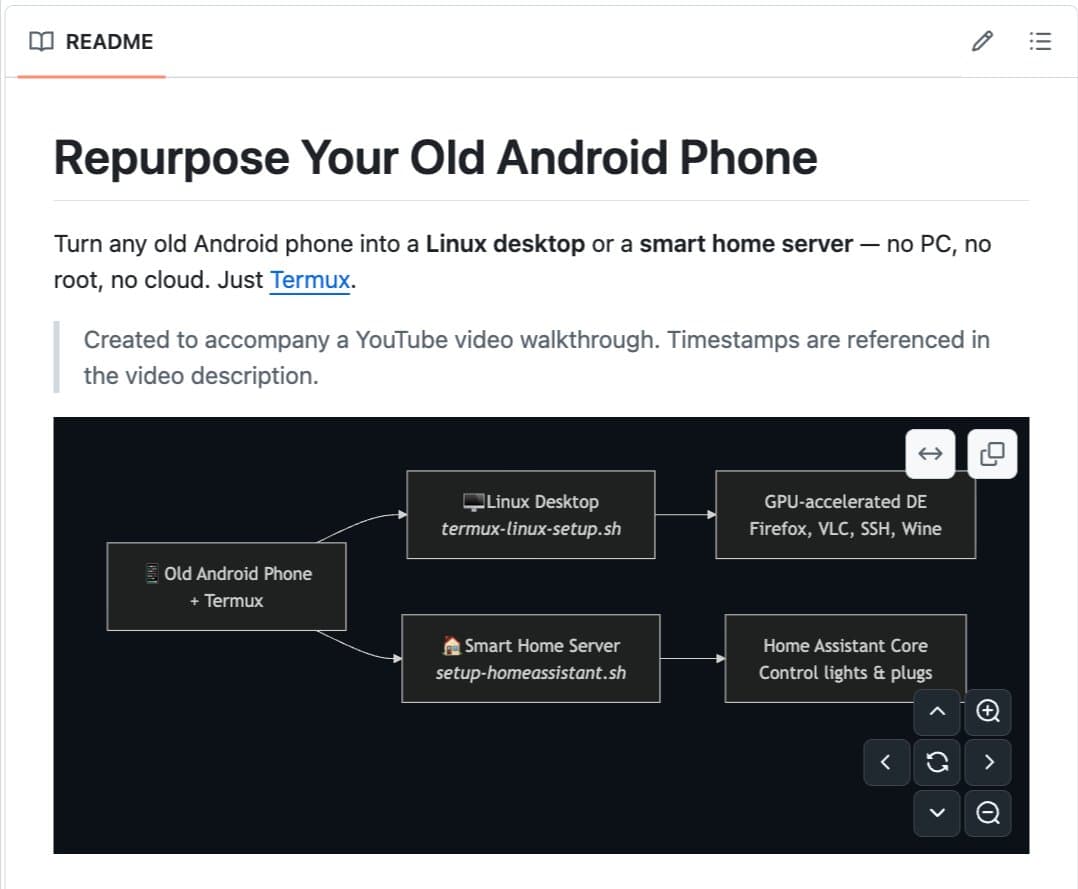
A new open-source project called linux-android provides a single script that transforms old Android phones collecting dust in drawers into fully functional Linux desktop computers, smart home servers, or development machines—with no root access required and no risk of bricking the device.
What It Does
The script runs within Termux, a terminal emulator for Android, and installs a complete Linux environment directly on the phone. Unlike traditional methods that require flashing custom ROMs or unlocking bootloaders, this approach works entirely within Android's user space, making it accessible to non-technical users.
Key features include:
- Full Linux desktop environments (XFCE4, LXQt, or MATE) with windowed desktop interface
- Smart home server capability with Home Assistant for controlling WiFi-connected devices locally
- GPU acceleration through Turnip Vulkan drivers for Snapdragon processors
- SSH server for remote access from other computers on the same network
- Wine support via Box64 translation for running basic Windows applications
- Audio support with PulseAudio configured automatically
- No root required and no device flashing needed
Technical Implementation
The script leverages Termux's proot environment to create a chroot-like Linux installation alongside Android. This approach isolates the Linux environment while allowing access to the phone's hardware resources through Android's existing drivers and kernel interfaces.
For GPU acceleration, the project implements two pathways:
- Snapdragon devices: Use Turnip Vulkan drivers for near-native GPU performance
- Mali GPUs: Fall back to software rendering through llvmpipe
The installation includes a complete package manager (typically apt), allowing users to install additional Linux software as needed. The script automatically configures network bridging, storage mounts, and input device forwarding when external monitors and keyboards are connected via USB.
Hardware Requirements and Performance
The project works on any Android phone with Termux support, which includes most devices running Android 7.0 or later. Performance varies based on the phone's specifications:
2018-2019 Flagship Snapdragon 855 Outperforms Raspberry Pi 4, comparable to entry-level x86 servers 2020-2021 Mid-range Snapdragon 7xx Similar to Raspberry Pi 4 with better power efficiency Older Devices Various Functional but may have GPU limitationsThe economic case is compelling: A Raspberry Pi 4 costs $35-75, a used mini PC costs $100+, and a cloud VPS costs $5/month indefinitely. An old Android phone represents zero additional cost for users who already own the hardware, plus it includes built-in battery backup, WiFi, Bluetooth, and a touchscreen display.
Use Cases
1. Linux Desktop Replacement
Connect a monitor, keyboard, and mouse via USB-C hub, and the phone becomes a complete desktop computer capable of web browsing, document editing, coding, and light multimedia tasks.
2. Smart Home Server
Run Home Assistant locally to control smart devices without cloud dependencies. The phone's battery provides uninterrupted operation during power outages.
3. Development Machine
Use as a headless server for hosting web applications, databases, or CI/CD pipelines. SSH access allows full remote administration.
4. Educational Tool
Provide students with a low-cost Linux environment for learning programming, system administration, or networking concepts.
Installation Process
# Install Termux from F-Droid (not Google Play)
# Run the following commands in Termux:
pkg update && pkg upgrade
pkg install git
git clone https://github.com/linux-android/linux-android
cd linux-android
./install.sh
The script guides users through desktop environment selection and initial configuration. The entire process typically takes 15-30 minutes depending on internet speed and phone performance.
Limitations and Considerations
- Storage constraints: Most phones have limited internal storage compared to traditional computers
- Performance variability: Older phones with weaker processors may struggle with intensive tasks
- Cooling: Phones aren't designed for sustained high CPU loads; thermal throttling may occur
- Peripheral support: USB-C hubs with multiple ports may have compatibility issues
- Security: Running network-accessible services on consumer devices requires proper firewall configuration
Project Status and Licensing
Linux-android is 100% open source under the MIT License, with active development on GitHub. The project maintains compatibility with the latest Termux releases and regularly adds support for new Android versions and device configurations.
gentic.news Analysis
This development represents a practical implementation of the edge computing trend that has gained momentum since 2024, where computational resources are distributed to endpoint devices rather than centralized in cloud data centers. What makes linux-android particularly noteworthy is its zero-cost barrier to entry—it leverages hardware that already exists in massive quantities (an estimated 5 billion smartphones are sitting unused globally) rather than requiring new hardware purchases.
Technically, this follows the broader movement toward containerization and lightweight virtualization on mobile devices. While projects like Termux have existed for years, linux-android represents a significant usability advancement by packaging everything into a single script with automatic hardware detection and configuration. This aligns with similar efforts in the retro computing and hardware repurposing communities, where old laptops and single-board computers are given new life as servers or specialized appliances.
From an environmental perspective, this addresses the growing e-waste problem in the smartphone industry. Most phones are replaced every 2-3 years despite having processors that remain capable for another 5+ years of useful service. By extending the functional lifespan of these devices, linux-android provides a tangible sustainability benefit beyond just cost savings.
For AI practitioners, this creates interesting possibilities for distributed model inference and federated learning. An array of old phones could serve as low-cost nodes for parallel processing or data collection in edge AI applications. While not suitable for training large models, they could efficiently run inference for computer vision, natural language processing, or sensor data analysis tasks in distributed systems.
Frequently Asked Questions
Can I use my old iPhone with this script?
No, linux-android specifically requires Android with Termux support. iPhones have different architecture and security restrictions that prevent similar approaches without jailbreaking. However, there are separate projects for iOS devices using different methods.
Will this work on phones with broken screens or batteries?
Yes, as long as the phone can boot into Android and connect to WiFi. Since you can access the device via SSH once installed, physical screen and battery condition don't matter for server applications. For desktop use, you'll need a working USB-C port for display output.
Is my data safe if I repurpose my old phone this way?
The script doesn't touch your Android data partition by default—it creates a separate Linux installation. However, you should still perform a factory reset before repurposing any phone that previously contained personal data, as a security best practice.
How does performance compare to a Raspberry Pi 5?
A flagship phone from 2020-2021 (with Snapdragon 865/870) generally outperforms a Raspberry Pi 4 but falls short of the Raspberry Pi 5's CPU performance. However, phones often have better GPU capabilities and include built-in battery backup, which the Raspberry Pi lacks without additional purchases.
Can I run Docker containers on my phone with this setup?
Yes, once linux-android is installed, you can install Docker within the Linux environment and run containers just as you would on any Linux system. Performance will depend on your phone's specifications and whether the containers are CPU or memory intensive.