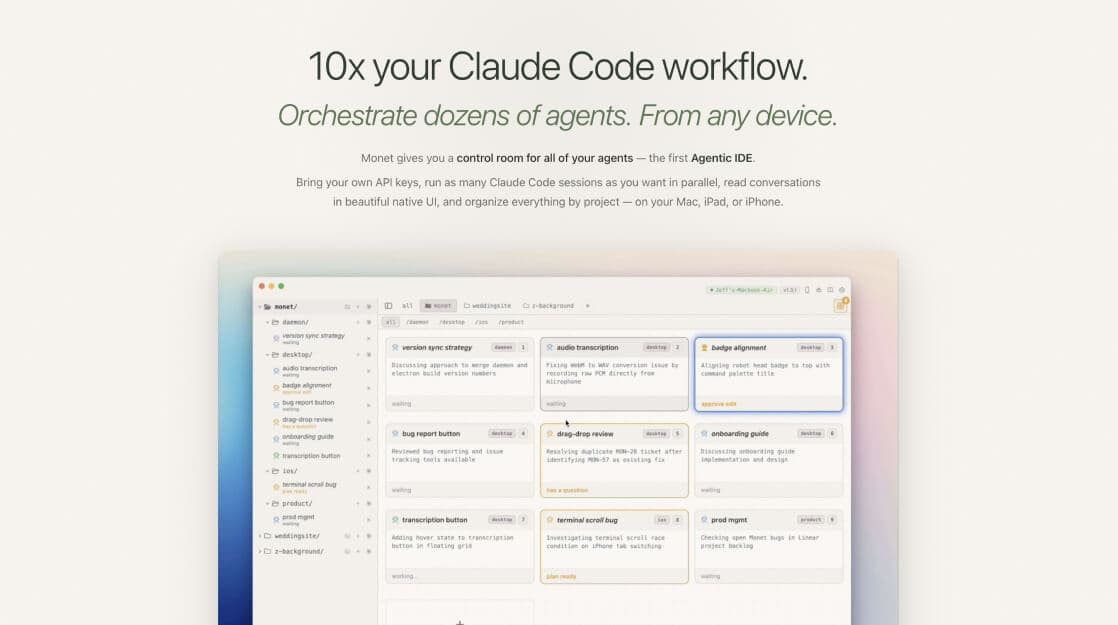
What It Does — A Grid-Based Control Room for Agents
Monet is a native macOS application that solves a growing problem for power users of Claude Code: session sprawl. As Claude Code agents become more capable and autonomous, developers often launch multiple sessions to work on different tasks in parallel—like having one agent refactor authentication while another writes tests. Monet provides a centralized "control room" to manage this fleet.
It runs a lightweight daemon on your Mac that manages real claude code processes. This means each agent has direct access to your local filesystem and tools. The core interface is a resizable grid where each card represents a live Claude Code session. Cards display a live, AI-generated summary of the agent's current activity and change color to indicate status: green for working, orange for needing help, and blue for ready for a new task.
Setup — Local, Private, and Bring-Your-Own-Keys
Installation is straightforward: download the Monet app. It uses SQLite and runs entirely on your machine. Your API keys for Claude and for the optional summarization LLM never leave your computer; the app only phones home to check for updates and validate its license key. The free tier allows up to 3 concurrent agents, with unlimited sessions available via a one-time license purchase (not a subscription).
For remote access on an iPad or iPhone, you need to set up a Tailscale VPN to connect to your Mac's network, as all session data stays local.
When To Use It — For Parallel Development and Asynchronous Work
Monet shines in specific, high-leverage workflows for Claude Code users:
- Parallel Feature Development: Launch separate agents to simultaneously tackle different parts of a project, like backend API changes, frontend components, and test writing.
- Asynchronous Bug Fixing: Queue up multiple bug tickets, assign an agent to each, and monitor their progress from a single dashboard. Get push notifications to your phone when an agent is stuck or completes a task.
- Project Context Switching: Use Monet's tab system to organize agents by project. Instead of hunting through dozens of terminal windows, see all active work for a given project at a glance.
- Mobile Supervision: Review agent activity, approve tool use, and check diffs from your iPhone, turning downtime into productive oversight time.
The creator, who is also its primary power user, calls it a "game changer" for moving from a hands-on coding mindset to a system architecture and product management role, as it handles the orchestration overhead.