The Technique — Layered Configuration
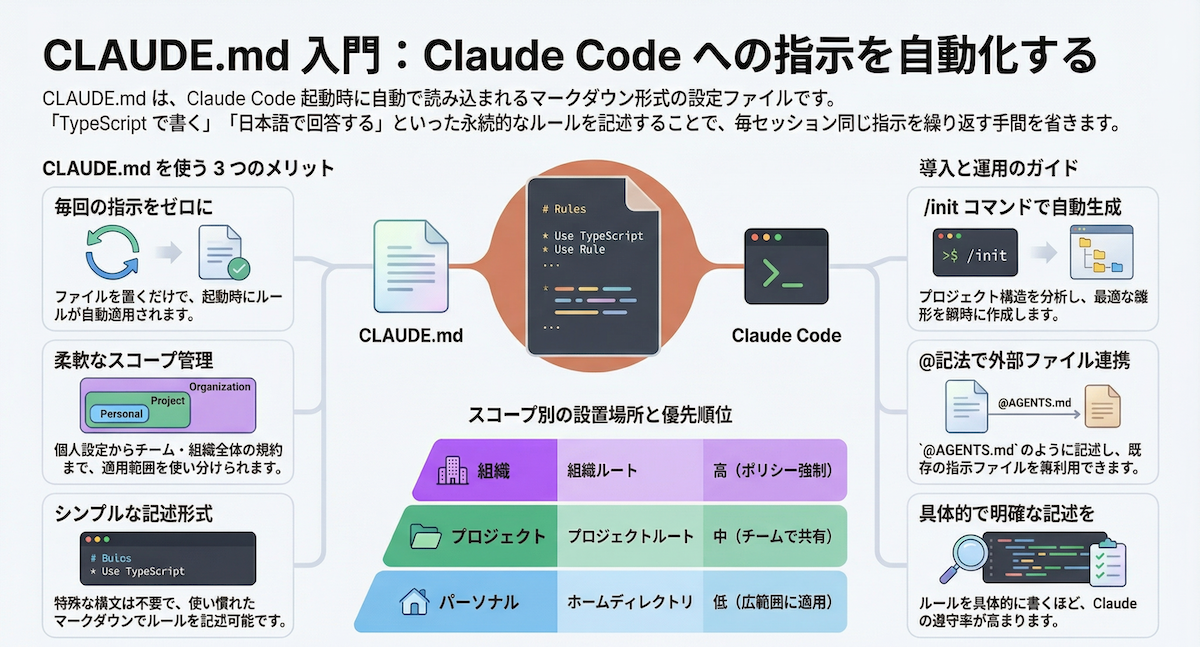
The most effective Claude Code users don't use a single, bloated CLAUDE.md. They use a layered system: a minimal global file, project-specific instructions, and file-type rules that only load when needed. This structure, detailed in the source from a daily user, prevents token waste and ensures the right context is active for the right task.
Why It Works — Token Efficiency & Precision
Every line in your global CLAUDE.md is loaded into every single interaction, consuming precious context tokens. The source's key insight: your global file should only contain universal preferences and nudges to correct agent behaviors. General principles like YAGNI or KISS are already in the system prompt—adding them is redundant. The real power comes from splitting context into layers that load on-demand, keeping the active context window lean and relevant.
How To Apply It — The Three Layers
1. The Global ~/.claude/CLAUDE.md
Keep this file minimal. Before adding anything, ask Claude: "Is this already covered in your system prompt?" The source recommends it should primarily contain high-level directives. Here's a critical snippet from their config:

<prefer_online_sources>
Use the find-docs skill or WebSearch to verify before relying on pre-trained knowledge. Look things up when:
- Writing code that uses libraries, APIs, or CLI tools
- Configuring tools, services, or environment variables
- Checking if a stdlib replacement exists for a third-party package
- Pinning dependency versions — always check the latest
</prefer_online_sources>

<auto_commit if="you have completed the user's requested change">
Use the commit skill to commit. Don't batch unrelated changes into one commit.
</auto_commit>
2. The Project ./CLAUDE.md
This is for project-specific instructions. The source emphasizes that the highest-signal content is the 'Gotchas' section. Build this from the failure points Claude actually encounters in your project. For example:
- Database connection strings must use the local tunnel URL.
- The
buildscript requiresNODE_ENV=production. - API calls need the staging header
X-Env: test.
3. Per-File Type Rules in ~/.claude/rules/
This is the most powerful optimization. Place language-specific rules in ~/.claude/rules/ (e.g., python.md, javascript.md). Claude Code only loads these rules when editing files matching the path pattern. Here's the source's example for ~/.claude/rules/python.md:
---
paths:
- "**/*.py"
---
# Python
- Before adding a dependency, search PyPI or the web for the latest version
- Pin exact dependency versions in pyproject.toml — no >=, ~=, or ^ specifiers
- Target Python >=3.13 by default
- Use uv for project and environment management
- Use ruff for linting and formatting
- Use pytest for testing
- Use pathlib.Path over os.path
Putting It All Together
Your configuration should work like this:
- Global Layer (
~/.claude/CLAUDE.md): 5-10 lines of universal behavior nudges. - Project Layer (
./CLAUDE.md): A concise list of project-specific gotchas and requirements. - Rule Layer (
~/.claude/rules/): A directory of markdown files with tech stack specifics that activate automatically.
This structure ensures Claude has the precise context it needs without drowning in irrelevant instructions, making it faster and more accurate for every task.