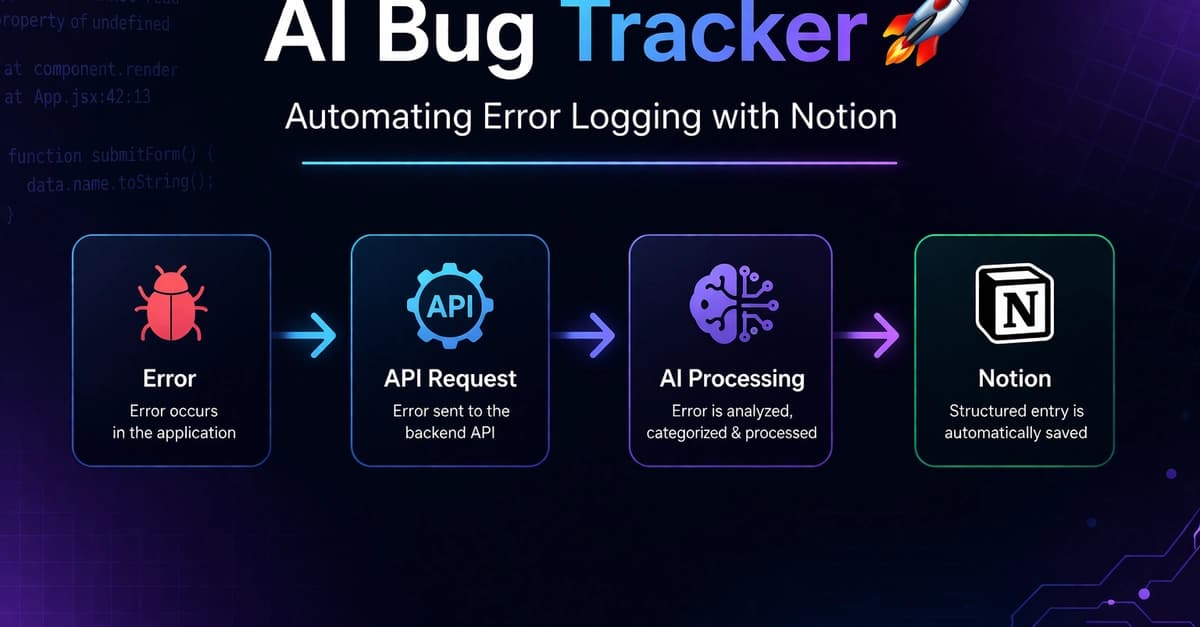
What It Does
This AI Bug Tracker is a custom MCP server that processes error messages sent via API, categorizes them (Frontend, Backend, Database, or API), generates suggested fixes, and automatically logs them to a structured Notion database. Instead of manually copying errors from your terminal to a tracking system, you can pipe errors directly to this server and get them organized with context and potential solutions.
Setup
First, clone the repository and install dependencies:
git clone https://github.com/Nani-Hatake/ai-bug-tracker
cd ai-bug-tracker
npm install
You'll need a Notion integration token and database ID. Create a Notion integration at notion.so/my-integrations, then create a database with these properties:
Error Message(Title)Category(Select: Frontend, Backend, Database, API)Suggested Fix(Text)Status(Select: Open, In Progress, Fixed)
Copy your .env.example to .env and fill in your credentials:
NOTION_API_KEY=your_integration_token_here
NOTION_DATABASE_ID=your_database_id_here
PORT=3000
Start the server:
npm start
How To Use It With Claude Code
You have two main integration options:

Option 1: Direct API calls from your code
Add this to your error handling logic:
// In your error catcher
fetch('http://localhost:3000/log-error', {
  method: 'POST',
  headers: { 'Content-Type': 'application/json' },
  body: JSON.stringify({
    error: error.message,
    stackTrace: error.stack,
    timestamp: new Date().toISOString()
  })
});
Option 2: Pipe terminal output
When running tests or scripts, pipe errors directly:
# Pipe npm test errors to the tracker
npm test 2>&1 | curl -X POST http://localhost:3000/log-error \
  -H "Content-Type: application/json" \
  -d "{\"error\": \"$(cat)\"}"
Option 3: Create a custom MCP tool for Claude Code
Modify the server to expose an MCP-compatible endpoint, then add it to your Claude Code configuration:
// In your Claude Code MCP config
{
  "mcpServers": {
    "notion-bug-tracker": {
      "command": "node",
      "args": ["/path/to/ai-bug-tracker/server.js"],
      "env": {
        "NOTION_API_KEY": "your_key",
        "NOTION_DATABASE_ID": "your_db_id"
      }
    }
  }
}
Once configured, you can ask Claude Code: "Log this TypeScript compilation error to the bug tracker" and it will use the MCP tool to create the entry.
When To Use It
This shines in three specific scenarios:
- During test suite runs - Automatically capture failing test errors without context switching
- In CI/CD pipelines - Log deployment or build errors directly to a shared Notion board
- When debugging with Claude Code - When Claude identifies an error during code review, it can immediately log it with its analysis
Limitations & Considerations
The current implementation uses basic pattern matching for categorization. As the developer notes, future improvements could integrate a real LLM for smarter analysis. Also note that this runs as a separate server process—you'll need to keep it running alongside your development environment.
For teams already using Notion for project management, this provides a lightweight alternative to full-featured bug trackers like Jira. The structured data format makes it easy to create views, filters, and dashboards directly in Notion.