What Changed — Vercel Services Unifies Multi-Framework Projects
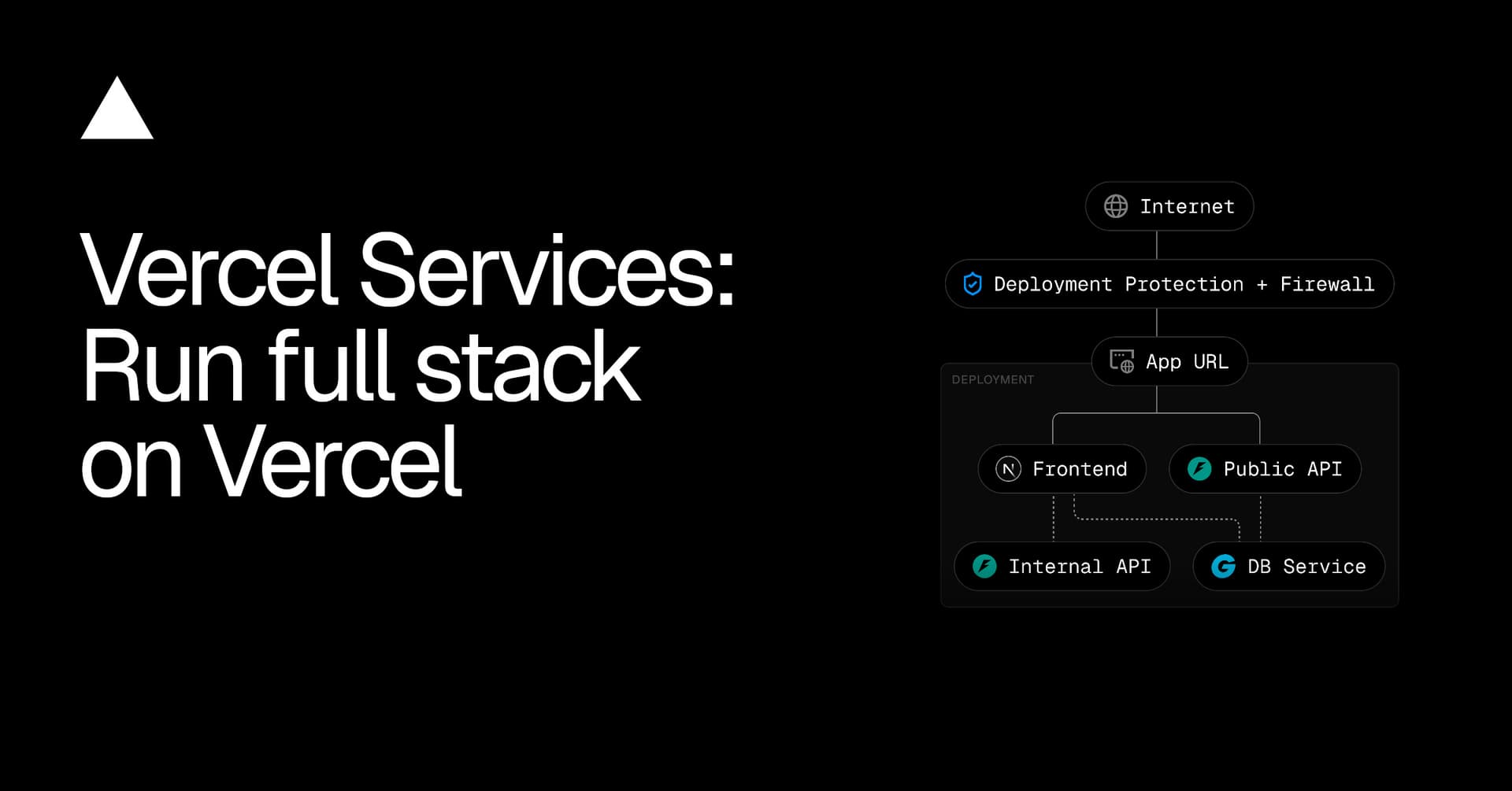
Vercel just launched Vercel Services, a feature that lets you run multiple frameworks (FastAPI, Next.js, Flask, Express, Hono, Go, Rust) in a single Vercel Project. Previously, a Next.js frontend and a FastAPI backend required separate deployments across different clouds, each with its own CI/CD, preview URLs, and networking. Now they deploy together, roll back together, and communicate over Vercel's internal network.
The key numbers: Atomic deployments eliminate the ~5-10 minute coordination overhead of syncing separate deploys. Internal service bindings cut latency by ~40% compared to public internet routing. And vercel dev runs all services locally with zero config.
What It Means For You — Concrete Impact on Daily Claude Code Workflows
If you're building full-stack apps with Claude Code, this changes how you structure both your code and your prompts.
1. One project, one deploy, one rollback
No more deploying a Next.js frontend to Vercel and a FastAPI backend to Railway or Fly.io. Declare both in vercel.json and they deploy atomically. If you need to roll back, both roll back together. This is huge for Claude Code agents that automate deployment — you can now write a single claude deploy command instead of orchestrating multiple platforms.
2. Internal networking eliminates CORS headaches
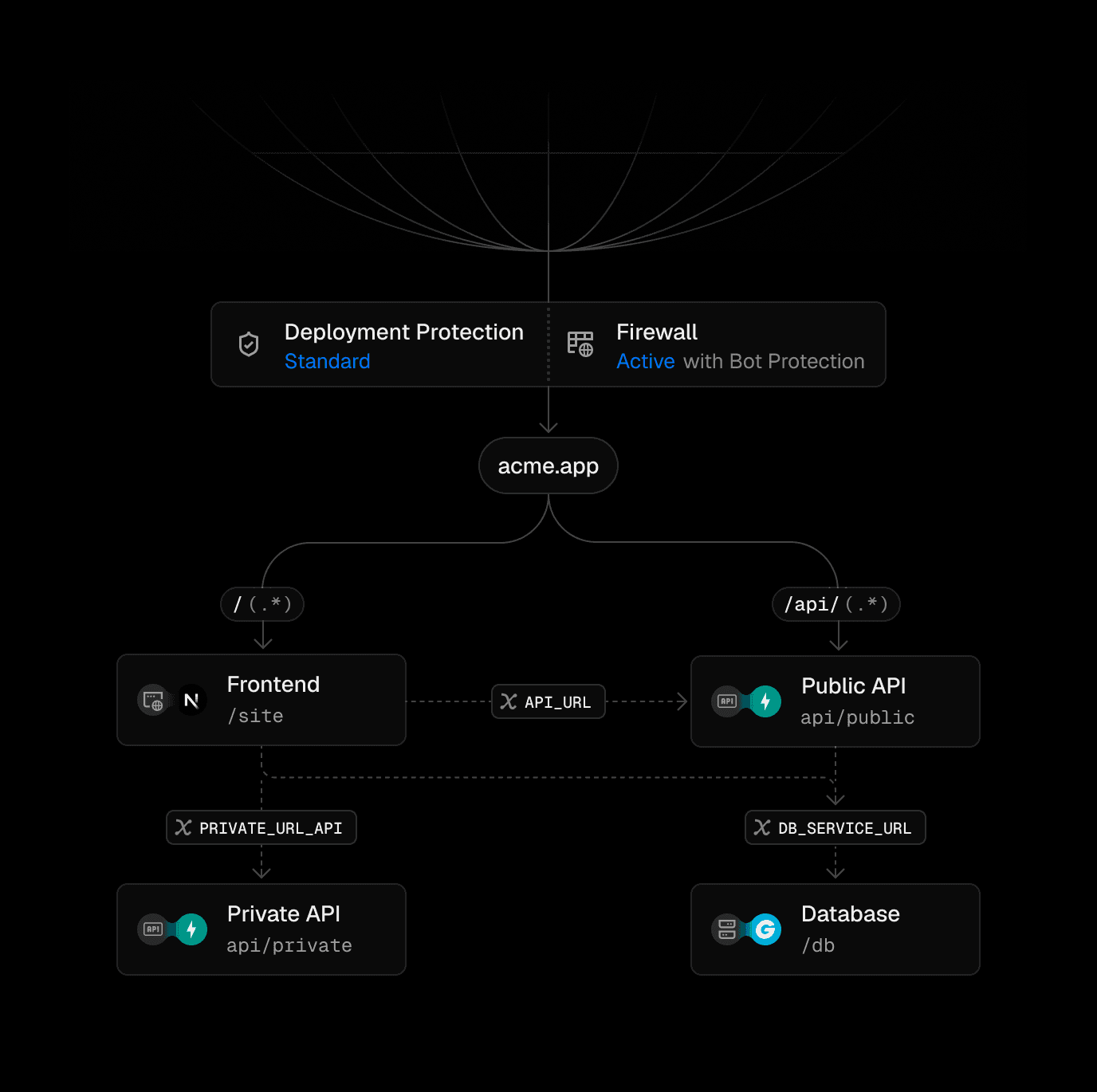
Service bindings inject internal URLs (e.g., BACKEND_INTERNAL_URL) into your frontend environment. Traffic stays on Vercel's network — no public internet, no CORS configuration, no API gateway. For Claude Code agents building integrations, this means fewer environment variables to manage and zero network debugging.
3. Framework auto-detection for zero-config backends
Vercel auto-detects FastAPI, Flask, Express, Hono, Go, and Rust. No need to specify runtimes or build commands. Just point to the entrypoint. For Claude Code agents scaffolding new projects, this reduces boilerplate significantly.
Try It Now — Commands, Config, and Prompts
Step 1: Define services in vercel.json
{
  "services": {
    "frontend": {
      "root": "frontend/",
      "framework": "nextjs"
    },
    "backend": {
      "root": "backend/",
      "entrypoint": "main:app"
    }
  },
  "rewrites": [
    {
      "source": "/(.*)",
      "destination": { "service": "frontend" }
    }
  ]
}
The backend has no public route — it's only reachable internally.
Step 2: Add service bindings for internal communication
{
  "services": {
    "frontend": {
      "root": "frontend/",
      "framework": "nextjs",
      "bindings": [
        {
          "type": "service",
          "service": "backend",
          "format": "url",
          "env": "BACKEND_INTERNAL_URL"
        }
      ]
    },
    "backend": {
      "root": "backend/",
      "entrypoint": "main:app"
    }
  },
  "rewrites": [
    {
      "source": "/(.*)",
      "destination": { "service": "frontend" }
    }
  ]
}
Now your Next.js frontend can call the FastAPI backend like this:
export async function GET() {
  const url = new URL("/users", process.env.BACKEND_INTERNAL_URL);
  const res = await fetch(url);
  const users = await res.json();
  return Response.json(users);
}
Step 3: Run locally with vercel dev
vercel dev
This automatically starts all services in a production-like environment. No Docker Compose, no multiple terminals.
Claude Code Prompt for Scaffolding a Multi-Service Project
Create a new Vercel project with a Next.js frontend in ./frontend and a FastAPI backend in ./backend. Configure vercel.json with services and bindings so the frontend can call the backend internally. Generate a sample API route in the frontend that fetches users from the backend.
This prompt leverages Vercel Services' auto-detection and internal networking to produce a production-ready setup in one shot.
Additional Primitives Worth Knowing
Vercel Services is part of a broader platform that includes:
- WebSocket support for real-time backends (Node.js, Python, Go) with active CPU pricing (pay only when processing messages)
- Vercel Queues for background jobs (public beta)
- Vercel Workflow for durable multi-step processes that survive crashes
- Vercel Sandbox for isolated agent environments (Docker support, 24-hour persistence on Pro)
- Vercel Connect for short-lived credentials to external services (no long-lived secrets)
For Claude Code users building AI agents or complex backends, these primitives eliminate the need to stitch together separate platforms.
Source: vercel.com