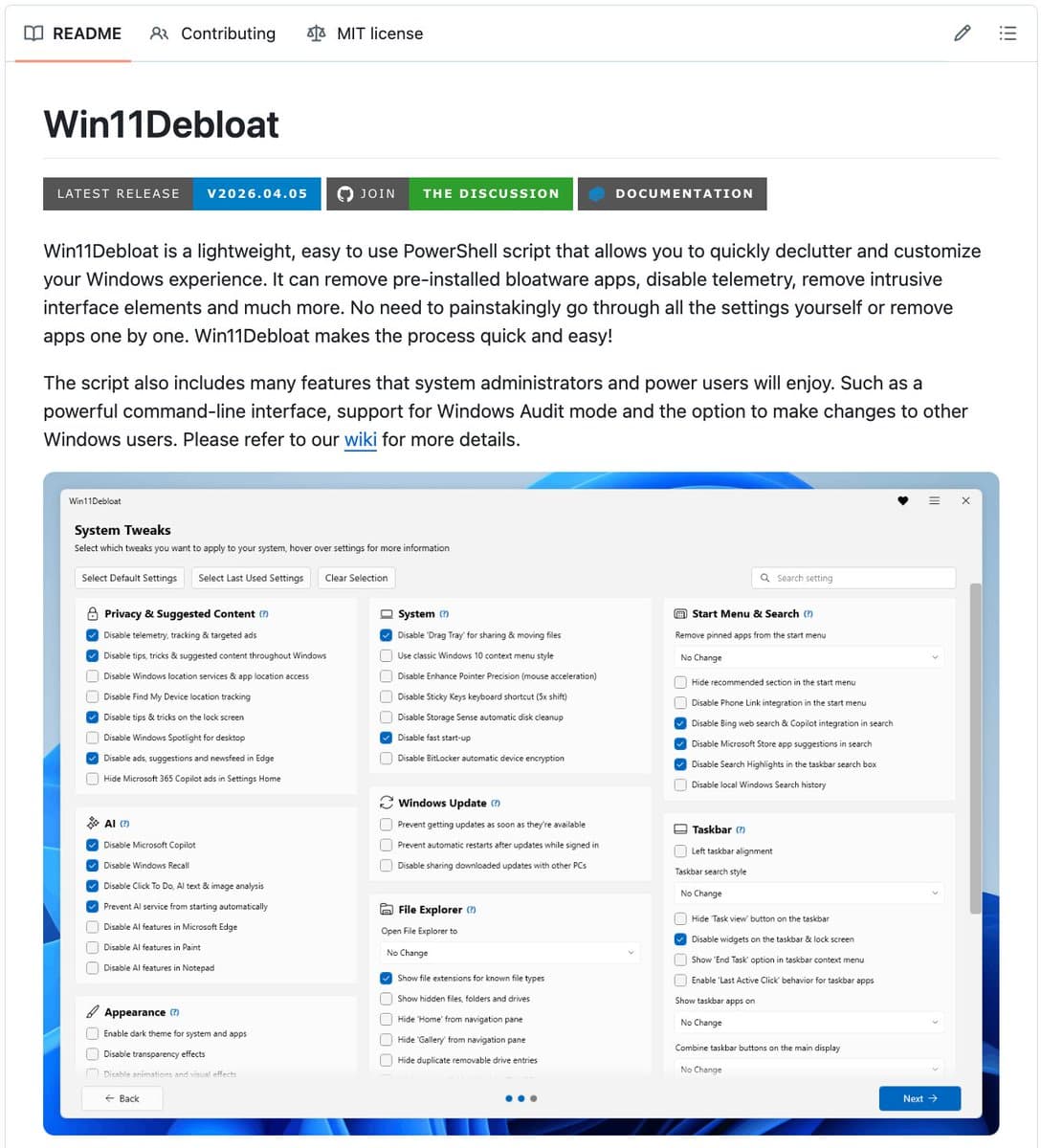
A lightweight, open-source PowerShell script named Win11Debloat is gaining significant traction among users seeking to reclaim control of their Windows installations. With over 43,800 stars on GitHub and an MIT license, the tool systematically removes or disables a suite of Microsoft's integrated services, with a notable focus on newly added AI features and pervasive telemetry.
The script represents a direct, user-driven countermeasure to what many perceive as an overreach of Microsoft's software-as-a-service model into the desktop OS, where unremovable apps, ads, and data collection have become default.
Key Takeaways
- The Win11Debloat script removes Microsoft Copilot, disables the Recall screenshot AI, and strips telemetry and ads from Windows.
- It highlights user pushback against Microsoft's aggressive AI and data collection integration.
What the Script Removes

The script's actions are comprehensive, targeting several categories of what the developer terms "bloat":
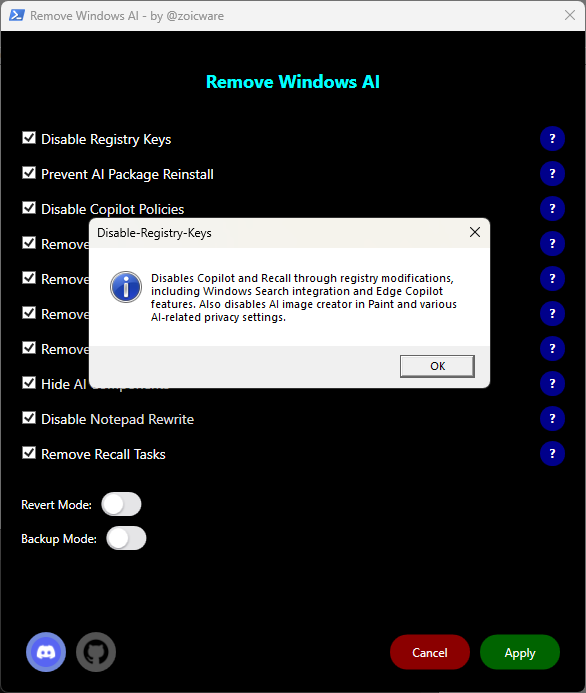
- AI Features: It disables and removes Microsoft Copilot and disables Windows Recall, the controversial AI feature that takes periodic screenshots for local search.
- Bloatware Apps: Pre-installed applications like Candy Crush, TikTok, Instagram, Clipchamp, and Teams are removed.
- Ads & Suggestions: Ads, tips, and suggestions are stripped from the Start Menu, Settings app, notifications, and lock screen.
- Search Hijacking: The Bing integration that overrides local file search in the Windows search bar is removed, reverting it to a local computer search.
- Telemetry: Diagnostic data collection, activity history, app-launch tracking, and settings for targeted ads are disabled.
- Edge Clutter: Ads, suggestions, and the MSN news feed within the Microsoft Edge browser are disabled.
Critically, the developer states the script is designed to leave user files, personal settings, and core OS functionality intact. Execution is a single PowerShell command.
The Technical Mechanism
Win11Debloat operates by leveraging PowerShell's deep system management capabilities to:
- Uninstall Provisioned Apps: It uses
Remove-AppxPackageandRemove-AppxProvisionedPackagecommands to strip out the pre-installed Modern (UWP) and Win32 apps that come bundled with Windows. - Modify Registry Settings: The script alters Windows Registry keys to disable services, turn off telemetry IDs, and shut down advertising IDs and tailored experiences.
- Apply Group Policy-Like Settings: For features like Recall and Copilot, it uses registry tweaks that mimic Group Policy settings, effectively hiding or disabling the features at a system level.
- Configure Privacy Settings: It automates the toggling of dozens of privacy settings scattered across Windows Settings that most users never fully configure.
The project is maintained on GitHub, allowing for public code review, community issues, and contributions. Its MIT license permits free use, modification, and distribution.
Why This Matters for the AI Ecosystem
This tool's popularity is a tangible metric of user sentiment. The specific targeting of Copilot and Recall is particularly telling. It indicates a segment of technically proficient users are not just indifferent to Microsoft's flagship AI integrations but are actively seeking to remove them. This pushback is not about the AI capability per se, but its implementation as a non-removable, data-collecting service deeply embedded in the OS.
The script also highlights a growing tension in software: the conflict between a platform owner's desire to monetize and gather data through integrated services and the end-user's desire for a clean, performant, and private computing environment. As AI becomes a primary vector for this integration, tools like Win11Debloat are likely to proliferate.
gentic.news Analysis
This development is a direct user-level response to the strategic shift we've tracked at Microsoft since the broad integration of OpenAI's models across its ecosystem. Our coverage of Microsoft's 2024 Build conference detailed the company's "Copilot-first" vision, embedding AI into Windows at the kernel level. Win11Debloat is a grassroots technical rebuttal to that top-down vision.
It aligns with a broader trend of user resistance to opaque AI data practices. Recall's initial announcement was met with significant security and privacy criticism, forcing Microsoft to make it an opt-in feature. This script takes that a step further, making it a removable feature. The script's focus on telemetry and ads also connects to the ongoing regulatory scrutiny in the EU and US over data collection by major platforms, suggesting user tools will emerge where regulatory action is slow.
For AI practitioners and enterprise IT, Win11Debloat is a case study. It demonstrates that even deeply integrated AI services can face technical bypass if they violate user trust or preference. For companies building AI into core products, it underscores that deployment must balance innovation with user control and clear value propositions. Forcing adoption through OS integration may drive engagement metrics in the short term but can also galvanize a sophisticated minority to find ways to rip it out, potentially creating support and security complexities.
Frequently Asked Questions
Is Win11Debloat safe to use?
As an open-source script with 43,000+ GitHub stars, its code is publicly auditable. It uses standard PowerShell commands for app removal and registry edits. However, as with any system-level tool, there is inherent risk. It could potentially break future OS updates or specific features that rely on removed components. Users should create a system restore point before running it.
Will running this script improve my computer's performance?
It may lead to modest performance improvements by freeing up RAM and CPU cycles from background telemetry services and unused pre-installed apps. The primary benefits for most users are reduced clutter, increased privacy, and the removal of unwanted ads and AI features.
Can Microsoft detect or block this script?
Microsoft could theoretically update Windows Defender or the OS itself to flag or reverse these changes, especially if they are deemed a security risk or a violation of terms. However, targeting a widely used, open-source tool that simply configures privacy settings and removes optional packages would be a significant and controversial step.
Does this work on Windows 10 and enterprise versions?
The script is confirmed to work on both Windows 10 and 11. For enterprise versions (Windows 10/11 Pro, Enterprise), many of these settings can and should be managed centrally via Group Policy or Intune for organizational consistency. This tool is primarily geared towards individual users or administrators seeking a quick, scripted deployment for a clean baseline image.