The Technique — From Cursor to a Customized Claude Code Agent
The author, a daily Snowflake data practitioner, switched from Cursor to Claude Code (referred to as Cortex Code CLI/CoCo CLI in the source) for one reason: native integration with his data stack. But the real productivity leap came from moving beyond basic usage. By implementing 7 custom skills, 5 custom subagents, and quality-check hooks with Slack notifications, they transformed Claude Code from a reactive tool into a proactive, autonomous agent tailored to their specific workflows.
This isn't about installation. It's about the four extensibility features and AGENTS.md that most users underutilize.
Why It Works — Separating Capabilities from Guidelines
The source clarifies a critical distinction often missed:
- AGENTS.md defines behavioral guidelines (project rules, coding standards, don'ts). It's an instruction loaded at session start.
- Skills, SubAgents, Hooks, and MCP are extensibility features that add new capabilities.
This separation is powerful. AGENTS.md tells the agent how to behave within your project context ("use Black formatter," "write SQL in uppercase"). Skills inject what it can do ("here's the exact workflow for creating a monthly sales report"). Hooks enforce rules by intercepting lifecycle events. This architecture mirrors best practices in software design: separate configuration, business logic, and enforcement.
How To Apply It — Actionable Customization Steps
1. Master AGENTS.md Structure

Don't just list rules. Use this proven structure in your project root's AGENTS.md:
# Project Overview
(Brief purpose and architecture)

# Directory Structure
(Key directories and file roles)

# Tech Stack
(Languages, frameworks, tools)

# Coding Standards (Do)
(Style guide, naming conventions, comment policy)

# Don'ts
(Secrets handling, destructive SQL prohibition, direct production access ban)

# Testing & Quality
(Test commands, lint commands, CI/CD notes)

# Custom Skills & SubAgents Guide
(Names and purposes of custom skills/subagents used in the project)
Critical Tip: The source warns that AGENTS.md is an instruction, not a guarantee. For high compliance, keep it concise. To enforce critical rules (like "don't run DROP TABLE"), you must use Hooks.
2. Build Skills for Repetitive Workflows
Skills are Markdown files with YAML frontmatter. Place them in .cortex/skills/. They define domain expertise and are injected when relevant.
Create a skill for a common task, like setting up a demo environment:
---
name: setup-demo-env
description: Step-by-step procedure to spin up a clean Snowflake demo environment.
tags: [snowflake, demo, setup]
---

## Demo Environment Setup Procedure
1. **Create Demo DB**: `CREATE DATABASE DEMO_DB CLONE FROM PROD_SNAPSHOT;`
2. **Set Warehouse**: `USE WAREHOUSE DEMO_WH;`
3. **Create User Roles**: `CREATE ROLE DEMO_USER;`
4. ...

Invoke it explicitly in your prompt: $setup-demo-env Create a demo for the Q4 dataset. Or, the agent will auto-activate it if your question matches the description.
3. Delegate with SubAgents
SubAgents are specialized agents for specific task types. Define a sql-specialist subagent in .cortex/subagents/:
---
name: sql-specialist
description: An agent specialized in writing, optimizing, and debugging complex Snowflake SQL.
instructions: |
  You are a senior Snowflake DBA. Always write SQL in uppercase.
  Use full table paths: `DB.SCHEMA.TABLE`. Explain query performance implications.
---
Delegate a task: @sql-specialist Optimize this slow-moving window function.
4. Enforce Rules with Hooks
Hooks intercept agent lifecycle events (PreToolUse, PostExecution) via shell scripts. This is where you move from guidance to enforcement.
Create a safety hook in .cortex/hooks/pre_tool_use.json:
{
  "script": ".cortex/hooks/block_destructive_sql.sh",
  "description": "Block potentially destructive SQL operations."
}
The accompanying shell script (block_destructive_sql.sh) can parse the agent's intended tool call and exit with an error if it detects DROP TABLE or TRUNCATE, preventing execution.
5. Connect External Tools with MCP
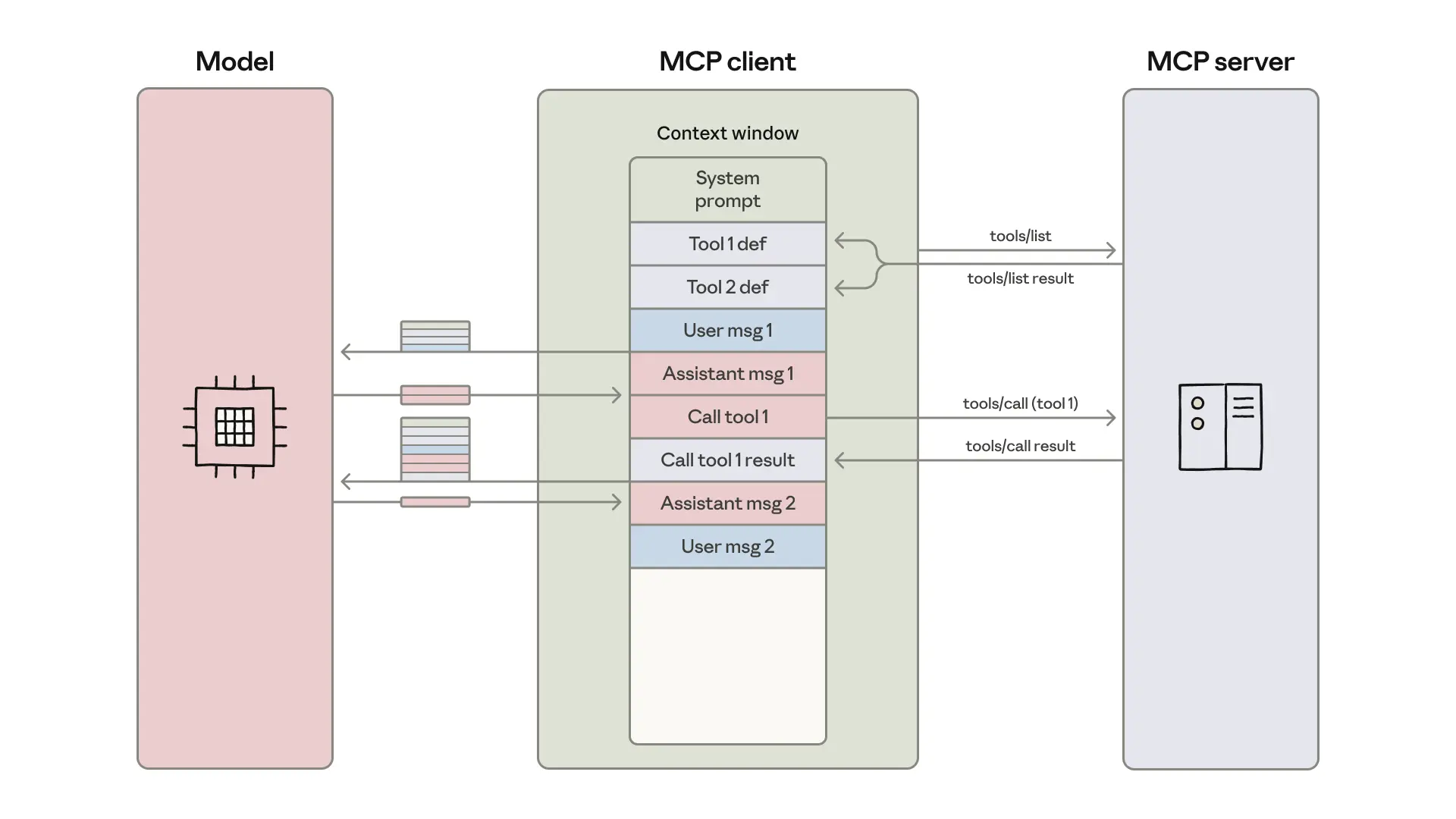
Use the Model Context Protocol to integrate Claude Code with external services. The source mentions using MCP for broader tool integration, moving beyond Snowflake's native connections. Follow Anthropic's MCP documentation to connect to internal APIs, task managers, or monitoring tools.
The Result: A Tailored Autonomous Agent
By combining these features, the author didn't just get better code suggestions. They built an agent that:
- Knows their project conventions inside out (AGENTS.md).
- Executes complex, multi-step business workflows on command (Skills).
- Delegates specialized tasks to the right expert (SubAgents).
- Cannot violate critical safety rules (Hooks).
- Pulls data from and writes notifications to their entire toolchain (MCP).

This is the evolution from using Claude Code to programming Claude Code. The agent becomes a bespoke member of the team.