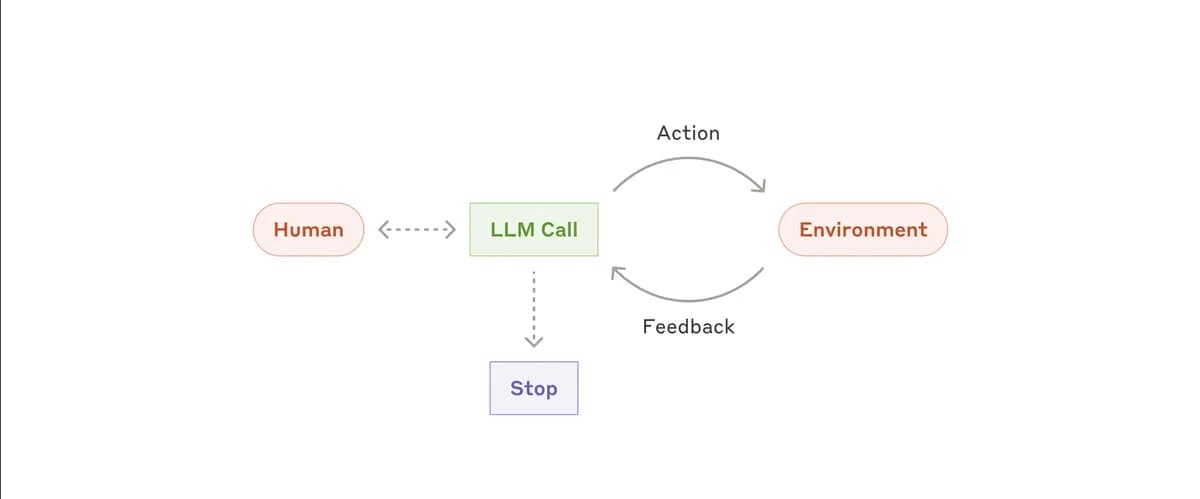
The Technique — Understanding the Agent Loop
Every AI coding agent, including Claude Code, operates on the same fundamental pattern: a continuous loop of calling the model, executing tools, and feeding results back. The source material reveals this as the "Core Pattern" that production systems build upon with policy, permissions, and lifecycle layers.
The minimal implementation looks like this:
while True:
    response = client.messages.create(messages=messages, tools=tools)
    if response.stop_reason != "tool_use":
        break
    for tool_call in response.content:
        result = execute_tool(tool_call.name, tool_call.input)
        messages.append(result)
This loop is the engine behind Claude Code's ability to write, test, and debug code iteratively. When you watch the messages array grow during execution, you're seeing this pattern in action.
Why It Works — The Psychology of Effective LLM Interaction
The source emphasizes that "using LLMs effectively is a skill we all need in 2026." This isn't just about better models—it's about understanding how to structure interactions. The agent loop works because:
- Tool execution breaks complex tasks into manageable steps - Instead of asking for an entire feature at once, the model works through discrete operations
- Feedback creates context awareness - Each tool result provides new information that informs subsequent decisions
- The loop prevents drift - Without this structure, agents tend to wander off-task or get stuck in unproductive patterns
The source specifically notes: "An agent without a plan drifts; list the steps first, then execute." This is why Claude Code often asks clarifying questions or proposes a plan before diving into code.
How To Apply It — Better Prompts Through Loop Thinking
You don't need to build your own agent to benefit from this understanding. Apply the loop mentality to your Claude Code prompts:
1. Structure Complex Tasks as Sequences
Instead of:
"Build a user authentication system"
Try:
"Let's build a user authentication system. First, outline the steps we need. Then we'll implement each step, testing as we go."
2. Use CLAUDE.md to Define Your "Tools"
Your CLAUDE.md file acts as a tool registry. Be explicit about what operations Claude Code should perform:
## Available Operations
- File operations: create, read, update, delete
- Testing: run unit tests, integration tests
- Dependency management: install packages, update requirements
- Code analysis: lint, format, type check
3. Embrace the "TodoWrite" Pattern
Before executing, have Claude Code list the steps. This mimics the agent's planning phase:
"Before writing any code, please list the specific files and functions we need to create or modify, in order."
4. Manage Context Like a Pro
As the source notes: "Context will fill up; three-layer compression strategy enables infinite sessions." In practice:
- Use
/compactwhen sessions get long - Reference previous work by filename rather than pasting entire files
- Ask Claude Code to summarize what it's done so far before continuing
5. Apply Subagent Thinking for Complex Problems
When working on multiple features simultaneously, treat each as a separate "subagent" with its own context:
"Let's pause the authentication system and switch to the payment processing module. Here are the relevant files..."
The Learning Path Forward
The source describes "12 progressive sessions, from a simple loop to isolated autonomous execution." You can create your own learning path with Claude Code:
- Start with simple file operations
- Add testing tools
- Implement multi-file refactoring
- Work with external APIs
- Handle database migrations
Each session builds on the previous, just like the agent adds tools to its dispatch map while keeping the core loop unchanged.
Remember: Claude Code isn't magic—it's this loop pattern, executed well. Understanding the mechanism makes you a better partner in the development process.