What Changed — The MCP Gateway Architecture
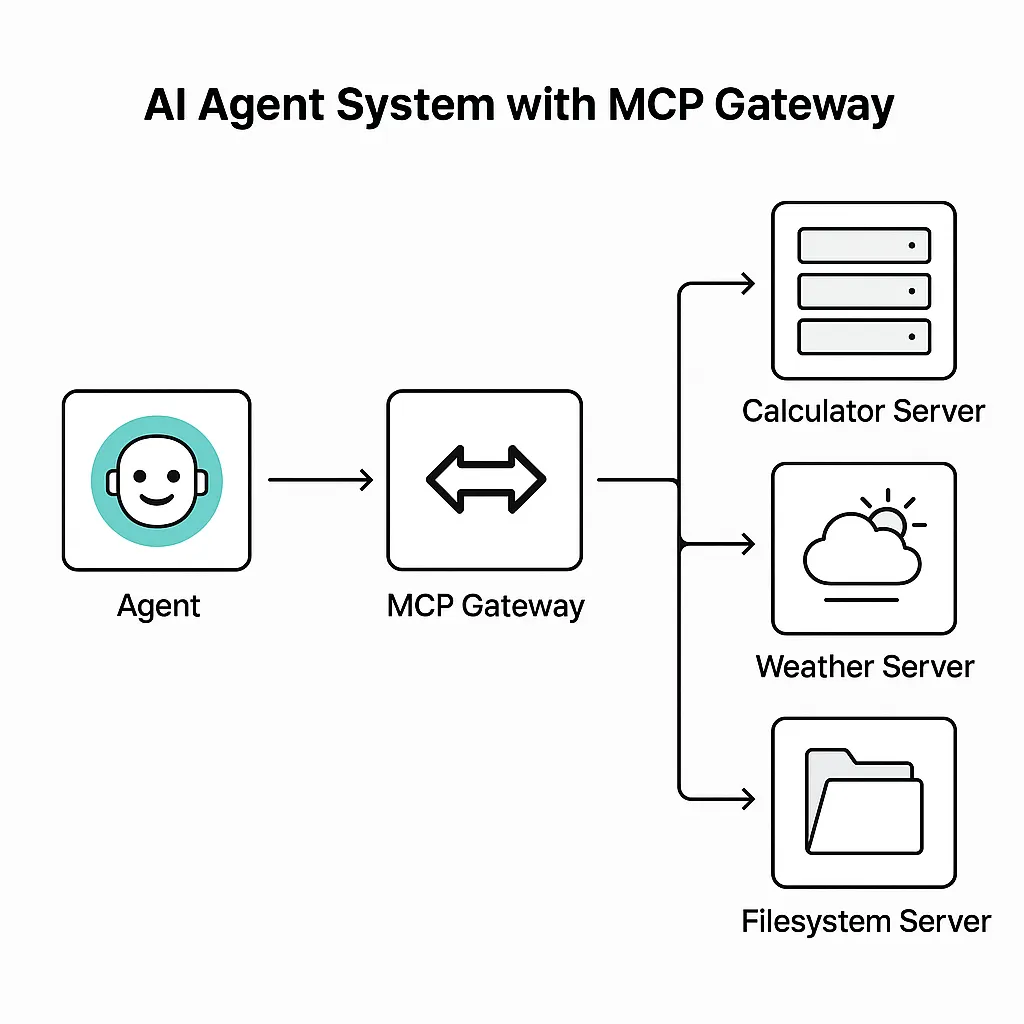
As Claude Code agents become more capable, they're making more calls to external tools—databases, APIs, file systems. Without a central governance layer, each tool connection is a security and cost risk. The Model Context Protocol (MCP) standardizes these interactions, but it doesn't inherently enforce policies.
Enter the MCP gateway: an AI gateway that sits between Claude Code and your MCP servers. It provides a unified control plane for governing both LLM requests and tool calls. Open-source examples like Bifrost implement this architecture.
What It Means For You — Concrete Impact on Daily Claude Code Usage
Without a gateway, your Claude Code setup likely looks like point-to-point connections: Claude Code talks directly to each MCP server (database, API, file system). This creates:
- Security blind spots: No central authentication or access control
- No audit trail: Hard to trace which agent did what
- Inconsistent rate limiting: Each server manages its own budgets
- Tool sprawl: Managing credentials for 10+ MCP servers becomes unmanageable
With an MCP gateway, you funnel all traffic through a single endpoint. Claude Code connects to the gateway, which then routes to the correct MCP server. The gateway enforces policies at every step.
Try It Now — How to Set Up an MCP Gateway for Claude Code
1. Deploy a Gateway (e.g., Bifrost)
Bifrost is an open-source AI gateway with native MCP support. You can run it locally or deploy it to your infrastructure.
git clone https://github.com/maximhq/bifrost.git
cd bifrost
docker-compose up
2. Configure Your MCP Servers
In your gateway config, register each MCP server with its credentials and permissions:
# bifrost-config.yaml
mcp_servers:
  - name: postgres-db
    url: "mcp://db.internal:8080"
    auth: "db-key-123"
    allowed_tools: ["query", "schema_list"]
  - name: slack-api
    url: "mcp://slack.internal:8080"
    auth: "slack-token-xyz"
    allowed_tools: ["send_message", "list_channels"]
3. Create Virtual Keys for Claude Code
Generate virtual keys that map to specific policies. Each key controls which MCP servers and tools that Claude Code instance can access.
# Create a read-only key for the DB
bifrost create-key --name "claude-readonly" --policy "db:readonly" --tool "postgres-db:query"
4. Point Claude Code to the Gateway
In your CLAUDE.md or project config, set the MCP endpoint to the gateway:
# CLAUDE.md
[claude.code.mcp]
endpoint = "http://localhost:8080/v1/mcp"
auth_key = "claude-readonly-key-abc"
Now Claude Code only discovers and can use tools you've explicitly allowed. All calls are logged, rate-limited, and budget-tracked.
How Governance Is Enforced
The gateway applies policies at two critical moments:
- Tool Discovery: When Claude Code connects, the gateway returns only the tools permitted by the virtual key. Unauthorized tools are invisible.
- Tool Execution: Every tool call is validated against policy before execution. The gateway can block parameter misuse (e.g., preventing
DROP TABLEon a read-only DB tool).
This gives you defense in depth: Claude Code can't even see tools it shouldn't use, and even if it tried, the gateway would block unauthorized actions.
When To Use This
- Production deployments: When Claude Code agents access sensitive databases or APIs
- Multi-team environments: Different teams need different tool access levels
- Cost-sensitive projects: Centralized budget controls prevent runaway costs from complex agent tasks
- Compliance requirements: Complete audit trail of every tool call for SOC 2, HIPAA, etc.
Bottom Line
An MCP gateway turns Claude Code's tool access from a security liability into a managed, auditable, and cost-controlled system. Deploy one before your agents scale.
Source: dev.to
[Updated 31 Jul via devto_mcp]
A new open-source project, PolicyAware, targets the same MCP governance gap with a zero-trust, deny-by-default control plane. Unlike Bifrost's policy enforcement at the gateway, PolicyAware inspects tool arguments at the protocol level, distinguishing SELECT from DELETE or ls from rm. It runs as a standalone proxy between MCP tools and services, with policy-as-code rules in version-controlled YAML. The project claims to block hidden prompt injection attacks that produce innocuous text but issue destructive tool calls, a scenario traditional prompt firewalls miss. Install via pip install policyaware and launch with policyaware up --config policy.yaml --port 8080. [per dev.to]