Why Your Claude Code Needs a CLAUDE.md Right Now
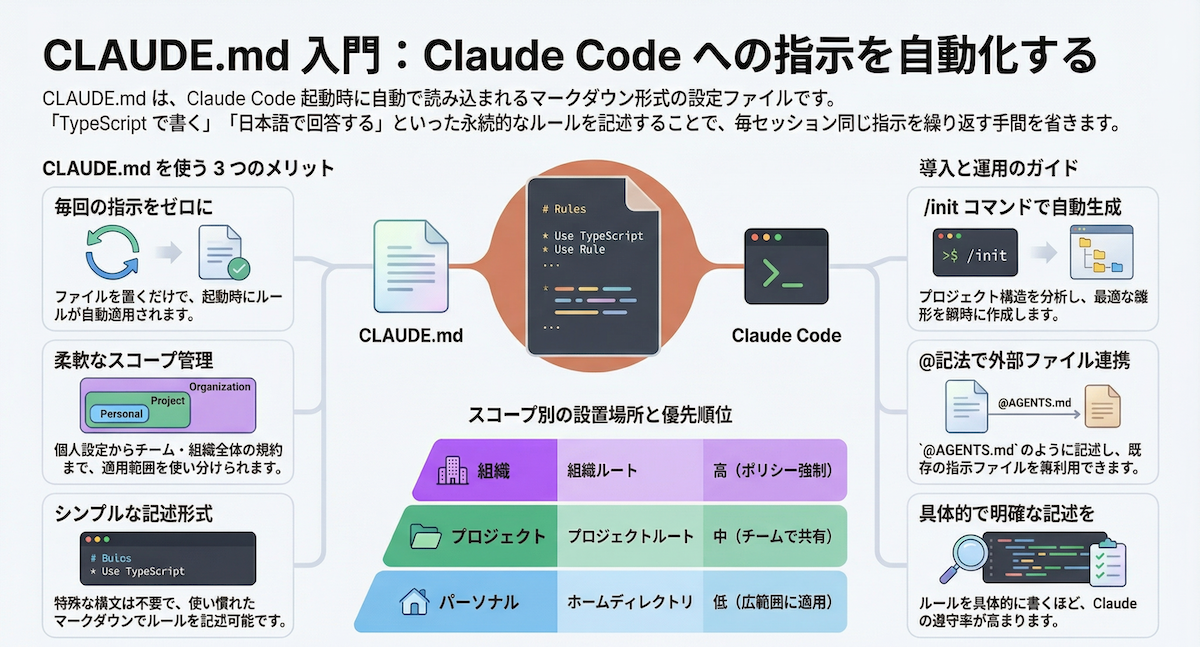
Every time you start a new Claude Code session, you're fighting the same battles: reminding it to use app/ not pages/, to add 'use client' only when necessary, to never use any. But Claude Code already has a mechanism to make this automatic — the CLAUDE.md file.
Claude Code auto-injects CLAUDE.md from your project root into the beginning of every conversation context. That means constraints you used to type out every session are now baked in. For a Next.js App Router + TypeScript project, this is a game-changer.
What CLAUDE.md Does (and Doesn't Do)
When you place a CLAUDE.md in your project root, Claude Code reads it at session start and treats it as system-level instructions. It's not a guarantee — think of it as a strong hint, not a hard constraint. The agent can still deviate, but it significantly reduces the frequency of common mistakes:
- Creating routes in
pages/instead ofapp/ - Forgetting
'use client'before using hooks in a Server Component - Writing
fetchin a client component, losing cache strategy - Using
anyinstead of proper TypeScript types
The Minimal CLAUDE.md Template That Works
Here's a battle-tested minimal CLAUDE.md for a Next.js 15 App Router project. Keep it under 30 lines to avoid context bloat:
# Project Rules
## Stack
- Next.js 15 App Router (TypeScript strict)
- Runtime: Node.js 20 LTS
- Styling: Tailwind CSS v4
- State: React Server Components first, Zustand only for client state
## Directory Conventions
- Route segments: `app/` only. Do NOT create `pages/`
- Server Components are the default. Add `'use client'` only when hooks or browser APIs are needed
- Data fetching: `fetch` in Server Components with explicit `cache` option (`force-cache` or `no-store`)
- API Routes: `app/api/**/route.ts` only
## TypeScript

- `any` is banned. Use `unknown` + type guard for unknown types
- Validate with Zod, extract inferred types via `z.infer<>`
## File Generation Rules
- Component: PascalCase, `*.tsx`
- Utility: camelCase, `*.ts`
- Tests: `__tests__/` or `*.test.ts`
## What NOT to Do
- Do NOT use `useEffect` for data fetching (keep it in Server Components)
- Do NOT use anonymous `export default` functions (hard to debug)
- Do NOT commit `console.log`
Pro Tips for Long-Term Maintenance
Subdirectory Rules
Create app/api/CLAUDE.md for API-specific rules (e.g., authentication required, rate limiting patterns). Claude Code merges parent and child rules.
Don't Overload It
Every line consumes context. Only add rules for violations that actually happen. If your team never forgets 'use client', don't waste tokens on it.
Track Changes via Git
Commit changes to CLAUDE.md and use git blame to understand why a rule exists. Comments in the file rot faster than git history.
Pair with CI
CLAUDE.md is a hint, not a gate. Run tsc --noEmit and ESLint in CI as the final safety net.
Multi-Agent Setup (Cursor, OpenAI Codex)
If your project uses multiple AI coding tools, maintain three files with the same content:
CLAUDE.md(Claude Code).cursorrules(Cursor)AGENTS.md(OpenAI Codex)
Or use a redirect comment in AGENTS.md:
# AGENTS.md
<!-- See CLAUDE.md for the canonical rules -->
What to Do Right Now
- Copy the template above into your project root as
CLAUDE.md - Customize the Stack section for your actual dependencies
- Add one or two rules from your team's most common code review comments
- Commit it
- Start a new Claude Code session and test: ask it to create a new route
You'll immediately notice fewer violations of your project conventions. The agent will generate code that matches your team's patterns from the first message, saving you time and review cycles.
Source: dev.to