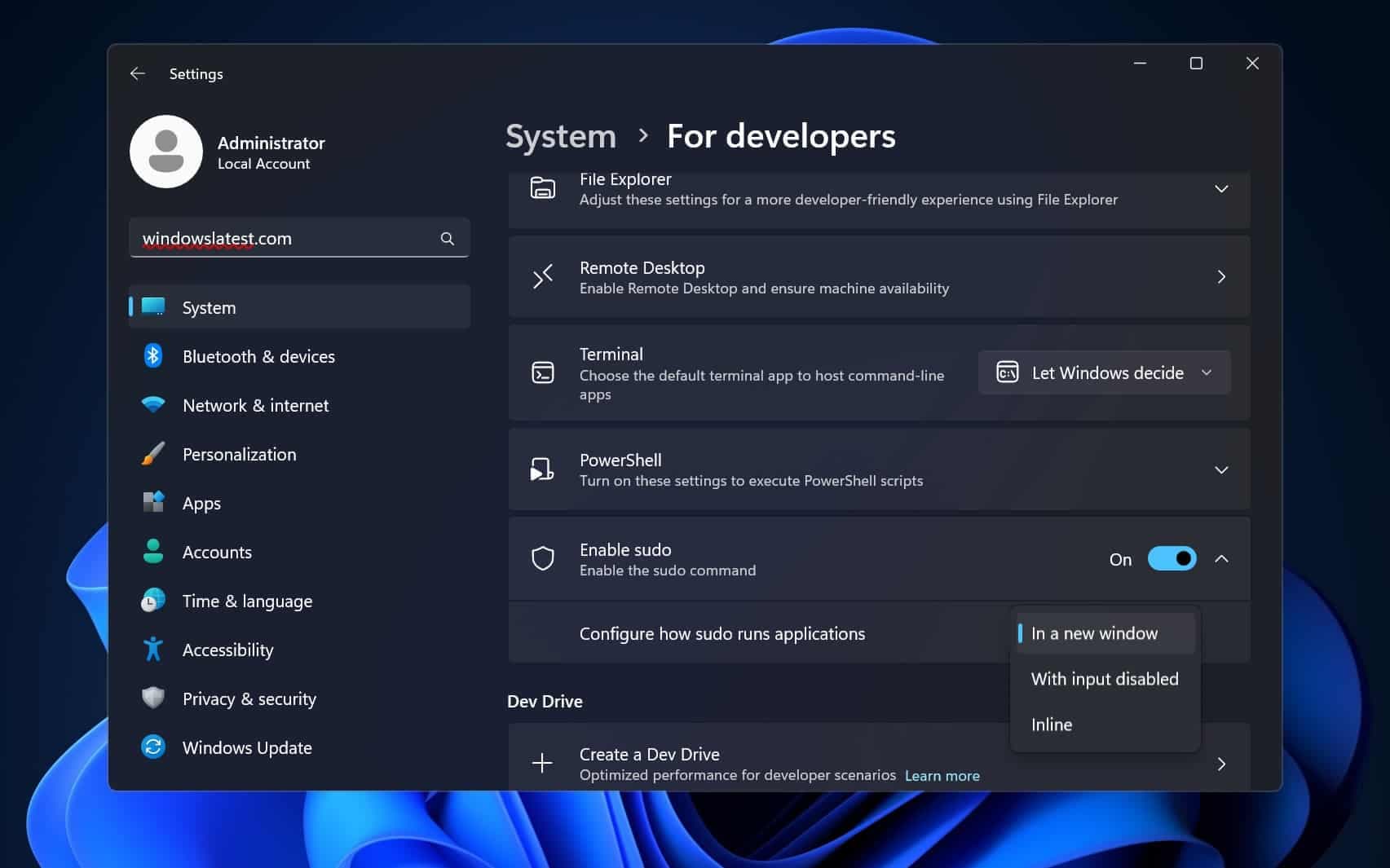
Microsoft has shipped a native implementation of the sudo command for Windows 11, addressing a decades-old developer workflow pain point. The feature is built directly into the operating system using Rust, not as a third-party workaround or port, and is available through Windows Settings.
Key Takeaways
- Microsoft has shipped a native 'sudo' implementation for Windows 11, built in Rust and integrated directly into the OS.
- This addresses a long-standing developer pain point of needing to relaunch terminals as administrator for single commands.
What Microsoft Delivered

The implementation provides Windows developers with a familiar sudo command that elevates privileges for individual commands without requiring them to close and relaunch their terminal as Administrator. Previously, developers working in Windows terminals (like Windows Terminal, PowerShell, or Command Prompt) would need to launch a new terminal window with "Run as Administrator" privileges to execute a single command requiring elevation—a disruptive context switch in development workflows.
Technical Implementation & Caveats
Microsoft's implementation is not a direct port of the Linux sudo command. According to the announcement, it's "written in Rust & it actually ships in the OS." This native approach means it integrates with Windows' own permission model rather than attempting to replicate Linux's security architecture.
The key technical caveat: "Some unix scripts won't transfer directly" between Linux and Windows due to fundamental differences in permission models and security architectures. Linux's sudo operates within a Unix permission system (user/group/other with read/write/execute bits), while Windows uses Access Control Lists (ACLs) and different privilege escalation mechanisms.
However, for what Microsoft estimates as "95% of day-to-day dev tasks," this implementation provides the necessary functionality without requiring platform-specific workarounds.
How to Enable It
The feature is enabled through:
- Settings → Developer Features → Sudo for Windows
- Toggle the setting to "On"
Once enabled, commands like sudo netstat -ab can be run directly from a non-admin terminal session, with the system prompting for elevation through the standard Windows User Account Control (UAC) interface.
Why This Matters for Windows Development
This change represents Microsoft's continued investment in making Windows a first-class development platform, particularly for developers who work across Windows and Linux environments. The sudo command is fundamental to Unix/Linux development workflows, and its absence in Windows has been a persistent friction point for developers using tools like Docker, Node.js, Python, and other cross-platform development stacks.
By implementing sudo natively rather than through third-party packages (like the previously available gsudo from Gerardo Grignoli), Microsoft ensures better integration with Windows security, more reliable updates through Windows Update, and official support channels.
gentic.news Analysis
This move continues Microsoft's multi-year strategy to bridge the Windows-Linux development gap, which began in earnest with the 2016 introduction of Windows Subsystem for Linux (WSL). The native sudo implementation represents a logical evolution: where WSL brought Linux binaries to Windows, native sudo brings a core Linux workflow pattern to native Windows development.
The Rust implementation is particularly noteworthy. Microsoft has been increasingly adopting Rust for system-level components due to its memory safety guarantees—a critical consideration for privilege elevation tools that operate at the security boundary. This follows Microsoft's 2023 announcement that they were rewriting core Windows libraries in Rust and their 2024 disclosure that 70% of Common Vulnerabilities and Exposures (CVEs) in Microsoft products were memory safety issues. Building sudo in Rust from the start suggests Microsoft is applying lessons from their broader security initiative to new developer tools.
Competitively, this strengthens Windows' position against macOS in the developer workstation market. While macOS has long offered sudo through its Unix foundation, Windows now closes one of the remaining workflow gaps. For cloud and backend developers who increasingly work in Linux-like environments but prefer Windows as their client OS, this reduces context switching friction.
Practically, developers should note this isn't a drop-in replacement for all Linux sudo usage—complex scripts with Linux-specific sudo options will still require adaptation. However, for the common case of prefixing individual commands with sudo, this eliminates a daily annoyance that has persisted since the Windows NT era.
Frequently Asked Questions
How do I enable sudo on Windows 11?
Go to Settings → Developer Features → Sudo for Windows and toggle the setting to "On." You may need to be running Windows 11 version 24H2 or later. Once enabled, you can use sudo directly from PowerShell, Command Prompt, or Windows Terminal.
Is Windows sudo exactly the same as Linux sudo?
No. Microsoft's implementation is built for Windows' permission model and security architecture. While it handles the common use case of elevating individual commands, some Linux sudo options and behaviors may differ. Complex shell scripts using advanced sudo features may need adjustment to work on Windows.
Why did Microsoft build sudo in Rust instead of C++?
Microsoft has been increasingly adopting Rust for system components due to its memory safety guarantees. Since sudo operates at the security boundary (handling privilege elevation), building it in Rust reduces the risk of memory safety vulnerabilities that could be exploited to gain unauthorized privileges.
Can I use Windows sudo with WSL (Windows Subsystem for Linux)?
The native Windows sudo is for Windows commands and applications. WSL has its own sudo implementation within the Linux environment. You would use Windows sudo for native Windows commands (like sudo netstat) and WSL's sudo for Linux commands within WSL distributions.