Key Takeaways
- Loop engineering is the new paradigm: Claude Code's /goal command and CLAUDE.md let you encode autonomous workflows.
- Build verification layers and skill files to ship code without being in the loop.
What Changed — The Loop Engineering Paradigm
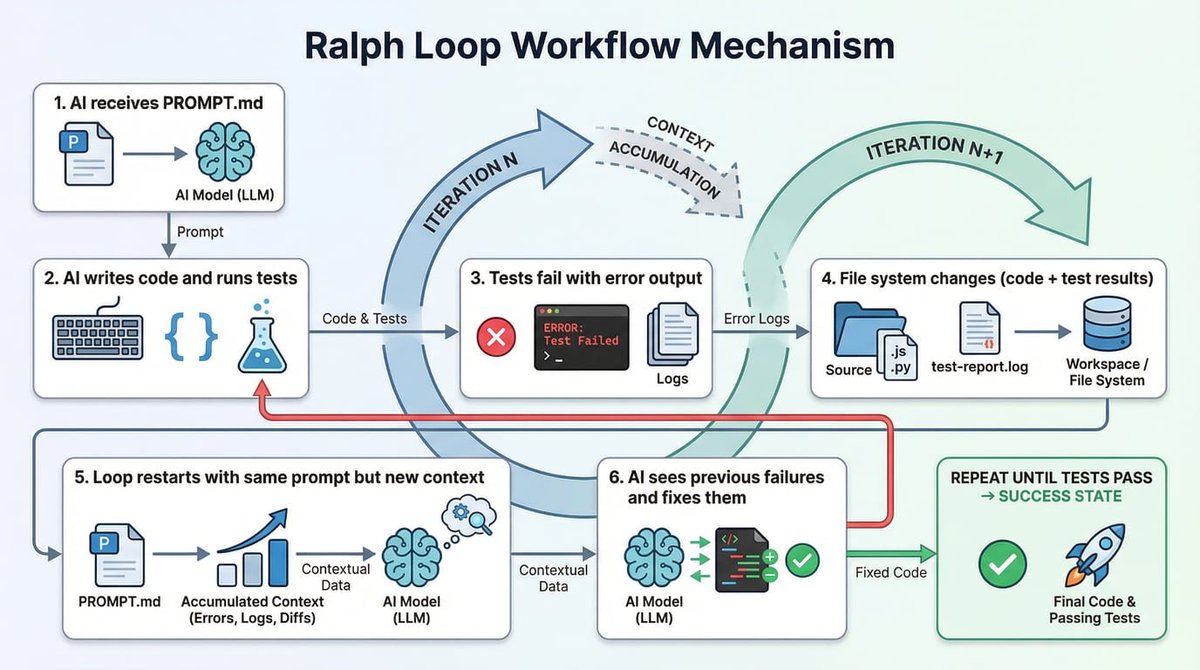
On June 7, 2026, Peter Steinberger posted 12 words on X: "You shouldn't be prompting coding agents anymore. You should be designing loops that prompt your agents." 6.5 million people read it in 24 hours. Two days earlier, Boris Cherny — head of Claude Code — said the exact same thing on stage at WorkOS Acquired Unplugged.
This isn't a trend report. It's a scoreboard that just became public.
The most productive Claude Code users have already stopped prompting manually. They build systems — loops — that prompt Claude for them. Then they walk away.
The Three Rungs of AI-Assisted Development
Cherny's framework breaks down how developers evolve:
Rung 1: Autocomplete — You use Claude like a smarter Copilot. You write code, review every line, direct every step. The agent assists; you hold the wheel.
Rung 2: Parallel Prompting — You're running 5 or 10 Claudes in parallel. Handing off tasks, reviewing outputs, routing between them manually. You're a traffic manager, not a driver. Most developers who think they're "advanced with AI" are here.
Rung 3: Loop Engineering — You're not in the loop at all. You built the system that runs the loop for you. Claude executes against conditions, verification gates, and retry logic you defined once. Your job shifted from "write the prompt" to "design what happens when the agent fails, succeeds, or hits something you didn't anticipate."
Why It Works — The Compounding Effect
A developer who prompts manually gets better at prompting. Linear improvement on a linear effort curve.
A developer who encodes loop logic operates in a structurally different model. Each loop runs without them. Each improvement applies to every future run automatically. One trajectory improves the work you already do. The other builds a system that handles that category while you design the next loop.
These trajectories look identical in week 1. The differential compounds over weeks. It's not recoverable by prompting faster.
How To Apply It — Your First Loop
You're likely already on rung 3 for some tasks without knowing it. /goal in Claude Code is already a closed loop: you define a stop condition, Claude iterates until it's met or hits a hard error. You're not making decisions between iterations.
Here's how to build a real production loop:
Step 1: Encode Quality Rules in a Skill File
Create a .claude/skills/ file that defines what "done" looks like:
# skill: code-review

When reviewing code, check:
- All error paths are handled
- No hardcoded secrets
- Test coverage for new logic
- Performance: no O(n²) where O(n) works

If any check fails, return the specific issue with the line number. Do not proceed until all checks pass.
Step 2: Add a Verification Step
In your CLAUDE.md, add:
## Workflow

After any code change, run the code-review skill before marking the task complete.
If the review fails, log the issue and retry up to 3 times before escalating.
Step 3: Use /goal with Escalation Rules
/goal Implement user authentication using JWT. Follow the code-review skill requirements.
If you hit a blocker after 3 retries, output the error and stop.
Step 4: Add a Review Agent
The final piece: a second agent that sees the output fresh before anything ships. This catches what the first agent missed because it was too deep in the implementation.
/review-agent Check the output of the last task against:
- Security: no tokens in logs
- Architecture: follows our patterns
- Completeness: all acceptance criteria met
The Real-World Proof
Andrej Karpathy's AutoResearch project runs 50 ML experiments overnight on a single GPU. The agent modifies training code, runs it, reads results, iterates — no human decisions in the loop. He calls this the "Loopy Era of AI."
Cherny's own number: 100% of his personal code for the 30 days before December 2025 was written by routines he'd set up, not by him prompting Claude directly.
And the industry data: Claude Code is approaching 4% of all public commits on GitHub. That's not happening through manual prompting session by session. That's loops running.
The Takeaway
If you're still prompting Claude manually for every task, you're leaving compounding gains on the table. Start with /goal. Add a skill file. Add verification. Then design the next loop.
Your job isn't to write prompts. It's to build the systems that write prompts for you.
Source: news.google.com
[Updated 14 Jun via gn_claude_code_tips]
A June 12 Claude Code update (version 2.1.174) introduced a granular usage breakdown in the VS Code extension's /usage screen, splitting consumption by cache misses, subagents, skills, plugins, and MCP servers — a direct answer to the quota-tracking gap Peter Steinberger's loop engineering paradigm exposed [per devto_claudecode]. The timing coincides with Anthropic's announcement that Fable 5 exits the free tier on June 23, making per-activity credit tracking newly essential.