Key Takeaways
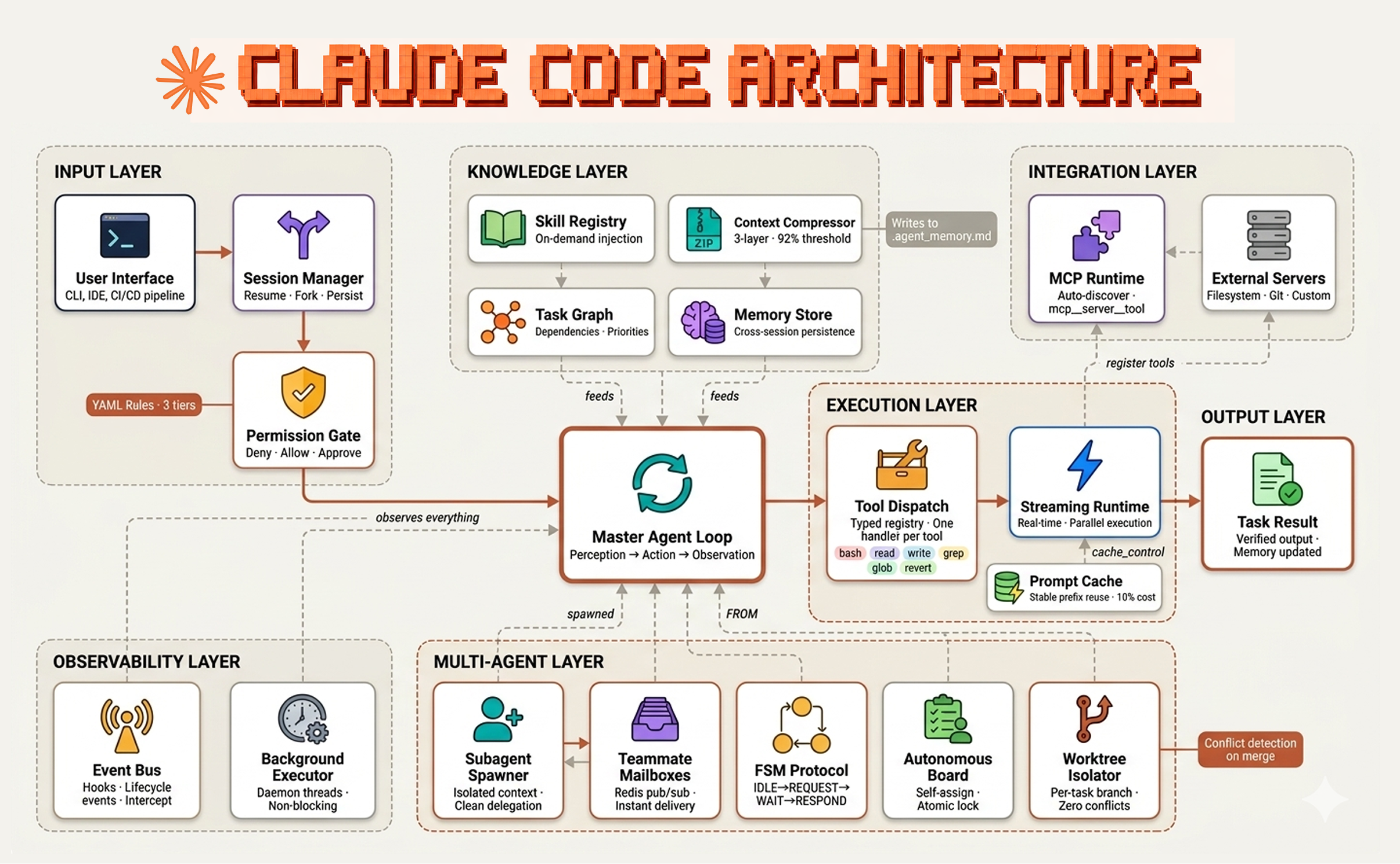
- Build a self-sustaining Claude Code environment with 14 components: memory, skills, autonomy, guardrails, and monitoring.
- Connect them into a feedback loop where measurements flow back into memory.
- Use CLAUDE.md and hooks.
The Complete Claude Code Environment: 14 Components That Work Together
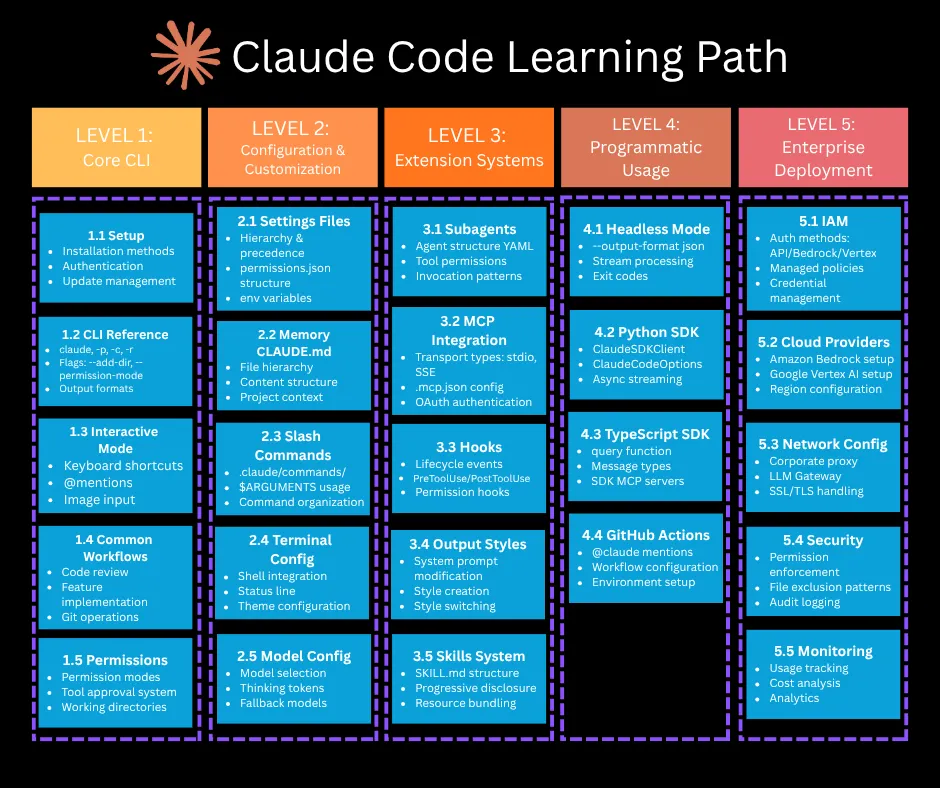
Most Claude Code users install a few hooks, write a CLAUDE.md, and call it a day. But one developer took it further — building a full self-sustaining environment across 14 articles, each component feeding into the next.
This isn't about adding random tools. It's about a closed-loop system where memory feeds skills, skills enable autonomy, and measurements flow back into memory.
The Loop: How the Parts Connect
[Memory] → [Skills] → [Autonomy] → [Visibility]
    ↑                                       ↓
    └──── [Guardrails] ← [Self-healing] ────┘
Here's what each component does:
Memory — Making Claude Remember Yesterday
- 4-layer memory architecture: Foundation for carrying context across sessions. Not just a single file — layered short-term, long-term, project-specific, and global memory.
- Conversation logs → Obsidian Vault: Automatically distill every session into an Obsidian Vault. This becomes ground truth that prevents fabrication.
Skills — Making Claude Remember Procedures
- Self-propagating skills: Claude turns reusable procedures into skills on its own, without being asked. Skills go stale at 30 days unused, archived at 90.
Autonomy — Running Unattended
- Daily GitHub scouting: Automatically discover and score useful OSS and skills.
- Autopilot: Cross-check remaining-quota caps against self-reported measurements.
- Cost visibility: Print spending to terminal during sessions.
Guardrails — Letting It Act Safely
- Codex and Claude collaboration: Claude designs, Codex implements — a division of labor that catches errors early.
- Pre-push secret guard: Automatically block API keys and PII at commit/push time.
Visibility & Self-Healing
- Health monitoring: Silent when normal, RED FLAG only when broken.
- Auto-generating environment map: Mermaid diagram of PC, Claude, and projects every morning.
- Hook latency profiling: Measure p95 with a one-line wrapper.
The 4 Principles Underneath
1. Don't Trust Self-Reports; Cross-Check with Measurements
Claude says "I did it" — but words and reality diverge. Conversation logs treat actual files as ground truth. Autopilot matches self-reported counts against measurements. The more you hand to the AI, the more the humans (and scripts) hold onto verification.
Try it: Add a hook that counts files modified vs files claimed modified. Log the discrepancy.
2. Speak Up Only When Something's Broken
A system that notifies you "everything's OK" every morning stops being read within three days. Make silence the default. Make only deviations stand out.
Try it: In your CLAUDE.md, add: "When running autonomously, log only errors. Silence means success."
3. Put Guardrails Precisely on the Automation
The more something runs unattended, the more quietly accidents spread. Push an API key even once and there's no taking it back.
Try it: Add a pre-push hook that blocks any file containing sk- or ANTHROPIC_API_KEY. Here's a snippet:
#!/bin/bash
# .claude/hooks/pre-push
if git diff --cached | grep -qE '(sk-[A-Za-z0-9]{32,}|ANTHROPIC_API_KEY)'; then
  echo "❌ Blocked: potential secret leak in staged files"
  exit 1
fi
4. An Environment Isn't Designed — It's Grown
Both self-propagating skills and project categorization operate by "add as you use and prune periodically," not "build a perfect system up front." Skills go stale at 30 days unused and get archived at 90.
Try it: In your CLAUDE.md, add: "Archive any skill not used in 30 days. Remove any project not touched in 90 days."
What This Environment Actually Produced
The developer reports this environment produced real results — including revenue — by running unattended. The key wasn't any single component, but the feedback loop: memory → skills → autonomy → monitoring → memory.
Try It Now
- Start with memory: Create a 4-layer memory system using CLAUDE.md sections for global, project, session, and ephemeral context.
- Add one skill: Let Claude write one reusable procedure as a skill file.
- Set up one guardrail: The pre-push secret guard above.
- Add one visibility metric: Print token usage or cost to terminal.
Then watch the loop close.
Source: dev.to
[Updated 16 Jul via gn_claude_code]
Meanwhile, Anthropic is offering Claude Code users 50% higher rate limits until July 19, 2025, a temporary boost that could significantly extend the autonomy of self-sustaining environments like the one described above [per Help Net Security]. The higher limits allow more unattended sessions and larger skill propagation without hitting quota caps, directly supporting the closed-loop system's need for sustained throughput.