What Changed — The Core Insight
Here's a thing that took one developer embarrassingly long to accept: you cannot instruct your way to reliability with Claude Code.
He had a working-memory MCP server. The agent would discover something, store a note, recall it later. Then he watched a real session, and the agent just... didn't recall. Notes sitting there, one tool call away, and it re-read the same file it had already read two sessions ago. His CLAUDE.md said "call recall at the start of every task." The model read that instruction and ignored it.
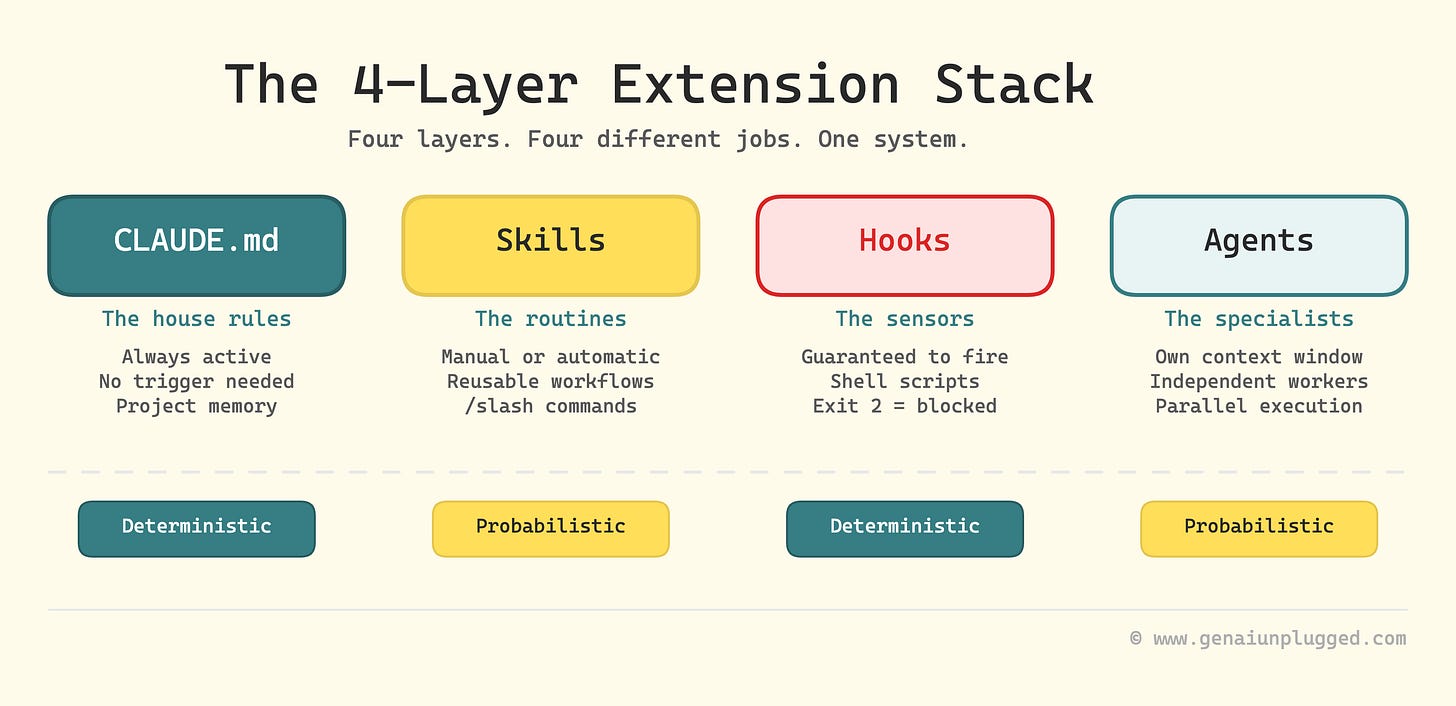
The lesson generalizes: any behavior you need to happen every single time — inject context, run a linter, block a dangerous command, snapshot state — cannot depend on the model deciding to do it. The model is probabilistic. The harness is deterministic. In Claude Code, that deterministic layer is hooks.
What It Means For You — The CLAUDE.md vs. Hooks Distinction
This is the single most important mental model shift for Claude Code users:
- CLAUDE.md: Things the model should tend to do. Preferences, style guidance, conventions.
- Hooks: Things that must deterministically happen. Guards, state injection, cleanup.
Confusing the two — trying to instruction-engineer a guarantee — is how you end up with a system that works in demos and flakes in production.
The Events That Matter
Hooks fire on specific session lifecycle events. Here are the workhorses:
SessionStart
Session begins or resumes
Inject state before turn 1 — branch info, recalled memory
UserPromptSubmit
Before each user prompt
Inject per-turn context; can block the prompt
PreToolUse
Before a tool call runs
Block dangerous commands, rewrite arguments
PostToolUse
After a tool call succeeds
React to results, add follow-up context
PreCompact
Before context compaction
Persist anything about to be summarized away
Stop / SubagentStop
When a turn finishes
Enforce "you're not done yet"
SessionEnd
Session terminates
Cleanup, flush, teardown
The Configuration Surface
Hooks live in settings.json. Three tiers:
~/.claude/settings.json— all projects, never checked in.claude/settings.json— one project, shared with team.claude/settings.local.json— one project, gitignored, personal
The shape is nested. Each event maps to a list of groups, each with a matcher and hooks:
{
  "hooks": {
    "PreToolUse": [
      {
        "matcher": "Bash",
        "hooks": [
          {
            "type": "command",
            "command": "${CLAUDE_PROJECT_DIR}/.claude/hooks/guard.sh",
            "timeout": 30
          }
        ]
      }
    ]
  }
}
The matcher filters: for tool events it matches tool names ("Bash", "Edit|Write", "mcp__memory__*"). For session events it matches reasons (startup|resume|clear|compact). Omit it to fire on everything.
Hook types include command (shell), http (POST to URL), mcp_tool (invoke MCP tool), and LLM-in-the-loop types (prompt, experimental agent). For latency-sensitive hooks, use command — local process, no network round trip.
Try It Now — Build Your First Hook Pipeline

1. Block dangerous commands
Create .claude/hooks/guard.sh:
#!/bin/bash
readonly input
tool_name=$(echo "$input" | jq -r '.tool_name // empty')
command=$(echo "$input" | jq -r '.input.command // empty')

if [[ "$tool_name" == "Bash" && "$command" == *"rm -rf"* && "$command" != *"node_modules"* ]]; then
  echo "{\"type\":\"error\",\"content\":\"Blocked: rm -rf outside node_modules requires manual approval\"}"
  exit 1
fi
exit 0
2. Inject context at session start
"hooks": {
  "SessionStart": [
    {
      "matcher": "startup",
      "hooks": [
        {
          "type": "command",
          "command": "${CLAUDE_PROJECT_DIR}/.claude/hooks/inject_context.sh",
          "timeout": 15
        }
      ]
    }
  ]
}
The hook script reads a JSON event on stdin with tool_name, input, and session_id. It communicates back through exit code (0 = proceed, nonzero = block) and stdout (which replaces tool output or adds context).
3. React to tool results
Use PostToolUse to run a linter after every file write, or to persist state before context gets compacted with PreCompact.
The Bottom Line
Stop hoping the model will do what you asked. Put guarantees in hooks, preferences in CLAUDE.md. Your agent will thank you by not accidentally deleting production.
Source: dev.to