What Changed — Microsoft's Production-Grade MCP Bet
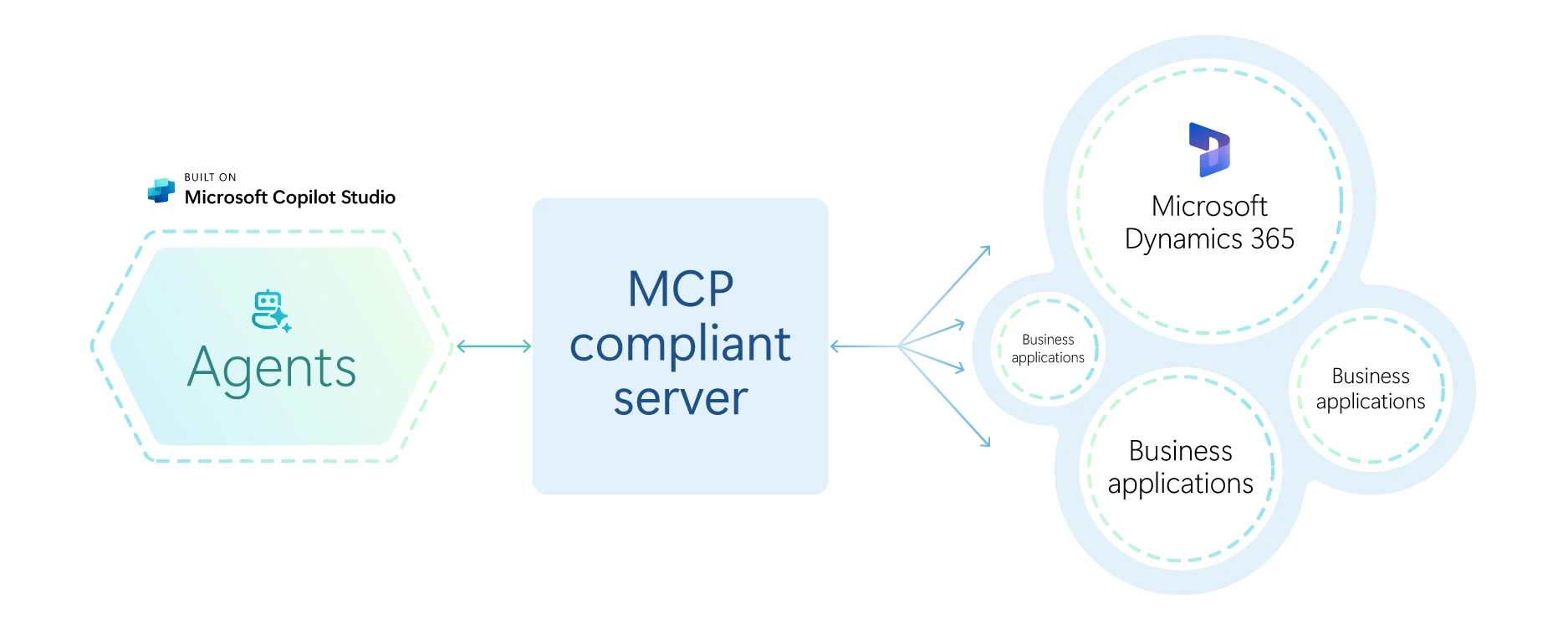
On April 3, Microsoft shipped Agent Framework 1.0 with stable APIs for .NET and Python. This isn't another research project—it's a production-ready framework from a major cloud vendor. The most important feature for Claude Code developers is native, built-in support for the Model Context Protocol (MCP).
This means the framework can dynamically discover and invoke tools from any MCP-compliant server. If you've built MCP servers for Claude Code—whether for database queries, API integrations, or custom workflows—those same servers now work with Microsoft's framework without any changes to your tool definitions, endpoints, or authentication.
What It Means For You — Your MCP Investment Just Multiplied
Before MCP adoption, building a tool for multiple AI frameworks meant creating N implementations for N frameworks. MCP collapses that work to a single implementation. Microsoft's endorsement in their 1.0 release significantly boosts MCP's legitimacy and adoption trajectory.
Your existing MCP servers gain a new major client. The framework includes first-party connectors for Claude (alongside OpenAI, Gemini, Bedrock, and Ollama). This creates a practical bridge: you can develop and test agents locally using Ollama (free, no API costs) through the framework, then deploy the same agent logic with Claude in production.
The Ollama Connector: A New Development Loop
The built-in Ollama connector changes how you can prototype agentic workflows that might eventually use Claude. Instead of burning Claude API tokens during development, you can:
- Build your MCP server (as you would for Claude Code)
- Prototype agent logic in Microsoft Agent Framework using a local Ollama model
- Test tool integrations and orchestration patterns
- Swap the connector to Claude for production deployment
This creates a cheaper, faster iteration cycle for complex multi-agent systems that might be overkill for Claude Code's built-in agent capabilities but share the same underlying tools.
The Middleware Model: Enterprise Features Without Lock-In

The framework's middleware pipeline—inspired by ASP.NET—lets you inject compliance checks, safety filters, logging, and rate limiting without touching agent prompts. While solo developers might not need this, it demonstrates where the industry is heading: governance and observability as first-class concerns.
For Claude Code users watching industry trends, this signals that future MCP servers might need to consider audit logging and compliance metadata in their tool responses, as enterprise frameworks will expect to intercept and filter them.
When To Consider This Framework (And When Not To)
Don't switch if you're productively using Claude Code's built-in agent features for single-agent tasks. The framework adds orchestration overhead you don't need.
Do explore if:
- You're building multi-agent systems where different agents have specialized roles
- You need enterprise features like audit trails, compliance middleware, or human-in-the-loop workflows
- You want to visualize agent execution in the built-in DevUI debugger (it's excellent for understanding complex tool-call chains)
- Your organization standardizes on .NET for backend services
The Bottom Line: Standards Over Silos
Microsoft's move validates the MCP ecosystem that Claude Code helped pioneer. When a vendor of Microsoft's scale treats MCP as a core 1.0 feature rather than an afterthought, it reduces fragmentation across the AI tooling landscape.
Your takeaway: Continue building MCP servers for your Claude Code workflow. Each server you create now has potential utility in Microsoft's ecosystem (and likely others that will follow). The return on your MCP development time just increased substantially.
Try It Now
To test compatibility with your existing MCP servers:
# Install the Python package
pip install microsoft-agent-framework

# Create a simple agent that uses your MCP server
# (assuming your MCP server is running on localhost:8000)

# Example agent.py:
"""
from agent_framework import Agent
from agent_framework.connectors import OllamaConnector
from agent_framework.tools import MCPToolClient

# Connect to your existing MCP server
tool_client = MCPToolClient(server_url="http://localhost:8000")
tools = tool_client.discover_tools()

# Create agent with local model for testing
agent = Agent(
    name="claude_tool_tester",
    connector=OllamaConnector(model="llama3.2"),
    tools=tools
)

# Run a test query
response = agent.run("Use my database tool to count users")
print(response)
"""
This lets you verify your MCP servers work in a new context without modifying them. The investment in open protocols pays dividends when major frameworks adopt them.