Key Takeaways
- Stop appending rules to CLAUDE.md.
- Use the 3-Layer Agent Harness: a short constitution (CLAUDE.md), specialist skills, and subagents.
- This respects the 150-instruction compliance budget and keeps your agent reliable.
What Changed — The 150-Instruction Budget That Breaks Your Agent
HumanLayer's internal research, published in early 2026, quantified what power users have felt: LLM instruction compliance degrades significantly around 150 distinct behavioral directives. Below that threshold, models follow instructions reliably. Above it, compliance drops — not uniformly, but selectively. The model drops recent instructions, ones conflicting with training priors, and ones buried deep in a long document.
Your CLAUDE.md with 300 lines isn't followed 60% of the time. The first 100 lines work. The other 200 are optional suggestions. The system prompt already consumes ~50 of that budget. You're competing for the remaining 100 slots.
What It Means For You — The 3-Layer Agent Harness
A developer managing twelve production projects converged on an architecture he calls the 3-Layer Agent Harness. It separates concerns so each layer is independently comprehensible, auditable, and improvable. It matches Anthropic's own documentation but gives it a name and explains why separation matters.
Layer 1: CLAUDE.md (The Constitution)
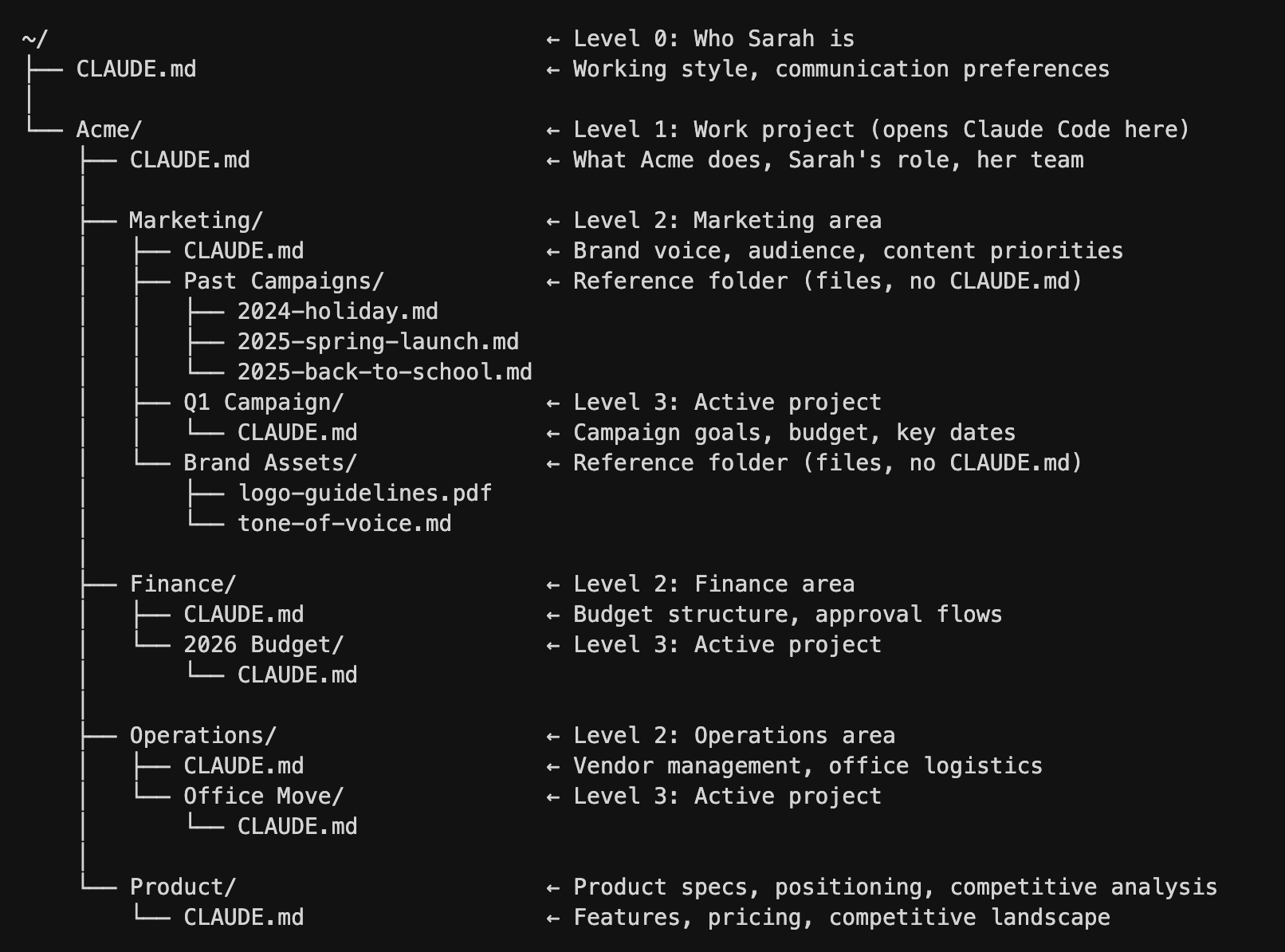
CLAUDE.md should be a constitutional document: principles, non-negotiables, structural conventions. Not procedures, not task descriptions, not workflow automation. A well-written constitution is short enough to remember.
Answer four questions:
- What is this project? (Product + stack + architecture)
- What are the absolute prohibitions? (Things that must never happen)
- What are the trust-boundary conditions? (Security constraints)
- Where do extended rules live? (References to skill files)
Structural skeleton:
# Project Name

## What This Is
[Two sentences: product description + primary tech stack]

## Architecture
[Directory map with one-line purpose per path]

## Hard Rules (Never Violate)
[5-8 absolute prohibitions with brief rationale]

## Decision Engine
[When to upgrade to subagent, when to read extended rules]

## Conditional Rules (loaded automatically)
- `.claude/rules/deploy-invariants.md` — deploy pipeline constraints
- `.claude/rules/trust-boundary.md` — security checklist for auth/payment paths
- `.claude/rules/seo-standards.md` — SEO checklist for new content

@AGENTS.md
This skeleton is 80-120 lines. The developer reduced his 670-line CLAUDE.md to 108 lines, and agent reliability on hard rules improved measurably. Rules buried on line 400 were now on line 40.
Layer 2: Skills (The Specialists)
Skills are guidance documents with SKILL.md frontmatter, auto-discovered and loaded when triggered by user patterns or slash commands. They are not part of CLAUDE.md's permanent context. They load on demand.
Use skills for:
- Deploy-time constraints (22 hard rules from production incidents)
- Security checklists for auth/payment paths
- SEO standards for new content
- Language-specific conventions (TypeScript patterns, React patterns)
The failure mode: using CLAUDE.md as a running log of lessons learned. Every incident appends a new rule. Route rules to the right layer instead.
Layer 3: Subagents (The Workers)
Subagents are isolated workers for complex multi-step tasks. They get their own context, their own instructions, and their own output. Use them for:
- Refactoring across multiple files
- Implementing a feature from specification
- Running a batch of tests and fixing failures
Try It Now — Audit Your CLAUDE.md
- Count the lines in your CLAUDE.md. If it's over 150, you're in the danger zone.
- Categorize every rule: constitutional (stays in CLAUDE.md), specialist (moves to a skill file), or workflow (moves to a subagent definition).
- Create
.claude/rules/directory and move specialist rules there. - Reference them from CLAUDE.md with
@filenamesyntax. - Test: run your most common task. Does the agent follow the hard rules more consistently?
Example: Create .claude/rules/deploy-invariants.md:
# Deploy Invariants
- Never deploy on Friday after 3 PM
- Always run `npm run typecheck` before deploy
- Verify all environment variables are set
- Check for uncommitted migrations
Then reference from CLAUDE.md: - .claude/rules/deploy-invariants.md — deploy pipeline constraints
The agent will load this file automatically when it detects deployment-adjacent operations.
Source: dev.to
[Updated 04 Jul via devto_claudecode]
The viral GitHub repositories — mattpocock's skills repo at 55K stars, forrestchang's Andrej Karpathy collection at 107K, and shanraisshan's best-practices compendium trending past 20K — underscore a critical warning: copying someone else's CLAUDE.md is like copying their .bashrc. The developer behind the 3-Layer Agent Harness, who manages twelve production projects including a marketplace with 1,800-plus products and a Cloudflare Worker fleet, notes that pasting 300 lines of another's experience makes your agent subtly less reliable [per dev.to]. The project portfolio includes a custom WordPress pipeline and a cron-driven SEO research agent running overnight.