Most "AI automation" demos fall apart the moment a workflow needs to run longer than a single request. An agent makes a few tool calls, the process crashes or times out, and you lose all state. For business workflows that touch real Jira issues, that is not acceptable.
Developer Ahmet Özel built an open-source platform that solves this by combining two ideas: MCP for tool access and Temporal for durable execution. The repo is at github.com/ahmet-ozel/atlassian-ai-workflow-platform.
The Problem With One-Shot Agents

A typical agent loop looks like: read a ticket, decide on an action, call a tool, repeat. This is fine for short tasks. It breaks down when a workflow:
- Spans minutes or hours
- Depends on external systems that fail intermittently
- Needs to resume after a deploy
If your orchestration lives in a single Python process, any crash means you start over. For Claude Code users automating multi-step Jira workflows, this is a dealbreaker.
Why MCP for Tools
The Model Context Protocol (MCP) standardizes how an agent discovers and calls tools. Instead of hard-coding Jira API calls into the agent, you expose Jira and Confluence as MCP tools. The agent sees a clean, typed tool surface: create_issue, transition_status, search, comment, fetch_confluence_page. The protocol handles the wiring.
The practical benefit is decoupling. You can add or change tools without touching agent logic. The same tools work with any MCP-compatible client—including Claude Code. It also keeps the agent prompt focused on intent rather than API mechanics.
Why Temporal for Orchestration
Temporal gives you durable workflows. Workflow code looks like ordinary Python, but every step is checkpointed. If a worker dies, the workflow resumes from the last completed step on another worker. Retries, timeouts, and backoff are declarative.
This maps perfectly onto agent workflows. Each LLM call and each tool call becomes a Temporal activity. If an LLM provider rate-limits you or a Jira call fails, Temporal retries that single activity instead of replaying the whole reasoning chain. Long-running approvals (wait for a human to review before transitioning a ticket) become a normal part of the workflow instead of a hack.
The tradeoff is added infrastructure. Temporal is one more service to run, and you have to think in terms of deterministic workflow code versus side-effecting activities. For short, stateless tasks it is overkill. For anything that has to be reliable, it pays for itself quickly.
Architecture at a Glance
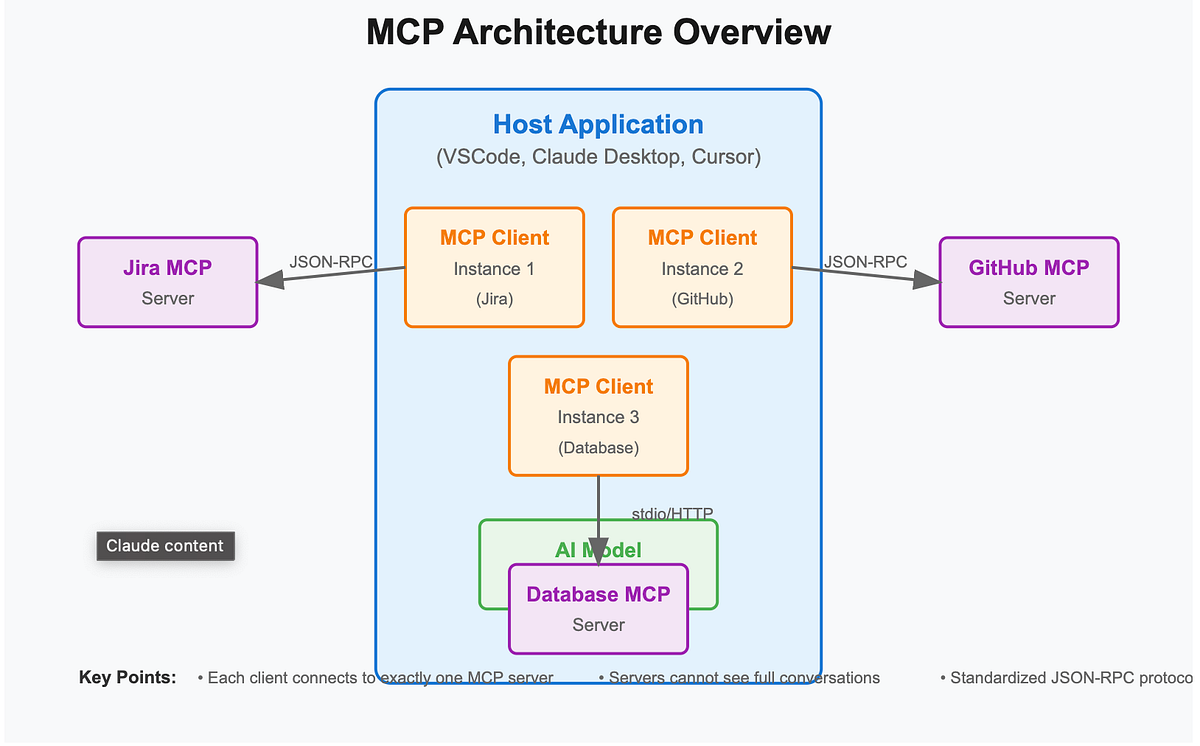
The stack ties together:
- An MCP integration layer exposing Atlassian tools to the agent
- Temporal workers running durable workflows and activities
- A webhook gateway turning Jira events into workflow triggers
- An admin dashboard plus a Streamlit UI for running and inspecting workflows
- Multi-provider LLM support (OpenAI, Anthropic, Gemini, and self-hosted vLLM)
Everything runs in a single Docker Compose stack, so you can bring the whole system up locally.
What This Means for Claude Code Users
If you're using Claude Code to automate Jira workflows today, you're likely running one-shot prompts or custom scripts that break on failure. This architecture gives you a production-grade alternative:
- Expose Jira/Confluence as MCP tools — Claude Code can discover and call them via the standard MCP interface.
- Wrap each step as a Temporal activity — Your agent's reasoning is checkpointed. Crashes don't lose state.
- Handle long-running approvals — Temporal natively supports waiting for human input before continuing.
Try It Now
- Clone the repo:
git clone https://github.com/ahmet-ozel/atlassian-ai-workflow-platform - Run
docker compose upto start Temporal, MCP server, and workers. - Configure your Jira credentials and LLM provider in the config file.
- Connect Claude Code to the MCP server by adding it to your
claude.jsonor using the--mcpflag. - Start a workflow: trigger it from a Jira webhook or the Streamlit UI.
The key insight from Özel: Separate "what to do" from "how to survive doing it." The agent reasons about intent and picks tools. Temporal owns reliability. MCP owns the tool boundary. Keeping those three responsibilities apart makes each one simpler to reason about and test.
Source: dev.to