What It Does — Automated Release Intelligence
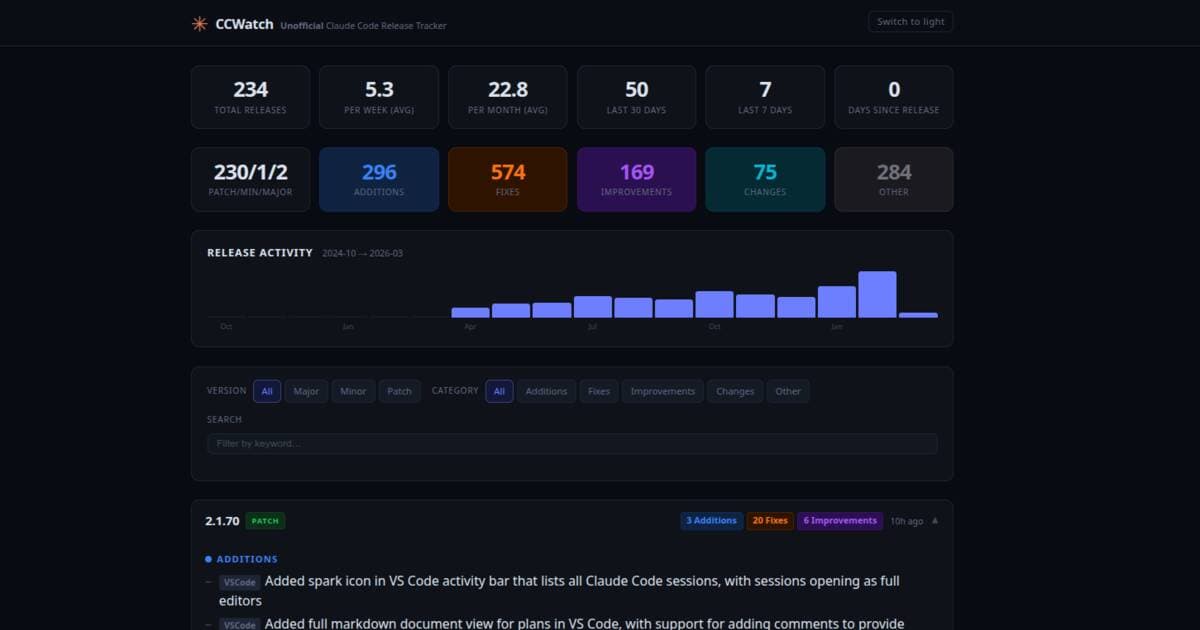
CCWatch is a free, no-login web tool that solves a specific, annoying problem: staying updated on Claude Code releases. It regularly scans the official Claude Code repository and its CHANGELOG.md file. It parses every release, categorizes changes (Added, Fixed, Improved, Changed, Other), and presents them in a clean, searchable interface. You can filter by version bump type (major, minor, patch) and see statistics like releases per week or month.
The creator built it because they were tired of manually checking the changelog. For developers who rely on Claude Code daily, missing a key update—like a new /compact flag or a critical MCP server fix—can mean working with outdated tools or missing efficiency gains.
Why It Matters — Data-Driven Workflow Decisions
Staying current isn't just about getting new features; it's about optimizing your workflow. For example, a recent analysis of over 1,500 real Claude Code sessions (from a related tool, Rudel) revealed surprising insights:
- Skills were only used in 4% of sessions. This suggests most developers aren't leveraging custom tools, perhaps because they don't know they exist or how to configure them.
- 26% of sessions are abandoned, most within 60 seconds. This highlights the importance of a clean, focused context from the start.
- Error cascade patterns in the first 2 minutes predict abandonment. A bad start often leads to a failed session.
CCWatch helps you avoid being part of these statistics. By knowing immediately when a new Skill or MCP server is added, you can integrate it and potentially boost your session success rate. By tracking fixes, you can avoid known bugs that might cause early errors and session abandonment.
How To Use It — Integrate It Into Your Routine
- Bookmark the Dashboard: Navigate to https://ccwatch.net/. No setup required.
- Check Before You Update: Before running
claude code --update, glance at CCWatch. See what's in the latest version and decide if you need it immediately or if you should wait for a patch. - Search for Specifics: Use the search and filter to answer questions like "Has there been a fix for the Docker MCP server yet?" or "When was the
--context-fileflag added?" - Adopt the Underlying Principle: The tool reinforces a best practice echoed in the session data: start fresh, stay focused. Use CCWatch to learn about new features that enable this, like better session isolation, and then apply them. Don't let your main coding session become polluted with "side quests"; start a new, purpose-built session using the latest tools.
The Bigger Picture — Building a Smarter Workflow
Tools like CCWatch and Rudel represent a shift from passive AI usage to active, analytical management of your AI pair-programmer. They provide the metadata you need to make intelligent decisions. Combine them:
- Use CCWatch to know what your tools can do.
- Use principles from Rudel's analytics (like keeping sessions short and focused) to know how to use them effectively.
The goal is to move from guessing to knowing. Instead of wondering if a session failed because of you, the model, or the tool, you can consult the changelog to see if a related fix was recently deployed and adjust accordingly.