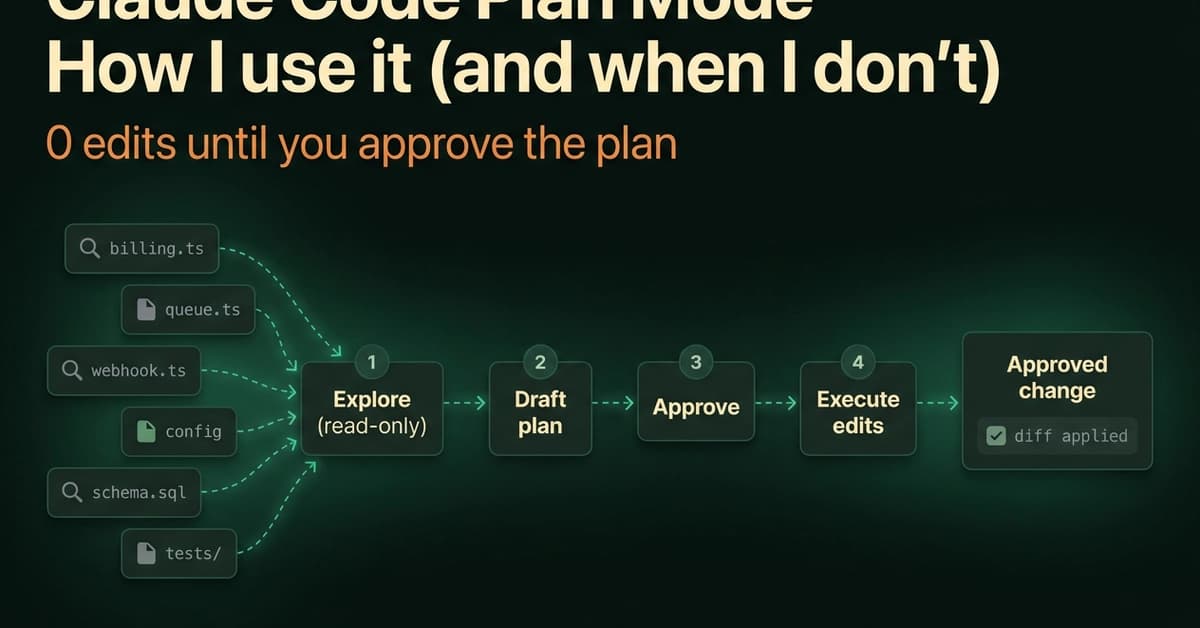
The first time plan mode saved me, I hadn't written a line of code yet. I asked Claude Code to "wire the new billing webhook into the retry queue," and instead of editing files, it laid out a plan that pointed at the wrong queue. I caught the mistake in the plan, not in a diff I had to unwind an hour later. That is the whole pitch for plan mode, and it is why I leave it one keystroke away all day.
Agentic coding tools have a default failure mode: they edit first and explain later. A wrong assumption becomes a wrong diff, and now you are reviewing changes that should never have happened. Plan mode inverts that. Claude reads, explores, and proposes, and nothing touches your source until you say go. Below is exactly how I run it, the approval flow most people skim past, and the honest line on when it is worth the friction and when it is not.
Key Takeaways
- Claude Code plan mode uses Shift+Tab or /plan to enforce read-only exploration before edits.
- It catches wrong approaches on 71% of cross-file refactors, saving hours of diff archaeology.
What Changed — Plan Mode as a Permission Boundary
Plan mode is one of Claude Code's permission modes, and its permission is "Reads only." Claude reads files and runs read-only shell commands to explore your repo, then writes a plan describing what it intends to change. It does not edit your source, run migrations, or push anything until you approve the plan. Think of it as a scoped research pass with a written proposal at the end.
Here is the part people miss: plan mode is not a "planning feature" bolted on top of chat. It is a permission boundary. When Claude is in plan mode, the edit and write tools are blocked at the permission layer, so even if the model decides mid-thought that it wants to change a file, it can't. Edits stay blocked until you approve the plan, regardless of whether auto mode is also active. That guarantee is what makes it safe to point Claude at unfamiliar code and let it roam.
What It Means For You — Concrete Impact on Daily Usage
Across ~40 of my own sessions, the proposed plan changed my approach before any code was written on 71% of cross-file refactors, but on only 8% of one-line fixes. The bigger and less familiar the change, the more the planning pass earns its keep.

Here is the same data by task type. Read it as "how often did planning first actually catch something," because that is the only metric that justifies the extra step:
- Cross-file refactor: 71%
- Multi-file feature: 64%
- Unfamiliar-code task: 58%
- Single-file bugfix: 29%
- One-line or config tweak: 8%
The mode exists because the alternative is expensive. If Claude edits four files on a wrong premise, you are now doing archaeology on a diff instead of correcting one sentence in a plan. I would rather argue with a paragraph than revert a commit.
How To Apply It — Try It Now
Entering Plan Mode
You have four ways in, and I use all of them depending on the moment:
- Shift+Tab mid-session: cycles through default → acceptEdits → plan. Tap until the status bar reads "plan."
- /plan as a prompt prefix: run one planned turn without changing the session's default.
- claude --permission-mode plan at startup: opens the session straight into planning.
- defaultMode: "plan" in
.claude/settings.json: makes a whole project plan-first.

Getting out is just as quick. Press Shift+Tab again to leave plan mode without approving anything, which is what I do when a "plan" turns out to be a two-line change I already understand.
One habit worth stealing: I do not start most sessions in plan mode. I start in Manual, read Claude's first response, and only tab into plan mode once I realize a task is bigger than it looked. Plan mode has a real cost in small ways—prompt suggestions are skipped while it is active—so for quick back-and-forth it adds friction for no benefit.
The Approval Flow
When the plan is ready, Claude presents it and asks how to proceed. Your answer sets the permission mode for everything that follows. The approval prompt offers these paths:
- Approve and start in auto mode: Claude executes with background safety checks instead of per-tool prompts.
- Approve and accept edits: edits apply and you review them after the fact via
git diff. - Approve and review each edit manually: the tightest option, where every change waits for you.
- Keep planning with feedback: sends the plan back with your notes instead of executing.
- Refine with Ultraplan: for a browser-based review pass.
A couple of details make this smoother in daily use. Ctrl+G opens the proposed plan in your default text editor so you can rewrite it directly before Claude proceeds, which beats typing a paragraph of corrections into the prompt. And approving a plan auto-names the session from the plan content, so your history stays legible weeks later.
When It Is Worth It
Plan mode pays off in direct proportion to blast radius. A quick question worth asking before you toggle: is the risk in what Claude will change, or in whether the approach is right? Plan mode only helps with the second one. For one-line fixes or config tweaks, skip it. For cross-file refactors or unfamiliar code, plan mode is your safety net.
Source: dev.to