A new MCP (Model Context Protocol) server has entered the ecosystem, but before you rush to install it, understand its purpose: it's highly specialized. Nymbus, a core banking platform provider, has launched a secure MCP server designed to enable AI agents to perform authenticated actions within banking systems.
What It Does
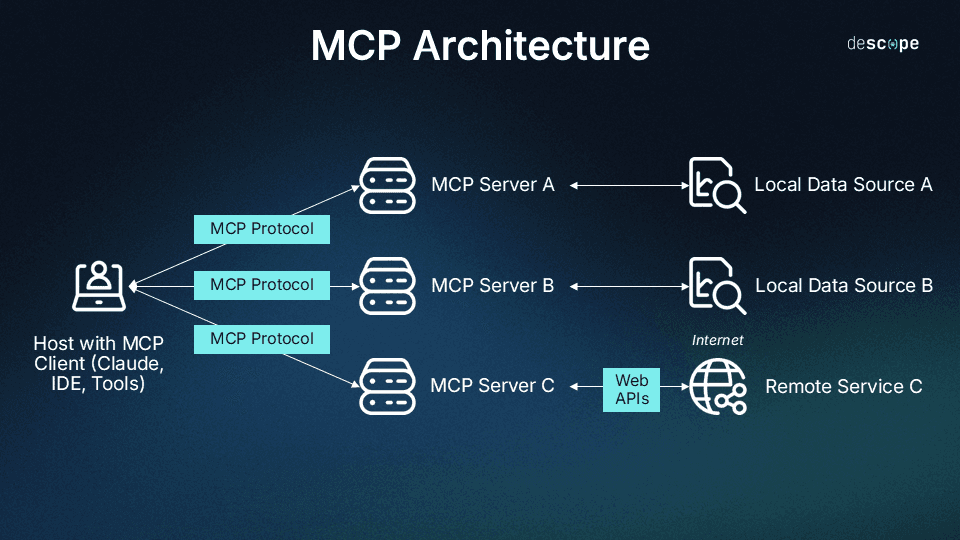
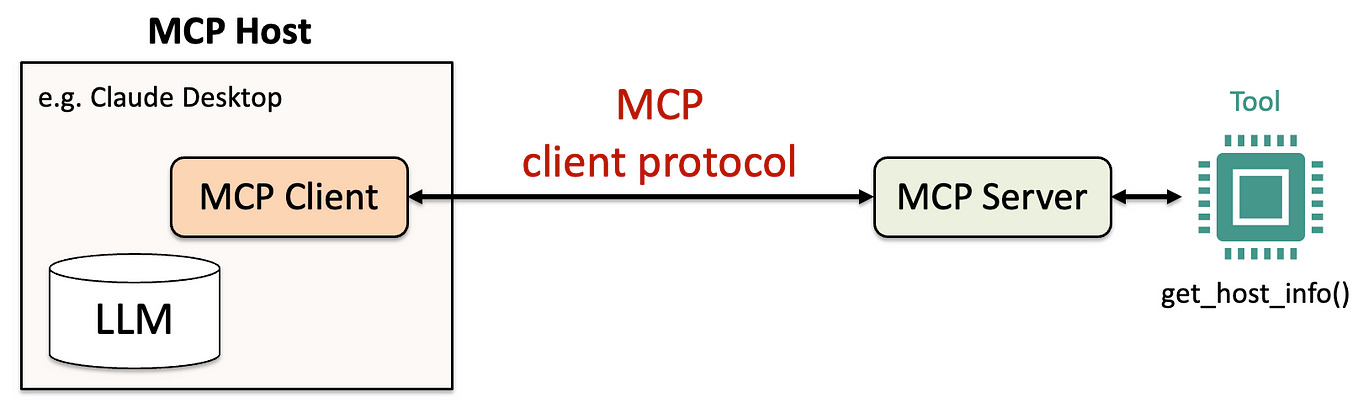
This server acts as a bridge between an AI like Claude Code and Nymbus's core banking APIs. If configured, it would allow Claude to perform specific, pre-defined banking operations programmatically through a secure connection. Think of it as a set of tools—like "create account," "check balance," or "process payment"—that Claude can use when you give it permission and context.
This is not a server for browsing your personal bank account. It's an enterprise development tool. Its primary use case is for developers building or testing financial technology applications who want to integrate AI-assisted workflows into their development and testing pipelines.
Setup & Security Implications
Installing this would be similar to adding any other MCP server to your Claude Desktop or Claude Code environment. You'd add it to your claude_desktop_config.json:
{
  "mcpServers": {
    "nymbus-banking": {
      "command": "node",
      "args": ["/path/to/nymbus-mcp-server/index.js"],
      "env": {
        "NYMBUS_API_KEY": "your_key_here",
        "NYMBUS_ENV": "sandbox"
      }
    }
  }
}
The critical part is the environment configuration (NYMBUS_API_KEY). This server is designed for use with specific Nymbus client credentials, likely scoped to a sandbox or development environment. You should never point a tool like this at a production banking system with live financial data. The security model relies on the existing Nymbus API authentication and the permissions of the API key you provide.
When To Use It (The Short List)
For the average Claude Code user, the answer is never. This is a niche tool. Consider it only if:
- You are a developer at a bank or fintech that uses the Nymbus core banking platform.
- You are building an internal tool that automates testing of banking flows (e.g., generating test accounts, simulating transactions).
- You are prototyping a financial application in a controlled sandbox and want Claude to help generate realistic test data or workflows.
For general software development—building web apps, APIs, or data pipelines unrelated to core banking—this server offers no utility. Your claude code sessions are better served by MCP servers for filesystems, databases, git, and web search.
The Bigger Picture: MCP is Maturing
The launch of such a specific, vertical-industry MCP server is a signal. The Model Context Protocol is moving beyond general-purpose tools into specialized, professional domains. We're likely to see more MCP servers for healthcare (HIPAA-compliant data access), legal research, or specialized engineering software. The value for developers is that these servers can package complex, secure domain expertise into tools Claude can safely use.
However, this also means an increasing need for discernment. Don't clutter your MCP configuration with servers you don't need. Audit your claude_desktop_config.json regularly. Each server adds a bit of overhead and complexity. Only run the tools that match your actual daily work.
Actionable Takeaway: Unless you're developing against the Nymbus API, ignore this launch. It's a signpost for where MCP is going, not a tool for your toolbox today. Focus on mastering the core MCP servers that speed up your existing workflow.