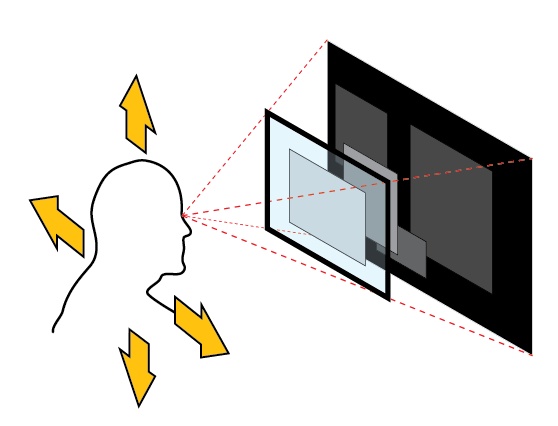
A developer has created a dynamic desktop wallpaper that uses a computer's webcam and head-tracking to produce a real-time parallax effect, making the background appear to shift in perspective as the user moves their head.
The project, shared on social platform X, is a lightweight application that captures video from a standard webcam. It employs computer vision techniques—likely via accessible libraries like OpenCV or MediaPipe—to detect and track the position of the user's head. As the user moves left, right, forward, or backward, the software calculates the relative displacement and applies a corresponding transformation to the wallpaper image, simulating a 3D depth effect.
This is a form of "vibe coding"—a term for building small, creative, and often whimsical projects that focus on immediate visual or interactive feedback rather than commercial utility. The implementation bypasses complex 3D engines or specialized hardware, relying instead on software that most modern laptops already possess: a camera.
Key Takeaways
- A developer built a dynamic wallpaper that tracks a user's head via webcam to shift the background perspective in real-time.
- It demonstrates a novel, accessible application of computer vision for interactive desktop environments.
How It Works

The core technology is almost certainly face detection and landmark tracking. A typical pipeline would involve:
- Capture: Grabbing frames from the webcam feed.
- Detection: Using a pre-trained model (e.g., a Haar cascade or a deep learning-based face detector) to locate the face within the frame.
- Tracking: Identifying key facial landmarks (like the tip of the nose or the center of the eyes) to determine the head's pose and translation between frames.
- Mapping: Translating the 2D movement of these landmarks into a simulated 3D displacement. A simple mapping might link horizontal head movement to a horizontal panning of the background layer, while forward/backward movement could trigger a zoom effect.
- Rendering: Applying the calculated transformation to the wallpaper image and updating the display.
The appeal lies in its simplicity and the direct, physical connection between user action and on-screen reaction, creating an immersive illusion of depth on a flat 2D screen.
What This Means in Practice
While primarily a fun demo, this project highlights the increasing accessibility of real-time computer vision. Libraries and APIs have abstracted away the heavy lifting, allowing developers to integrate sophisticated tracking into projects with minimal code. It points to a trend of using ambient AI and sensors to make static digital interfaces more responsive and personal.
gentic.news Analysis
This project sits at the intersection of several ongoing trends our readers will recognize. First, it's a textbook example of the "ambient AI" or "calm technology" movement, where sensing and intelligence are embedded into everyday environments to provide subtle, context-aware interactions—a theme we explored in our coverage of Always-On Contextual AI Assistants last quarter. Instead of a voice command or a click, the input here is passive and natural: mere physical presence and movement.
Second, it underscores the democratization of computer vision. Five years ago, building a robust, real-time head-tracking system required significant expertise in image processing. Today, as seen here, it can be the foundation of a weekend "vibe coding" project, thanks to mature open-source ecosystems. This aligns with the trajectory we've noted in frameworks like MediaPipe and OpenCV, which continue to lower the barrier to entry for perceptual computing.
Finally, while a parallax wallpaper is novel, the underlying principle—using camera data to create a responsive UI—has direct precursors in the gaming and VR industries for avatar control and in some laptop features for attention-aware display dimming. This project creatively repurposes that technology for aesthetic and experiential desktop customization, showing how tools from one domain can spark innovation in another when they become widely accessible.
Frequently Asked Questions
How does the head-tracking wallpaper work?
It uses your computer's webcam and a computer vision library to detect your face and track its position. The software then shifts or warps the desktop wallpaper image in the opposite direction of your head movement, creating an illusion that the background has depth and is reacting to your perspective.
What libraries or tools are needed to build this?
While the specific build isn't detailed, a developer would typically use a combination of a computer vision library like OpenCV or MediaPipe for face detection and tracking, and a desktop programming framework (like Python's Tkinter, PyQt, or a system-specific API) to manipulate the desktop background. The project demonstrates the accessibility of these tools.
Does this pose a privacy or security risk since it uses the webcam?
Any application that activates your webcam should be used with caution. This appears to be a local, hobbyist project where the video processing happens entirely on your device without sending data elsewhere. However, users should only run software from trusted sources and be aware of their webcam's activity light.
Could this technology be used for more than just wallpapers?
Absolutely. The core technology of real-time, low-latency head tracking via a simple webcam has applications in accessible gaming controls, hands-free UI navigation, video conferencing effects, and basic augmented reality experiences where full VR headsets are impractical.