Cua Driver launched Windows support for background computer-use on March 21, 2026. The tool enables agents like Claude Code and Codex to control GUI applications without blocking the calling process.
Key facts
- Windows support announced March 21, 2026 via X.
- Works with Claude Code, Codex, or custom agent loops.
- Uses Windows Desktop Duplication API for screen capture.
- Background execution avoids blocking the agent process.
- Follows macOS launch in February 2026.
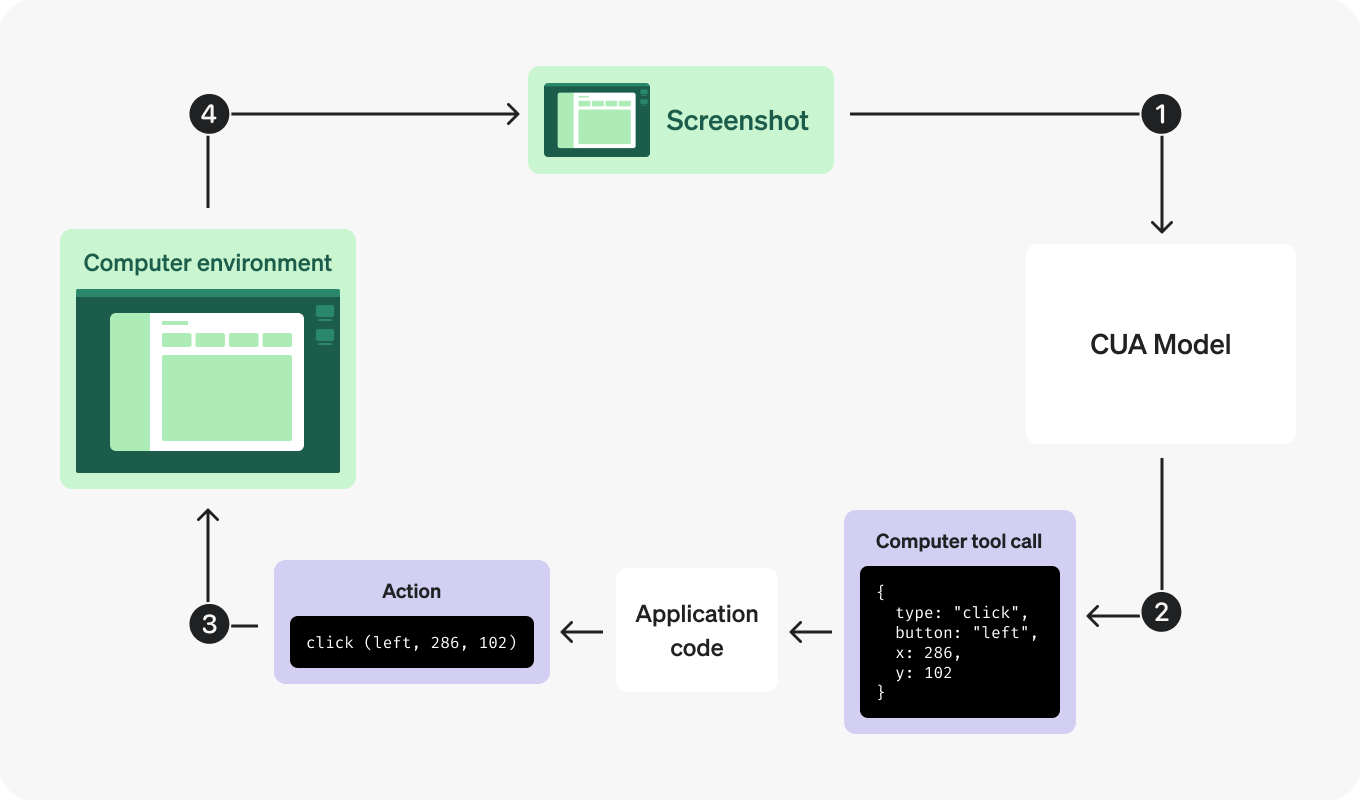
Cua Driver now supports Windows for background computer-use, according to an announcement on X by the company. The tool works with any agent, including Claude Code, Codex, or custom loops, to drive GUI applications programmatically. Background execution means the agent can continue processing while the driver performs GUI actions like clicking and typing.
Cua Driver handles screen capture, mouse movement, and keyboard input without requiring a visible window or blocking the calling process. This contrasts with earlier computer-use agents that typically required a dedicated visible desktop or synchronous execution. The company did not disclose Windows-specific performance benchmarks or latency figures compared to the macOS version.
The unique angle here is that Cua Driver targets a gap in the agent ecosystem: most computer-use tools (like Anthropic's computer-use demo or OpenAI's Operator) rely on synchronous, visible interactions. Cua Driver's background mode allows agents to automate long-running GUI workflows—like software installation or configuration—without tying up the agent's thread. This matters for enterprise RPA-style use cases where agents must orchestrate multiple desktop applications concurrently.
How Background Computer-Use Works
Background execution relies on Windows Desktop Duplication API for screen capture and SendInput for input injection, per the company's previous technical documentation. The driver runs as a system service, not a user-facing application. Agents communicate via a REST API or gRPC endpoint, sending natural-language commands or structured action sequences. The driver returns screenshots and status updates asynchronously.
Competitive Landscape
Existing computer-use agents—such as Microsoft's Copilot Vision, Anthropic's computer-use beta, and OpenAI's Operator—all require visible windows or synchronous execution. Cua Driver's background approach is closer to traditional RPA tools like UiPath or Automation Anywhere but adds LLM-driven decision-making. The company claims sub-second latency for screenshot capture and input injection on Windows 10 and 11, though independent benchmarks are not yet available.
The Windows release follows Cua Driver's macOS launch in February 2026, which gained adoption among developers building automated testing and data entry agents. The company has not disclosed user numbers or pricing changes associated with the Windows expansion.
What to watch
Watch for independent latency benchmarks comparing Cua Driver on Windows vs. macOS, and whether enterprise customers adopt it for GUI automation workflows previously handled by traditional RPA tools. The company's next release—likely supporting Linux—would complete the cross-platform story.