The Problem: Financial Data Drowns Context Windows
When building agents that work with financial data—daily OHLCV, multi-quarter statements, options chains—you face a fundamental bottleneck: context window overflow. Traditional MCP tool calls dump raw JSON data directly into the LLM's context. Five years of daily data can consume tens of thousands of tokens before the model even starts reasoning. Tool schemas alone from data vendors can eat 50k+ tokens upfront.
This developer's solution after burning 5B tokens? Stop putting data in the context window entirely.
The Solution: Programmatic Tool Calling (PTC)
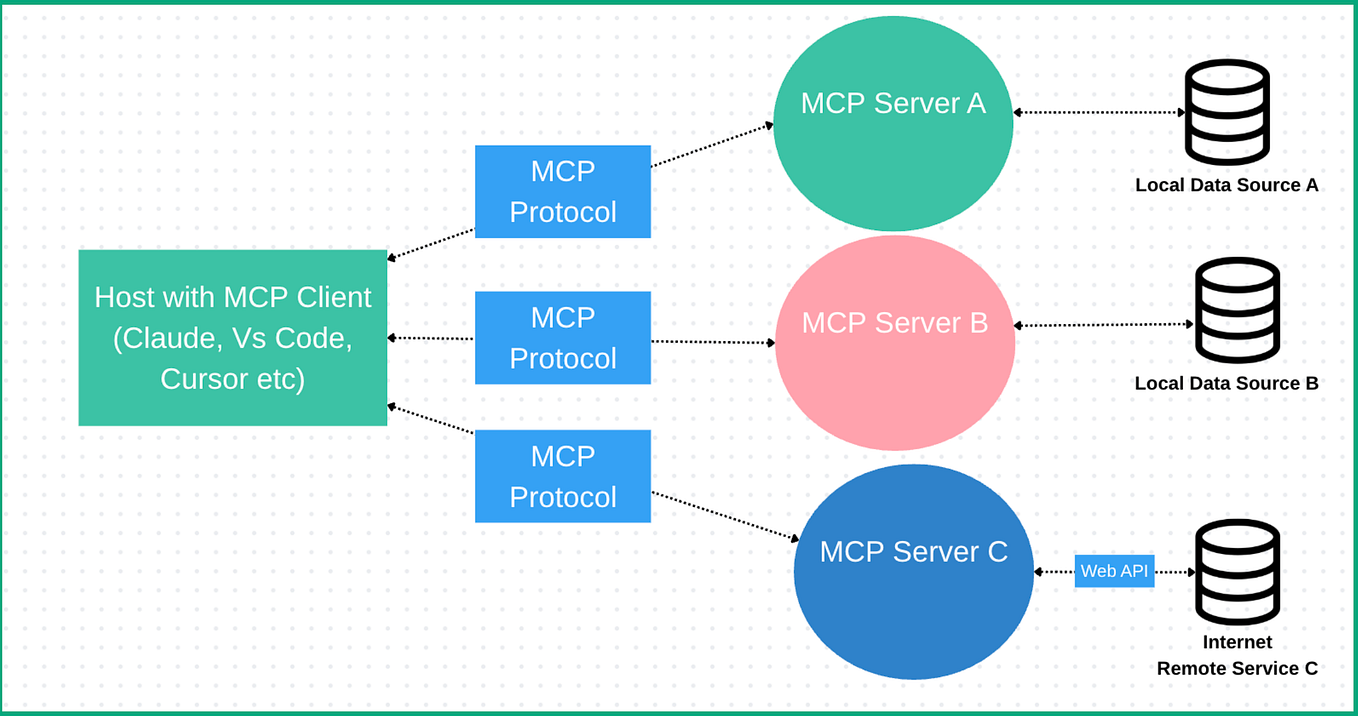
PTC transforms MCP servers into Python modules that live in the workspace, not the prompt. Here's how it works:
- At initialization, each MCP server gets translated into a documented Python module with proper signatures and docstrings
- Only metadata (server name, description, tool count, import path) stays in the system prompt
- The agent discovers tools progressively by reading their documentation from the workspace
- Raw data stays in the workspace—Claude writes pandas/numpy code to process it there
# What the agent writes in the sandbox:
from tools.fundamentals import get_financial_statements
from tools.price import get_historical_prices

# Process data, extract insights, create visualizations
# Only final results return to context
This pattern works with any MCP server automatically. Plug in a new server, PTC generates the Python wrappers.
Why This Works for Claude Code
Claude Code excels at writing code. Financial data needs filtering, aggregation, modeling, and charting—exactly what pandas and numpy are for. By letting Claude write the processing code in the workspace, you leverage its strongest capability while avoiding the token cost of raw data.
For high-frequency queries, the system includes curated snapshot tools as a fast path. These also inject time-sensitive context (market hours, data freshness, recent events) into tool results, keeping the agent oriented.
Persistent Workspaces: Research That Compounds
Each workspace maps to a Daytona cloud sandbox or local Docker container with a structured layout:
agent.md — workspace memory (goals, findings, file index)
work/<task>/data/ — per-task datasets
work/<task>/charts/ — per-task visualizations
results/ — finalized reports only
data/ — shared datasets across threads
tools/ — auto-generated MCP Python modules (read-only)
.agents/user/ — portfolio, watchlist, preferences (read-only)
agent.md gets appended to the system prompt on every call. The agent maintains it with goals, key findings, and file indexes. Start research Monday, pick up Thursday with full context. Portfolio and preferences live in .agents/user/—persistent, always in sync, never pasted.
Two Agent Modes for Different Tasks
PTC Agent: Full research mode with sandbox, MCP data servers, file tools, subagents, and skill library. Produces DCF models, coverage reports, and dashboards.
Flash Agent: Lightweight mode with no sandbox overhead, minimal system prompt, instant responses. Handles quick lookups and workspace management. Future: Flash as dispatcher that delegates deep research to appropriate PTC agents.
Async Subagents for Parallel Research
Main agents spawn subagents via Task() for concurrent execution:
- One pulls five years of financials
- Another maps competitive landscape
- Third scrapes SEC filings
All share the sandbox filesystem—files written by one are immediately visible to others. Lifecycle actions:
- Init: Fire and forget, returns immediately
- Update: Push redirect via Redis, injected before next LLM call
- Resume: Full state checkpointed to PostgreSQL, rehydrate from checkpoint
The orchestrator is fully async—main agent responds while subagents run in background.
23 Built-in Research Skills
The system includes ready-to-use skills:
- Valuation & Modeling: DCF, comps analysis, 3-statement model, model audit
- Equity Research: Initiating coverage (30–50 page reports), earnings preview, thesis tracker
- Market Intelligence: Morning note, catalyst calendar, sector overview
- Document Generation: PDF, DOCX, PPTX, XLSX creation and editing
Custom skills work the same way: drop a skill folder in workspace, metadata appears in context next turn.
Try It Now
The entire stack (React 19, FastAPI, PostgreSQL, Redis) is open-source under Apache 2.0 at github.com/ginlix-ai/langalpha. Self-host with three commands.
For your own projects, implement the core PTC pattern:
- Wrap MCP servers in Python modules with documentation
- Keep only import paths in system prompt
- Let Claude discover tools by reading workspace docs
- Process all data in-workspace with pandas/numpy
This approach isn't just for finance—any data-intensive domain (scientific research, log analysis, customer analytics) benefits from keeping raw data out of context windows.