What It Does
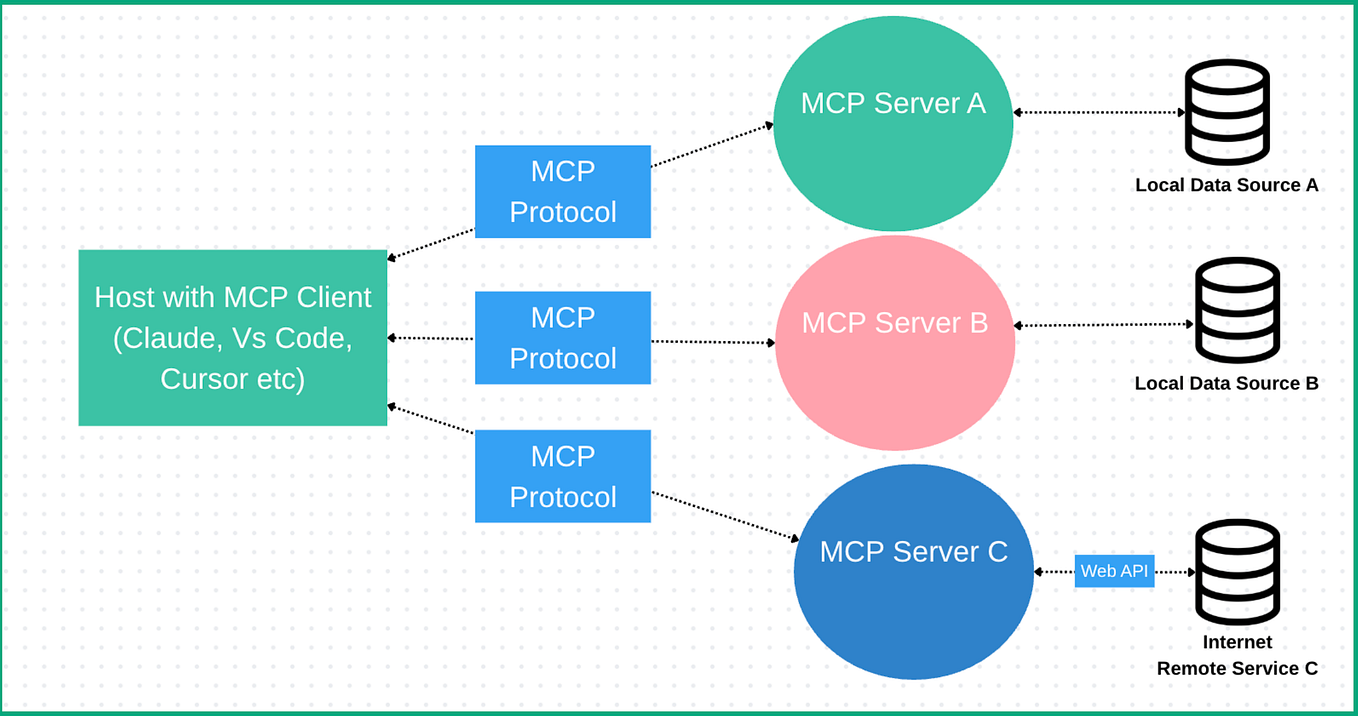
Datadog has officially launched its MCP (Model Context Protocol) server into general availability. This server provides AI agents—including Claude Code—with governed access to live observability data from your production systems. Instead of just analyzing code in isolation, Claude Code can now query real-time metrics, logs, and traces while you work.
The key capability: automated incident response and real-time production debugging. When Claude Code has access to this data, it can help you understand why a service is failing, trace performance bottlenecks, or analyze error patterns—all from within your development environment.
Setup
If you're already using Datadog for monitoring, adding the MCP server to Claude Code is straightforward:
- Install the Datadog MCP server via npm:
npm install -g @datadog/mcp-server
- Configure your
claude_desktop_config.json(typically in~/.config/Claude/):
{
  "mcpServers": {
    "datadog": {
      "command": "node",
      "args": [
        "/path/to/@datadog/mcp-server/build/index.js"
      ],
      "env": {
        "DD_API_KEY": "your_api_key_here",
        "DD_APP_KEY": "your_app_key_here",
        "DD_SITE": "datadoghq.com"
      }
    }
  }
}
- Restart Claude Desktop and verify the connection appears in your MCP tools list.
When To Use It
This integration shines in specific debugging and incident scenarios:
During Production Incidents: Instead of switching between tabs and manually querying Datadog dashboards, ask Claude Code directly:
"Check the error rate for service 'payment-processor' over the last hour and show me the top 5 error messages."
Performance Debugging: When reviewing slow code, Claude can correlate it with production metrics:
"What's the p95 latency for the /api/checkout endpoint over the last 24 hours? Show me any correlation with deployment events."
Root Cause Analysis: Combine code review with observability data:
"I'm seeing increased memory usage in this service. Pull the memory metrics and container stats for the last deployment to see if there's a correlation with my code changes."
Automated Checks: Add to your CLAUDE.md for projects with production services:
## Production Debugging
Before merging performance-sensitive changes, ask Claude to:
1. Check baseline metrics for affected services
2. Compare with staging environment data
3. Flag any anomalies in error rates or latency
Security Considerations
Note that this gives Claude Code access to potentially sensitive production data. Datadog's implementation includes "governed access" controls, but you should:
- Use dedicated API keys with limited permissions
- Consider restricting to non-PII metrics only
- Monitor Claude Code's queries in your Datadog audit logs
- Use different keys for development vs. production environments
This MCP server represents a significant shift: Claude Code is no longer just a coding assistant but can become part of your production operations workflow. For teams already invested in Datadog's observability platform, this integration creates a direct bridge between development and production troubleshooting.