What It Does — A Real-Time Collaboration Layer
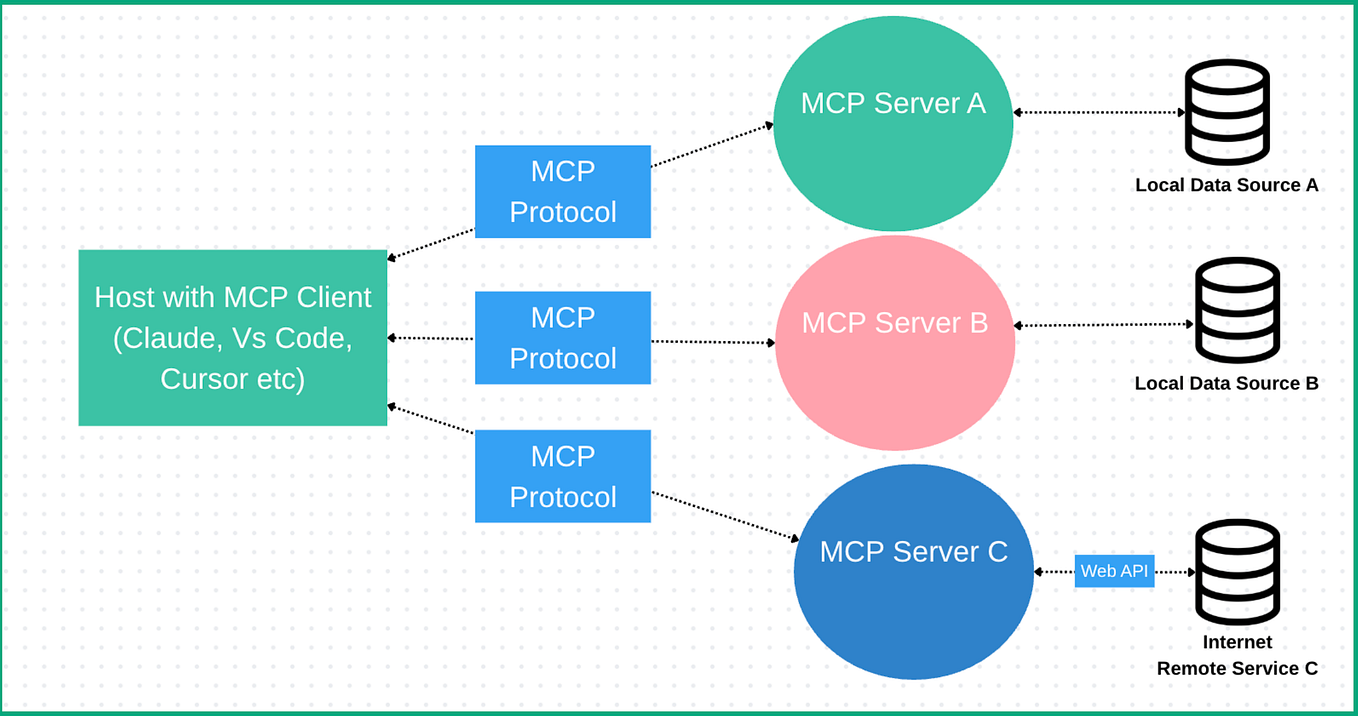
Tandem is an open-source Model Context Protocol (MCP) server that bridges Claude Code with a dedicated browser-based editor. It transforms Claude from a terminal-based code assistant into a live document collaborator. You open a document—a progress report, RFP, or compliance filing—and Claude reviews it alongside you in real time. Highlights, comments, suggestions, and questions appear as first-class annotations directly on the text. The original file is never modified unless you explicitly save.
This directly addresses a core workflow gap: the tedious back-and-forth of uploading a file, asking for feedback, receiving a block of text, and then manually applying changes. Tandem makes that interaction stateful and visual.
Setup — Connect Claude Code in Under a Minute
Installation is straightforward via npm. You need Node.js 22+ and Claude Code already installed.
npm install -g tandem-editor
tandem setup
The tandem setup command is key. It auto-detects your Claude Code and Claude Desktop installations, writes the necessary MCP configuration, and installs a skill (~/.claude/skills/tandem/SKILL.md) that teaches Claude how to use Tandem's tools effectively.
To start, run:
tandem
This starts the local server and opens the browser client. For the best experience, start Claude Code with channel push enabled for real-time notifications:
claude --dangerously-load-development-channels server:tandem-channel
Then, simply ask Claude: "Review the welcome document with me." Claude calls the tandem_open tool, and the session begins.
How To Use It — From Annotation to Action
Once a document is open, Claude's analysis appears as interactive annotations:
- Highlights & Comments: Contextual notes attached to specific text.
- Suggestion Cards: These show a visual diff—original text in red strikethrough, replacement in green.
- Side Panel: Lists all annotations for filtering (by type, author, status) and bulk actions.

You can accept, dismiss, or edit each annotation individually. The workflow is designed for speed:
- Keyboard Review Mode: Press
Ctrl+Shift+R. Navigate withTab, accept withY, dismiss withN, examine withE. A 10-second undo window prevents mistakes. - Anchored Chat: Select text before sending a chat message to attach it as a clickable anchor, letting you jump back to that passage later.
If you can't use channels, employ Claude Code's /loop skill to poll for updates:
/loop 30s check tandem inbox and respond to any new messages
Current Features & Limitations
Tandem is early but functional. Key features include:
- Multi-document tabs for
.md,.txt, and.docxfiles. .docxreview-only mode (imported Word comments appear alongside Claude's).- Session persistence across server restarts.

To verify everything is working, run npm run doctor or check the health endpoint:
curl http://localhost:3479/health
# Expected: {"status":"ok","version":"0.1.2","transport":"http","hasSession":false}
The hasSession flag becomes true once Claude Code connects.
gentic.news Analysis
Tandem exemplifies the rapid expansion of the Claude Code ecosystem via the Model Context Protocol (MCP). This follows Anthropic's strategic push to build Claude Code's architecture on MCP, as noted in our coverage of its launch on March 30. The protocol, trending with 15 mentions this week, is becoming the standard for extending Claude Code's capabilities beyond the terminal, similar to how Forge creates a multi-model TUI.

This development aligns with a broader trend of moving AI collaboration from sequential, text-heavy interactions to parallel, stateful, and visual workflows. It directly complements the "side-by-side" review philosophy we discussed in our April 6 article on comparing code outputs. However, it shifts the focus from code to documents, tackling a different but equally painful part of a developer's workflow—reviewing prose, specs, and reports.
As an open-source tool, Tandem's success will depend on community adoption and refinement. Its reliance on the experimental channels feature highlights both the cutting-edge and the fragile edges of building on Claude Code's platform. For developers, it's a compelling case study in using MCP to solve a specific, high-friction problem.